Quick Start for Dummies #sql #sqlitespy

You need a SQLite manager such as SQLiteSpy to read and modify a RootsMagic database using the queries or scripts from this wiki. That’s because RootsMagic incorporates the SQLite 3 database engine to write and read its database files.

SQLite acts on the database in response to SQL statements or commands it is given. These are commonly called “queries” which is a bit misleading because a query can also modify the data. A script comprises one or more statements. Because RootsMagic does not accept user inputted SQL statements, we use an outboard SQLite manager, an application that provides an interface for the user to input SQL statements to operate on a database file.

Because SQLite 3 is a free, open-source package, there are lots of applications that can open a RootsMagic file. I recommend SQLiteSpy to start with on Windows – I don’t know Mac. See SQLite Managers for download links.

You will also need to extend your SQLite manager to substitute for the secret RootsMagic RMNOCASE collation sequence having a large multilingual alphabet which is used to sort names of people, places, etc. Some of the queries simply will not work without it, returning the error “SQLite3 Error 1 – no such collation sequence: RMNOCASE”. See RMNOCASE – faking it… to get the substitute version compatible with your SQlite manager. Be sure to use the 32-bit DLL with a 32-bit manager and the 64-bit DLL with a 64-bit manager. – 2025-08-13

OK, get ready to rumble… First and foremost, make a backup of your RootsMagic database or a copy of it that you can play with so that if it gets messed up by your queries your master is intact. If you do not know how to do that, do not pass Go but proceed directly to Jail!

With SQLiteSpy installed and opened:

  1. File > Open.
  2. Browse to the folder where your play database is located.
  3. Start typing the first letters of the database filename or enter *.rmgc to get a list of the RootsMagic database files
  4. Select your file and it will now be registered in the left panel.
  5. Click on the + signs to expand and see the list of tables.
  6. Double-click on a table name and SQLiteSpy will automatically issue a (hidden) SQL statement or query to list all of the records in that table. Results will display to the right in the middle pane . Select any cell in the results pane and you can see its content in the bottom pane.
  7. In the upper pane, type in “SELECT Surname, Given FROM NameTable;” and then press F9 or click on menu Execute > Execute SQL. The results of this user-inputted query display the same way as for the macro query of step 6.
  8. Because the fake RMNOCASE collation your SQLite manager relies on is slightly different from that of RootsMagic, you should run the command REINDEX; on opening your database with it to reset the indexes for tables. Otherwise, the blocking error “SQLite3 Error 11 – Database disk image is malformed” may be returned. Having done so, on returning to the database with RootsMagic, you must run its File Tool “Rebuild Indexes” to reset the table indexes to its built-in RMNOCASE collation. – 2025-08-13

Congrats! You have run two queries on your database.

You can copy and paste a script from this wiki into the same SQL editor space or download a script file and use File > Open SQL to load it into the editor. Read about the experiences of other beginners at How to query RootsMagic.

I have had the same database open in both SQLiteSpy and RootsMagic with little conflict. After running a script that modifies data, you may need to refresh a RootsMagic screen to see the effect; closing and reopening the database is sure to do so. RootsMagic sometimes (wrongly) leaves a lock on the database that prevents SQLiteSpy from executing a query; closing RootsMagic is the only solution.

After modifying a database outside of RootsMagic, it is advisable that when you next go to use it in RootsMagic to run the RM Database tool “Test database integrity”. If it is OK, you are good to go. However any change made to a name is likely to cause the test to fail and require that you apply the “Rebuild indexes” tool. I have yet to see any harm come to a database by the inconsistencies between the fake and the actual RMNOCASE collations.

For more on using SQLiteSpy, this tutorial (while unrelated to RootsMagic and genealogy) does provide useful explanations:
[TUTORIAL] SQLiteSpy 101 – Civilization Fanatics’ Forums

SQLite Queries #sqlitemanagers #sql

This page has not been updated since 2012 but many scripts have been added since. The tag cloud on the home page and the search control are two good ways to find pages of interest.

RootsMagic Queries

Many of these were developed around RootsMagic 4 and should also work on RootsMagic 5 and 6 with limitations. Likewise, many were developed around RM5 and should also work on RM6, with fewer limitations. The limitations are due to the changes in database definitions. RM5 added the ResearchItemTable and changed the storage of some Media Properties from the tag to the media item. RM6 added the URLtable in support of WebTags. Therefore a few queries may be erroneous in dealing with Media, and/or ignore the ResearchLinkTable or the URLtable but most would be unaffected because their purpose does not include these tables.

Some SQLite managers can import a query file and some can also export a query file. Others may require you to open the file with a text editor and copy/paste the query into the SQLite manager’s query editor.

Some smaller standalone queries are combined in one file; other larger files may be multiple queries that run in seqence. Depending on the SQLite manager, you can select which statements you want to run by highlighting them or by placing the cursor anywhere in the one statement to be run. Each SQL statement must end with a semi-colon to demark it from the others.

Optionally, a single query can be expanded to begin with the CREATE VIEW command. When successfully executed, the query is embedded in the database as a virtual table which remains with the database file until it is ‘dropped’ (deleted). Some SQLite managers allow you to save a query as a view from the user interface, putting a GUI in front of an internal CREATE VIEW.

The following table lists the queries from most recent to oldest. Queries are categorized in a menu-like structure on the page Query Menu.

Description Page Query Name Date Added
Creates a Citation WebTag for each citation having an URL beginning the Citation Comments field with “http://”. Not restricted to Ancestry.com downloads. WebTags – from Ancestry.com and FTM WebTags-MakeFromAncestryComments 2012-12-10
Creates Person WebTags from Citation WebTags to consolidate all WebTags pertaining to a person under the WebTags button on the Edit Person Screen. WebTags – Consolidate WebTags-Consolidate 2012-12-10
Deletes perfectly duplicate WebTags as will occur if WebTags-Consolidate is repeated or other possible cause. WebTags – Consolidate WebTags-DeleteDuplicates 2012-12-10
Sets the Media Type value for each media file to one of the four types: Image, File, Sound, Video, according to the file extension. Media Type Reset MediaTypeReset 2012-12-04
Inserts an Alternate Name of type “Married” for female “Wife” spouses in a “Family” where no Alternate Surname matches the male “Husband’s” and a (family) Marriage fact exists. Names – Add Married Name-Add_Married 2012-11-26
Sets Birth and Death years as seen in the sidebar index and various other reports and displays to match the corresponding facts. NOT for use on RM4; requires RM5+ Rebuild Indexes after completion. Rebuild Indexes and Update Birth and Death Years UpdateBirthDeathYears 2012-11-14
For encoding to SortDates, dates with optional RM modifiers and decoding same. Dates – SortDate Algorithm SortDateDecodeDev 2012-11-03
Procedures involving Excel, text editor and SQLite queries to bring Ancestry hyperlinks, citations and images into RootsMagic that are otherwise lost on a straight GEDCOM import. Ancestry.com and RootsMagic 5 MergeAncestryURLsToFTM
Shrinking Verbose Master Sources from Ancestry.com
2012-10-31
Cleans out unused records from most tables, including phantom citations. Follow by RM Rebuild Indexes and Compact. Delete Phantoms DeletePhantoms 2012-10-27
Delete all people color-coded RED (or other color by editing the query). Follow with Delete Phantoms.

Delete all people belonging to a Named Group (edit the query to the group ID). Follow with Delete Phantoms.

Delete Many DeleteByColorCode

DeleteByNamedGroup

2012-10-27
Lists citations for Primary Name as imported from Ancestry.com, FTM, et al but hidden in RM.
Converts such invisible citations to visible Person citations.
Citations Invisible Revealed Citations, Invisible – List
Citations, Invisible – Convert to Personals
2012-09-10
Lists all addresses in AddressTable and reports how they are used. Addresses – How Used AddressesHowUsed 2012-08-17
An outline of procedures that have been used when People View throws error message “SQLite Error 1 – at most 64 tables in a join”. People View Error – at most 64 tables in a Join People View Error 2012-03-19
Lists the Include settings for all fact types.

Sets all fact types to be included in GEDCOM and drag’n’drop.

Stores a snapshot of all settings for fact types in an extra table in the database.

Lists the include settings stored in the snapshot.

Restores all settings for fact types from the snapshot.

Deletes the extra table storing the snapshot from the database.

Fact Inclusion Controls 2012-03-12
An outline of procedures that have been used with some success to recover a corrupted RootsMagic database. Corrupt Database Recovery Corrupt Database Recovery 2012-03-10
Finds SSN facts that have not been set to Private. WebTrees Website – Pre-Processing Tools using SQLite in Visual Basic et al RMSanity.exe 2012-02-06
Finds broken media links using an extension in Visual Basic.
Finds media items in the Media Gallery that are not tagged to anything in the database.
Finds media items that have been attached more than once to the Media Gallery
WebTrees Website – Pre-Processing Tools using SQLite in Visual Basic et al RMSanity.exe 2012-02-06
Finds Place Details that have no owner Place. WebTrees Website – Pre-Processing Tools using SQLite in Visual Basic et al RMSanity.exe 2012-02-06
This series of queries and related Windows commands revises a RM4 database and makes copies of the multiply-linked files so that the update to RM5 will preserve all the metadata. Media – Preserve Captions et al from RM4 to RM5 RM4-MultiLinkedMediaDuplicationPreRM5 2012-01-31
One query lists all Place Detail rows from PlaceTable for which there is no master Place. Another deletes such rows. Place Details without a Place Place Details without a Place 2012-01-30
The opposite direction is much easier. Needed for export to GEDCOM for third party apps that do not support Place Detail. Convert Place + Place Detail to Place Convert Place + Place Detail to Place 2012-01-22
Compare EXIF, IPTC, XMP metadata stored in image files to the Caption, Description and other metadata stored in a RootsMagic 5 database for image files linked to its Media Gallery and copy between the files and the database. Media Metadata, Read, Write, Compare with Picasa RM5comparePicasa.bat
ImportPicasaDescriptions.sql
RM5copyMetadataToImageFileExifToolArgList.sql
RM5copyMetadataToImageFileExifToolArgList.bat
RM5copyMetadataToRM.sql
RM5copyMetadataToRM.bat
2012-01-17
Lists those image files that have not been opened by RM, hence nothing in the thumbnail field. With comments leading to other references. Missing Media 2012-01-15
Causes Narrative Descendant reports to output childless, spouseless children in their own generation, along with their married or parental siblings. Reports, Narrative, Jerry Bryan Trick DummyFamily-Add
DummyFamily-Delete
2012-01-15
Every direct line ancestral RIN list for one or all persons in the database with the Ahnentafel number of the last person in each line, to 64 generations, exceeding RM’s 32 gen limit on the number. Also shows all lines, not just those of parents selected for display in RM’s main Views. Ahnentafel 64 generations Ahnentafel-64 2012-01-13
A SQLite equivalent to RootsMagic’s own Search & Replace function on “Multimedia filenames” in the “Field to search” selection but with no programming constraints Update Media Paths Update Media Paths 2012-01-11
Removes CR/LF characters around custom fact sentences and person/family/alt name/fact notes and adds CR/LF pairs to ends of notes except the last, for first cut batch paragraphing. Paragraphing Paragraph-Strip | Paragraph-Add 2011-12-22
Re-orders all same day events of limited types to a natural order, e.g., Birth before Death Dates – Same Day Sort Order SortDateSameDayOrder | SortDateSameDayOrderCustom 2011-12-19
List and convert events having key properties in common to shared events. Especially useful on imports from Legacy Family Tree in which events were copied to multiple persons. Sharable Events – Find and Convert to Shared SharableFacts2 | SharableEvents-Convert 2011-12-12
Makes an empty Master from current database, preserving custom fact types and source templates, Places, Master Sources and associated Repositories and Addresses, and Place/Source Media Depopulate but keep Customs, Places, Sources CustomDatabaseShell 2011-12-10
A fact may show that it is shared with someone whose name is missing. This query lists such facts with the names of the principals and the RINs of the missing witnesses. Shared Events With Missing Witnesses TraceHeadlessWitnesses 2011-12-10
There are four Internet sites that RM5’s County Check is set to call for maps and other information. County Check 2011-12-10
Clones a RM4/5 database without the RMNOCASE collation so that we’re free to do what we want to the data. Even works with RM but it might trip up on non-English alphabets. Convert Database to NOCASE RM#_CREATE_as_DB3_NOCASE | RM#_Copy_Data_to_DB3_NOCASE 2011-12-09
Report on the role, event and owner or principal of the shared event for which a witness or sharee is no longer a person in the database. Shared Events With Missing Witnesses TraceHeadlessWitnesses 2011-12-09
Marks or Unmarks members of a group according to a list; equivalent to memorising the checkboxes in RootsMagic Explorer for re-use. Named Group – Mark or Unmark List refresh Group Unmark List Refresh | Group Mark List Refresh 2011-11-27
Top page for a collection of queries for refreshing Named Groups Named Group Refresh Refresh – various 2011-11-26
Builds or refreshes a group of persons whose lifetime probably spanned a user-defined Census Year and who had some event in the user-defined jurisdiction but not a Census fact for that year. Census Needed – Named Group CensusNeededGroup | CensusNeededGroup2 2011-11-26
Provides a manual refresh for a specific Named Group, i.e., the ancestors of a specified person. Ancestors Named Group AncestorsGroup 2011-11-23
Lists all the ancestral lines for a given RIN Ancestors Query Ancestors 2011-11-23
Produces a list of names that match or sound like specified names, similar to RM4’s NameFind. Name Find query NameFind 2011-11-21
Combo of SQLite queries and RM4 edits of Place List beats having to edit every fact/event to split a Place into Place and Place detail; otherwise, wait for the RootsMagician! Places to Place Details Conversion Places to Place Details Conversion 2011-11-16
Complete listing of all users of media in the Gallery, more complete and navigable than what is provided in RM 4.1.2.1 Media Users List Query Media Users List 2011-11-09
About as close as we can get to a RM4 Source List Report presented in tabular form with which the results can be sorted and filtered with relative ease. Source List Query Source List 2011-11-05
This query strips extraneous Carriage Returns from the end of the Footnote sentence template for the Source Template “Vital Records (state-level, online derivatives)” which cause unwanted white space in reports. Source Templates Fix Extra Line Feeds in Footnote 2011-10-02
Converts Sources using uneditable, built-in templates to using editable copies. Source Templates SrcTmpltsConvert 2011-10-02
Reverts Sources modified by SrcTmpltsConvert to using uneditable, built-in templates. Source Templates SrcTmpltsRevert 2011-10-02
A Query for a To Do List in a Grid Format – using the REFN to assign status for paragraphing and census. Versions for both SQLite directly and MS Access via SQLODBC. A Query for a To Do List in a Grid Format MyToDoList 2011-07-07
Another version of a Set Living query. Another version of a Set Living query SetLivingFlag 2011-07-04
A discussion of queries that can modify the Living flag. Set Living Flag SetLivingFlag 2011-07-02
Variant of CopyFact2Group that copies a REFN fact to a group, substituting the target persons’ PersonID’s or RIN for that of the source person. Copy RIN to REFN CopyRINtoREFN 2011-06-29
Two queries that list the test results in a format suitable for easy review and copying and pasting into other applications. RM4.1.1.4 provides no DNA report. DNA Test results list DNA_mtDNA_locationslist | DNA_Y-STR_markerslist 2011-06-18
Lists Source Names along with Source Detail field names; illustrates principles applicable to Master Source fields and other XML-like columns. Source Detail View (Parsing XML) Source Detail View (Parsing XML) 2011-06-06
Copies a fact/event for a person to a Named Group of persons, along with the Sources but not the Media for the Fact. Copy Fact to Group CopyFact2Group 2011-04-05
Lists files under the RM Multimedia default folder and flags those used by the RM database; helps to ensure that files are used. Scrapbook Files Status ScrapBookFilesStatus 2011-03-13
Backs up the database file along with all the media files referenced by it to one file. Uses the command versions of SQLite3 (free), WinRAR ($fee) and 7-Zip (free). The 7-Zip version produces a .rmgb file that RootsMagic can restore, media and database. Backup Media with Database – RAR RMfullbackup.bat 2011-02-02
Backs up the database file along with all the media files referenced by it to one file. Uses the command versions of SQLite3 (free), WinRAR ($fee) and 7-Zip (free). The 7-Zip version produces a .rmgb file that RootsMagic can restore, media and database. Backup Media with Database – 7Zip RMfullbackup.bat 2011-02-02
The RMSplit C# program below allows you to create a group in RootsMagic5 which contains a selected person, their ancestors, and a selected number of “leaves” (collateral lines us a given depth). SplitTree Rmsplit 2011-01-03
Series of queries to list duplicate media file names in the Media Gallery and list duplicate links to items in the Gallery. Repairs a specific case of duplicate file names as an example; repairs all cases of duplicate links. Media Repair Queries MediaRepair 2010-12-14
Discussion and examples of how you can search (filter) using any SQLite manager and replace found values with revised ones using SQLiteSpy. Search & Replace Search&Replace 2010-11-09
This query helps you plot events from your RootsMagic database on Google Maps, Google Earth, and Bing Maps, provided there are geo-coded Places and Place Details (sites) in your database. MapEvents-KML query MapEvents-KML 2010-09-03
Have you ever wished to be able to look at all the facts in your family tree database that happened within a day’s horseride of a certain location? This adaptation of the LifeLines query helps you view your events for any geographic area in addition to looking at the lifeline of any person in your database. Geo-Lifelines Query Geo-Lifelines 2010-08-31
Lists persons with multiple spouses in descending number – may flag a data problem Multiple Spouses query Multi-spouses 2010-08-23
Lists all source names cited for a person in descending order of the count of duplicate citations – a help in finding and resolving duplicate citations after merging. All Citations & Dupes Count – Query AllCitations+Dupes 2010-07-08
Lists Individuals whose Death Year from NameTable does not match that of the date for their Death fact. Death Year Mismatch DeathYearMismatch 2010-06-04
Explains why an integrity check is needed and how, using PRAGMA quick_check. Check RootsMagic Database Integrity Check RootsMagic Database Integrity 2010-05-27
Lists count of rows in each table — If not 22 tables listed, database has corruption RMGC Tables Row Count RMGC_TablesRowCount 2010-05-26
Lists all events for all persons whether in a database tree or not, including shared facts, date, fact detail, site and place, MRIN, other parties, and duplication indicator. Sorted by RIN and Sort Date. With the right SQLite manager, can filter results for one person. LifeLines – Query LifeLines 2010-03-15
Lists people who share a fact with a Principal, as well as relevant fact and Principal information. People Who Share a Fact with a Principal List – Query People Who Share a Fact with a Principal 2010-03-10
Lists people who share a fact with a Principal, but who aren’t in a tree in the database file, as well as relevant fact and Principal information. People Who Share a Fact with a Principal, But Who Are Not in a Tree in the File List – Query People Who Share a Fact with a Principal, But Who Are Not in a Tree in the File 2010-02-26
Lists duplicate name pairs with a weighted score indicating degree of match. On a large database, produces results in 4.5 minutes similar to what RootsMagic 4’s Duplicate Search Merge tool does in 45 min. Duplicate Name Search – query DuplicateNameSearch 2010-02-23
Copies all unmerged pairs from the results of RM4’s Duplicate Search Merge Tool to RM4’s ExclusionTable so that they will not reappear in subsequent runs of Duplicate Search Merge. Duplicate Search Merge Database MarkNotProblem 2010-02-21
Lists Sources associated with Source Templates, as well as an extension to Citation details. Free-Form templates are excluded since they’re not included in SourceTemplateTable. Source Template List – Query SourceTemplateListWithCitationDetails2.sql 2010-02-13
As ‘Database Properties’ but with more detail and pointing out possible problem areas RMGC_Properties – Query RMGC_Properties 2010-01-31
Deletes citations of non-existent Sources from database that manifest themselves in the Edit Persons screen as a citation (counted and checkmarked) but return nothing when opened. Delete Phantom Citations – Query Delete Phantom Citations 2010-01-30
Lists all citations in the database from which citations of non-existent sources (‘phantoms’) and citations for non-existent events or persons (‘headless’) can be found, along with other useful information such as all citations per source. All Citations – Query AllCitations 2010-01-30
Reports in a list most of the values found in RM4’s File > Properties report; results can be exported to a file. Database Properties List – Query Database Properties 2010-01-29
Decodes most of the possible formats found in RM4 Date fields of the form Da+nnnnnnnn.x+nnnnnnnn.x Date Decoder DateDecoder 2010-01-21
Lists uncompleted To Do tasks for Individuals, Families and General; can be readily modified to filter or sort by surname, priority, repository, etc. RM4 To Do List To-Do (was To-Do4Persons) 2010-01-18
Lists Individuals whose Birth Year from NameTable does not match that of the date for their Birth fact. Birth Year Mis-Match BirthYearMisMatch 2010-01-17
Returns all Places with Place Details and the Persons or Families (couples) and their Facts, including Shared events, using the Place Detail. Facts Having Place Details – Query FactsHavingPlaceDetails3 2010-01-16
An optional extension to AllFacts4Persons or standalone. Having a Child as an event for the Father and the Mother. Births of children as facts PersonsBegatChildren 2010-01-14
List all the Individual, Family and Shared Facts/Events for all persons in a database. A complex query using UNION ALL, COUNT() and GROUP BY, constants and NULL to assemble multiple SELECTs in one big result. Pulling Together All the Events for An Individual AllFacts4Persons 2010-01-06
List Persons with Blank Names in the Address List — (a fault that may occur in a GEDCOM import). Four Little Queries blankname_in_addresslist 2009-12-30
List of unused Places Four Little Queries UnusedPlaces 2009-12-30
Lists Places having Place Details Four Little Queries PlacesDetails 2009-12-30
List Persons with specified Surnames. — Example of creating a SQL View or Virtual Table and the explicit use of COLLATE NOCASE to override the RMNOCASE collation defined for certain fields and embedded in the RootsMagic application. Four Little Queries selected_surnames 2009-12-30

Shared Events – Sort Witnesses by Consanguinity plus Name #sharedevent

Problem

The order in which witnesses of an event (sharers other than the Principal(s) are listed on screen and in reports is set by the order they were entered. Users have no control over it.

A Workaround

The WitnessOrder field in WitnessTable controls the order of output in the display of witnesses and in narrative reports but RootsMagic 7 provides no control for it.

This script modifies the WitnessOrder values so that they are sorted:

  1. Primary: Consanguinity of witness to reference person used by the RootsMagic SET RELATIONSHIPS function
  2. Secondary: Alphabetical order of the primary name of each person, including those not in a tree.

Clearing the relationships prior to execution results in a purely alphabetical sort.

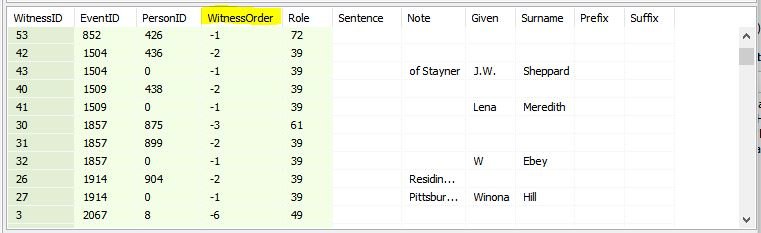
It sets negative values in WitnessOrder so inspection of the WitnessTable readily reveals those set by the script.

WitnessOrderByRelationship+Name.JPG
Example of the WitnessTable modified by the script with negative values under WitnessOrder.

WitnessOrderByRelationship+Name.sql

Relationships #relationships

This page is intended to collect some scripts in support of calculating and displaying relationships between people in a RootsMagic database.

Kinship List

This first script produces a table similar to the RootsMagic Kinship List report but it does so markedly faster for a large database. RootsMagic 7.0.11.0 took almost five minutes (290s) to calculate and display a 1900 page report for 75,000 people in a 160,000 population. SQLiteSpy 1.9.10 executed this script in 2 seconds! That’s a 145:1 improvement in speed. Moreover, an SQLite manager can sort on the columns and filter the results (features vary depending on the product) and the SQLite Views created by the script can be exploited in further ad hoc queries the user may write.

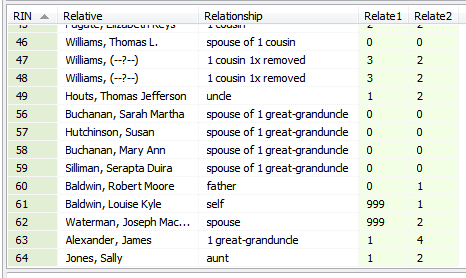
KinshipList.PNG
Screenshot of results from KinshipList.sql in SQLiteSpy sorted on the RIN column.

The script does not calculate relationships so the comparison with the RootsMagic Kinship List report is not apples to apples. Rather, it lists the relationships calculated by the RootsMagic “Set Relationships” function which added a further 50s execution time which, if included, degrades the speed advantage to a mere 5.5:1. However, it is often the case that the Kinship List is set to recompute relationships to the same person as was already done by Set Relationships. And the query can remain open in the SQLite Manager while working on the database in RootsMagic.

The columns Relate1 and Relate2 represent the distance to the common ancestor from the reference person and their relative and are calculated by RootsMagic. The script uses these to generate the Relationship phrase. They may also be used in SQLite Expert Personal as filters on the results set, e.g., limiting the people listed to those having a total distance between them of less than, say, 10. A custom query in any SQLite manager could likewise limit results.
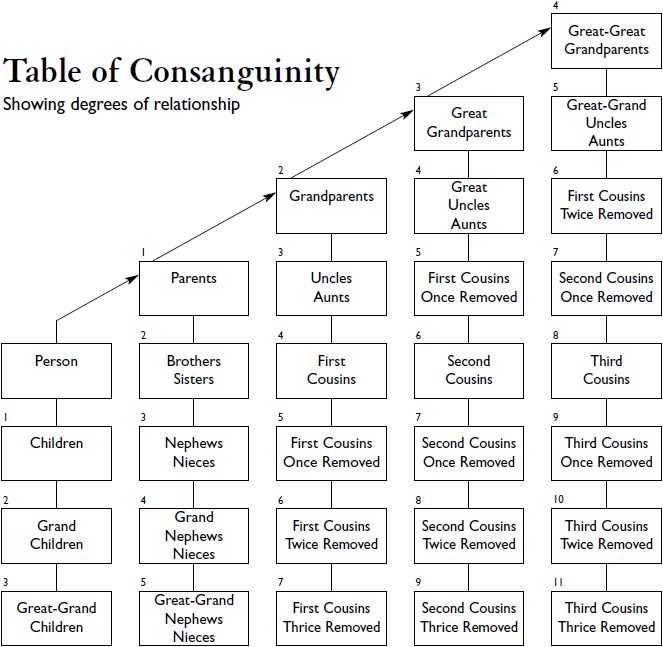
KinshipList.sql rev 2016-07-29 sample query calculates consanguinity degree of relationship
The part of the script that generates the Views should function with any SQLite Manager. The final query that displays results with the names of people requires one with a RMNOCASE collation.

Click image for Wikipedia page on Consanguinity.

To-Do List – filter by locale

Posted to Facebook by Art Dembinski 11 May 2016:
I have a long list of “To Do”s of various kinds that I will probably not live long enough to accomplish. I travel a fair amount, and usually with very little advance notice. The locations for doing these are scattered all over the USA and Canada. I would like to be able to quickly focus on a locale and then jump to any “To Do”s that refer to that area, no matter which part of the family tree this refers to. Does RM have a way “To Do” this?

This page is a To-Do about this wish…

Query – All Names in Tree

Trees

Two related problems
1) Finding all names in a selected person’s tree
2) Count Trees

1) Finding all names in selected person’s tree
Does anyone have any idea how to emulate the function that is in the RM Mark Group of “Everyone in the highlighted person’s tree”? RM does this very efficiently/quickly.I break the relationship between parents and then use it to create groups of maternal and paternal lines. It works ok, but would be a lot more efficient if I could automate it using SQL.

Tree-HourglassMembers.sql This produces a subset of the full tree; not the solution… (Tom, May 8)

2) Count Trees
I sometimes forget about this function, but it is very useful in finding orphans

Hopefully I did this right. Thanks in advance
marc

Discussions & comments from Wikispaces site


MLeroux84

A solution – not perfect but workable

MLeroux84
19 September 2016 20:31:55

I finally got back to this, and can get a solution by combining the ancestor/descendent scripts with a bit of procedural logic. And adding in the missing link – the spouses of descendants. It seems to work, although it could use a lot of optimization I’m sure – it runs fairly quickly on my computer.

I tested this on my database. First, I broke the connection between my father and mother. That left me with two “trees”, my French side with 7126 entries, the Irish side with 1091 (from RM/Tools/Count Trees).

Next I created 3 tables:
tTree – contains the RIN of all individuals in the tree (final result)
tAncWork – list of RIN to traverse backwards to get the ancestors of
tDecWork – List of RIN of descendants from a list of ancestors

I populate tAncWork with my seed RIN – in my case “1″ – myself

Then I modified the Ancestor and Descendent scripts
Ancestor reads tAncWork for a list of RINs rather than a single RIN parameter and stores the result back in to tAncWork. After doing this it adds new RINS to tTree

Descendant script reads from tTree (not the most efficient way, but it was easiest) rather than a single RIN parameter and stores the result to tDecWork. The results are moved back to tAncWork and tTree. Spouse (from the familyTable) are added to tAncWork

Then the procedural part. I check tAncWork to see if there are any entries. If there are, then there are spouses that have not been counted and I run the scripts again. As expected, the new entries in tAncWork comes down quickly, and after 4 iterations I have no entries left.

That gives me one tree. Then it’s a simple matter to find the lowest Id in the remaining entries and repeat.

To generalize this, or replicate the “Count Trees” function I would have to add a “treeId” column to tTrees and populate it with the seedId for each “tree”. In my case I’m happy with the results as they are.

I don’t think it’s possible to use loops inside sqlLite but pretty simple in a procedural script. In my case I wrapped it into a VB.net app.

Thanks for the great starting point. This saves me a great deal of time – although if I think about the time invested I could probably have done this in a manual fashion for the next 80 years and still come out ahead. But it is a creative exercise that needed solving.

The table create scripts:

— Drop and recreate temp tables

drop table if exists [tTree] ;
CREATE temp TABLE [tTree] (
[RIN] BIGINT);
drop table if exists [tAncWork] ;
CREATE temp TABLE [tAncWork] (
[RIN] BIGINT);
drop table if exists [tDecWork] ;
CREATE temp TABLE [tDecWork] (
[RIN] BIGINT);

— Seed with the starting RIN

insert into tAncWork (RIN) values (1) ;

The Get Ancestors portion

— Get ancesters of list of individuals in file tAncWork
— Results stored back into tAncWork and also moved to tTree

— Based on the original script by Tom Holden ve3meo


WITH RECURSIVE
parent_of(ChildID, ParentID) AS
(SELECT PersonID, FatherID AS ParentID FROM PersonTable
LEFT JOIN ChildTable ON PersonID=ChildTable.ChildID
LEFT JOIN FamilyTable USING(FamilyID)
UNION
SELECT PersonID, MotherID AS ParentID FROM PersonTable
LEFT JOIN ChildTable ON PersonID=ChildTable.ChildID
LEFT JOIN FamilyTable USING(FamilyID)
),
ancestor_of_person(AncestorID) AS
(SELECT ParentID FROM parent_of
WHERE ChildID in (select RIN from tAncWork)
UNION
SELECT ParentID FROM parent_of
INNER JOIN ancestor_of_person ON ChildID = AncestorID)

insert into tAncWork SELECT DISTINCT AncestorID FROM ancestor_of_person, PersonTable
WHERE ancestor_of_person.AncestorID=PersonTable.PersonID AND ancestor_of_person.AncestorID > 0
;
insert into tTree
select DISTINCT RIN from tAncWork where RIN not in (select RIN from tTree) and RIN > 0
;

The get Descendants portion. This needs to run for every iteration of the get ancestors – I just split them to make it easier to debug
— get descendents of everyone in ancester table
— uses tTree as source
— puts results in tDecWork, then moves to tTree and tAncWork
— tTree contains the final result

— Based on the original script by Tom Holden ve3meo

WITH RECURSIVE
child_of(ParentID, ChildID) AS
(SELECT PersonID, ChildTable.ChildID FROM PersonTable
LEFT JOIN FamilyTable ON PersonID=FatherID
LEFT JOIN ChildTable USING(FamilyID)
WHERE
RelFather=0
UNION
SELECT PersonID, ChildTable.ChildID FROM PersonTable
LEFT JOIN FamilyTable ON PersonID=MotherID
LEFT JOIN ChildTable USING(FamilyID)
WHERE
RelMother=0
),
descendant_of_person(DescendantID) AS
(SELECT ChildID FROM child_of

WHERE ParentID in (select RIN from tTree)
UNION –ALL
SELECT ChildID FROM child_of
INNER JOIN descendant_of_person ON ParentID = DescendantID)
insert into tDecWork SELECT distinct DescendantID FROM descendant_of_person, PersonTable
WHERE descendant_of_person.DescendantID=PersonTable.PersonID AND descendant_of_person.DescendantID > 0 ;

— Move results to tAncWork

delete from tAncWork ;
insert into tAncWork
select distinct RIN from tDecWork where RIN not in (select RIN from tTree) AND RIN > 0
;

— Move results to tTree

insert into tTree
select distinct RIN from tAncWork where RIN not in (select RIN from tTree) and RIN > 0
;

— Add their spouses to tAncWork to prapare for next itiration

insert into tAncWork
select distinct motherId from familyTable
where fatherId in (select RIN from tTree)
and motherId > 0
and motherId not in (select RIN from tTree)
UNION
select distinct fatherId from familyTable
where motherId in (select RIN from tTree)
and fatherId > 0
and fatherId not in (select RIN from tTree);

— Finally, clean out decWork

delete from tDecWork ;


ve3meo

Inline comment: “1) Finding all names in a selected person’s tree‍”

ve3meo
04 September 2018 01:25:23

ve3meo May 8, 2016

Good question for which I have no ready answer. It was difficult to do lineage before SQLite gained recursive query functionality. Doing recursions in SQLite does not come naturally to me. Your goal requires not only ancestors and descendants but also collateral lines. While it does not require kinship results which should make it easier, I confess I do not have a strategy in mind.
MLeroux84 May 8, 2016

Thanks. recursive SQL is not that easy for me either. I was thinking that it would not be that difficult, since it executes so quickly from the RM application. I haven’t seen it take very long to do “Count Trees” – well under a second for 4K names, so I was hoping that this was something obvious that I missed.


ve3meo

Inline comment: “2) Count trees”

ve3meo
04 September 2018 01:26:30

ve3meo May 8, 2016

This one mystifies me, too. It seems that it needs to be a recursion of “Finding all persons in a given person’s tree” iterating through all those remaining persons after subtracting those trees that have been counted.
MLeroux84 May 8, 2016

I wouldn’t think that it was iterating through remaining names, just because of the challenge of recursing through each name. Given the performance I’m seeing (albeit on a machine with reasonable performance) It would seem more likely that there is a way of identifying a node of each tree, then counting from there.

That said, since I haven’t been able to solve the first part of the problem it is all pure speculation


ve3meo

Inline comment: “produces a ‍subset‍ of the full tree”

ve3meo
04 September 2018 01:27:36

ve3meo May 8, 2016

This script includes all the ancestors of the starting person and their descendants but the full tree includes all the descendants of all the ancestors of all the descendants of all the ancestors of…
MLeroux84 May 8, 2016

Thanks, Tom. I played with this a bit today. I’m hampered by my lack of knowledge/experience with recursive queries. I get a bit further (but not very much) than you did by including spouses in the ancestor query. I’m thinking that each iteration needs to include siblings and spouses as seeds for the next iteration, but have not been able to find a way that seems to work.
I’ll keep plugging at it – it has gone from something “I’d like to do” to “It’s really bugging me now”

Inline comments


ve3meo

Comment: Good question for which I have no rea…

ve3meo
08 May 2016 17:31:19

Good question for which I have no ready answer. It was difficult to do lineage before SQLite gained recursive query functionality. Doing recursions in SQLite does not come naturally to me. Your goal requires not only ancestors and descendants but also collateral lines. While it does not require kinship results which should make it easier, I confess I do not have a strategy in mind.


MLeroux84

MLeroux84
09 May 2016 02:01:42

Thanks. recursive SQL is not that easy for me either. I was thinking that it would not be that difficult, since it executes so quickly from the RM application. I haven’t seen it take very long to do “Count Trees” – well under a second for 4K names, so I was hoping that this was something obvious that I missed.


ve3meo

Comment: This one mystifies me, too. It seems …

ve3meo
08 May 2016 17:31:20

This one mystifies me, too. It seems that it needs to be a recursion of “Finding all persons in a given person’s tree” iterating through all those remaining persons after subtracting those trees that have been counted.


MLeroux84

MLeroux84
09 May 2016 02:07:11

I wouldn’t think that it was iterating through remaining names, just because of the challenge of recursing through each name. Given the performance I’m seeing (albeit on a machine with reasonable performance) It would seem more likely that there is a way of identifying a node of each tree, then counting from there.

That said, since I haven’t been able to solve the first part of the problem it is all pure speculation


ve3meo

Comment: This script includes all the ancestor…

ve3meo
09 May 2016 03:58:26

This script includes all the ancestors of the starting person and their descendants but the full tree includes all the descendants of all the ancestors of all the descendants of all the ancestors of…


MLeroux84

MLeroux84
09 May 2016 23:11:22

Thanks, Tom. I played with this a bit today. I’m hampered by my lack of knowledge/experience with recursive queries. I get a bit further (but not very much) than you did by including spouses in the ancestor query. I’m thinking that each iteration needs to include siblings and spouses as seeds for the next iteration, but have not been able to find a way that seems to work.
I’ll keep plugging at it – it has gone from something “I’d like to do” to “It’s really bugging me now”

Events – Move Description to Note #events #notes

This script moves the entire contents of event descriptions of a selected fact type to the Note for that event. If there is already content in the Note, the Description value is appended as a new paragraph.

To select a Fact Type, you must use a SQLite manager that supports SQLite run-time variables, such as SQLite Expert Personal (SQLiteSpy does not). When the query is run, a box will pop out prompting for the entry of the Fact Type’s abbreviation. This is the label as seen in the Edit Person screen. By entering the wildcard character (%), all Fact Types having the Description enabled will be processed.

EventDescriptionToNote-Move.sql
— adapted from Events – Move Short Note to Description

Source Templates – Merge Duplicates #sourcetemplates #sources #merge

2022-03-24 test with #RM8 successful.

RootsMagic has no Merge Source Templates function and it really needs one. When you copy multiple times from one database to another and there are citations involved that use the same custom source template, each time that source template is brought over it is treated as a new source template and the associated source is, too. So now you have multiple identical source templates with no tool to merge them. And you have multiple identical master sources which cannot be merged by AutoMerge because they use different source template records. You can merge them manually but that is painfully tedious given that the identical properties of the source templates should make it possible to automate it.

This script automatically merges custom source templates that have matching (case and space character insensitive 2016-04-22):

  • footnote sentence templates
  • field definitions

Variances in name, the sentence templates for Short Footnote and Bibliography and other fields are ignored which means that source templates that are not quite exact duplicates in all respects will be merged. Unfortunately, it is still sensitive to differences in Hints and Long Hints which are not critical to the merging of source templates.

The first source template (lowest TemplateID) in a set of duplicates will be the last one standing. All sources that once used the duplicates will now use it.

The script does leave a trail of two custom tables that could be cleared out with the addition of DROP TABLE statements added at the end or run separately, identical to the two already in the script.

SourceTemplates-MergeDuplicates.sql Rev 2013-08-07 to correct bug.
Rev 2016-04-22 to make tolerant of differences in case and spacing.

-- SourceTemplates-MergeDuplicates.sql
/*
2013-07-30 Tom Holden ve3meo
2013-08-07 corrected error in Update SourceTable which obtained only the first TemplateID from xLookupSourceTemplateTable
2016-04-22 now tolerates differences in case and space characters in Footnote and FieldDefs
 
Merges custom source templates that have identical
Footnote sentence templates and field definitions.
Ignores differences in Short Footnotes, Bibliography and other fields.
Makes the lowest TemplateID of a set of duplicates the master.
 
It is still sensitive to differences in hints in what would be otherwise identical field definitions that could be merged.
- needs parsing to clear that out.
*/
 
--Create a table of the master custom source templates having duplicate(s)
DROP TABLE IF EXISTS xDupSourceTemplateTable
;
 
CREATE TABLE IF NOT EXISTS xDupSourceTemplateTable
AS
SELECT
   TemplateID
  , Name
  , Description
  , Favorite
  , Category
  , FootnoteCore
  , ShortFootnote
  , Bibliography
  , FieldDefsCore
FROM
(
SELECT COUNT()-1 AS Dupes,
   TemplateID
  , Name
  , Description
  , Favorite
  , Category
  , REPLACE(LOWER(Footnote),' ','') AS FootnoteCore
  , ShortFootnote
  , Bibliography
  , REPLACE(LOWER(FieldDefs),' ','') AS FieldDefsCore
FROM
(SELECT * FROM SourceTemplateTable WHERE TemplateID > 999 ORDER BY TemplateID DESC)
GROUP BY FootnoteCore, FieldDefsCore
)
WHERE Dupes > 0
;
 
-- Create table of matching custom source templates
DROP TABLE IF EXISTS xLookupSourceTemplateIDTable;
CREATE TABLE IF NOT EXISTS xLookupSourceTemplateIDTable
AS
SELECT xD.TemplateID AS MasterID, ST.TemplateID FROM xDupSourceTemplateTable xD
INNER JOIN SourceTemplateTable ST
WHERE xD.FootnoteCore LIKE REPLACE(LOWER(ST.Footnote),' ','')
AND xD.FieldDefsCore LIKE REPLACE(LOWER(ST.FieldDefs),' ','')
AND ST.TemplateID > 999
;
 
-- Revise SourceTable to point to master TemplateID
--EXPLAIN QUERY PLAN
UPDATE SourceTable
SET TemplateID = (SELECT MasterID FROM xLookupSourceTemplateIDTable xL WHERE SourceTable.TemplateID=xL.TemplateID)
WHERE TemplateID IN (SELECT TemplateID FROM xLookupSourceTemplateIDTable)
;
 
-- Delete now unused duplicate Templates
DELETE FROM SourceTemplateTable
WHERE TemplateID IN
(
SELECT TemplateID FROM xLookupSourceTemplateIDTable WHERE TemplateID != MasterID
)
;

Discussions & comments from Wikispaces site


Ksquared333

RMNOCase Error

Ksquared333
02 December 2017 23:08:24

OK. I know I’m being stupid, but I don’t remember how to use RMNOCASE_fake-SQLiteSpy.dll when I’m running SourceTemplates-MergeDuplicates.sql . Where do I load the driver? Also, where do I donate?
Thanks,
Kim Derrick


ve3meo

ve3meo
03 December 2017 02:47:36

This page should answer your question: RMNOCASE+-+faking+it+in+SQLiteSpy

Reports – Point Form Narratives Setup #reports

Rev 2016-04-05: Version 2
Tired of verbose and repetitious sentences in narrative reports and the effort involved in customising and tweaking them so that grammar and prepositions and pronouns were correct, I got the idea some years ago that what I might prefer is a hybrid of the tabular format of the Individual Summary and Family Group Sheet with event/fact notes embedded rather than at the end. Jerry Bryan demonstrated such a concept with his Oct 12, 2015 RootsMagic Forums posting, “Preparing an RM Descendant Narrative Report for a Family Reunion for This Year“. While he did so using largely manual procedures, this SQLite script makes it easy to try out a similar format and then restore your prior format.

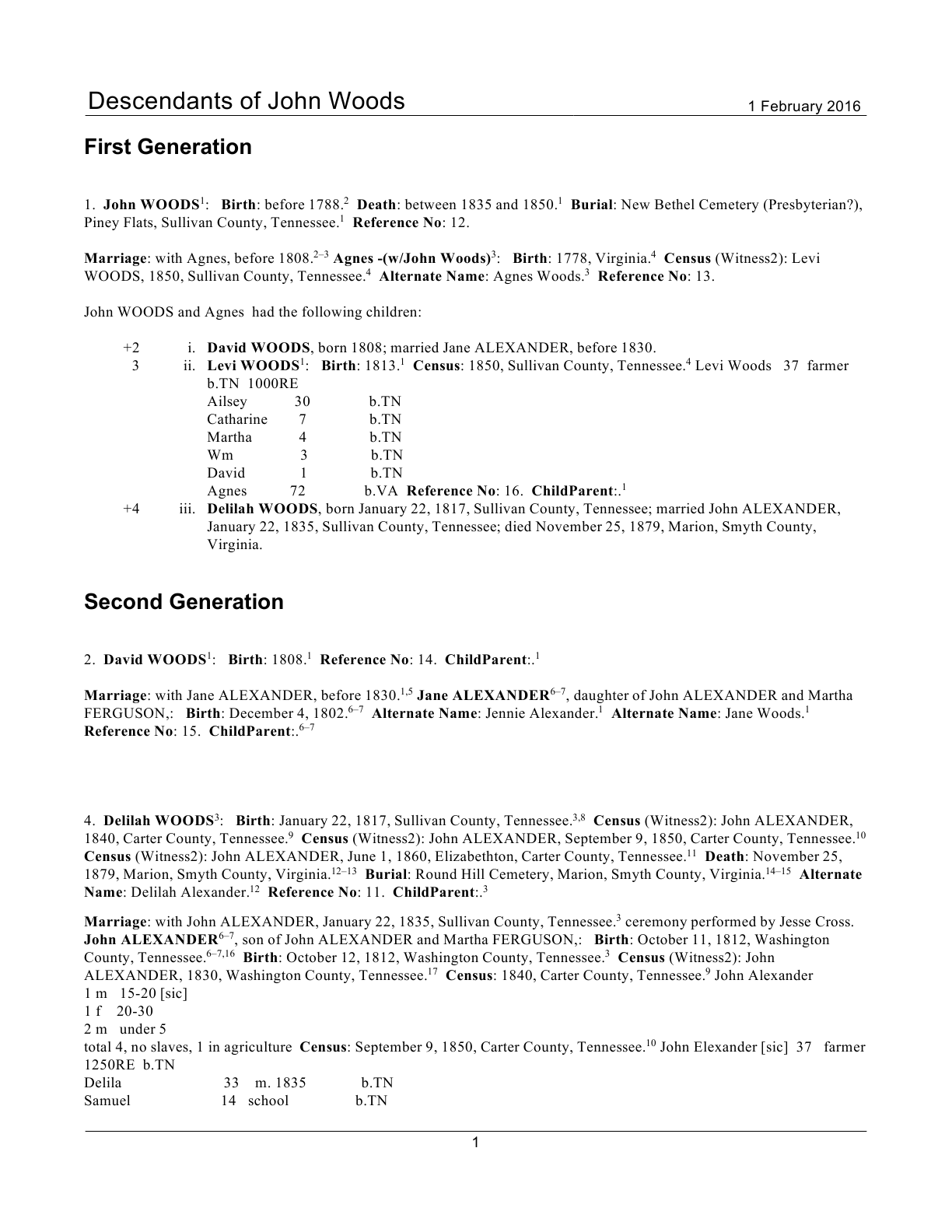
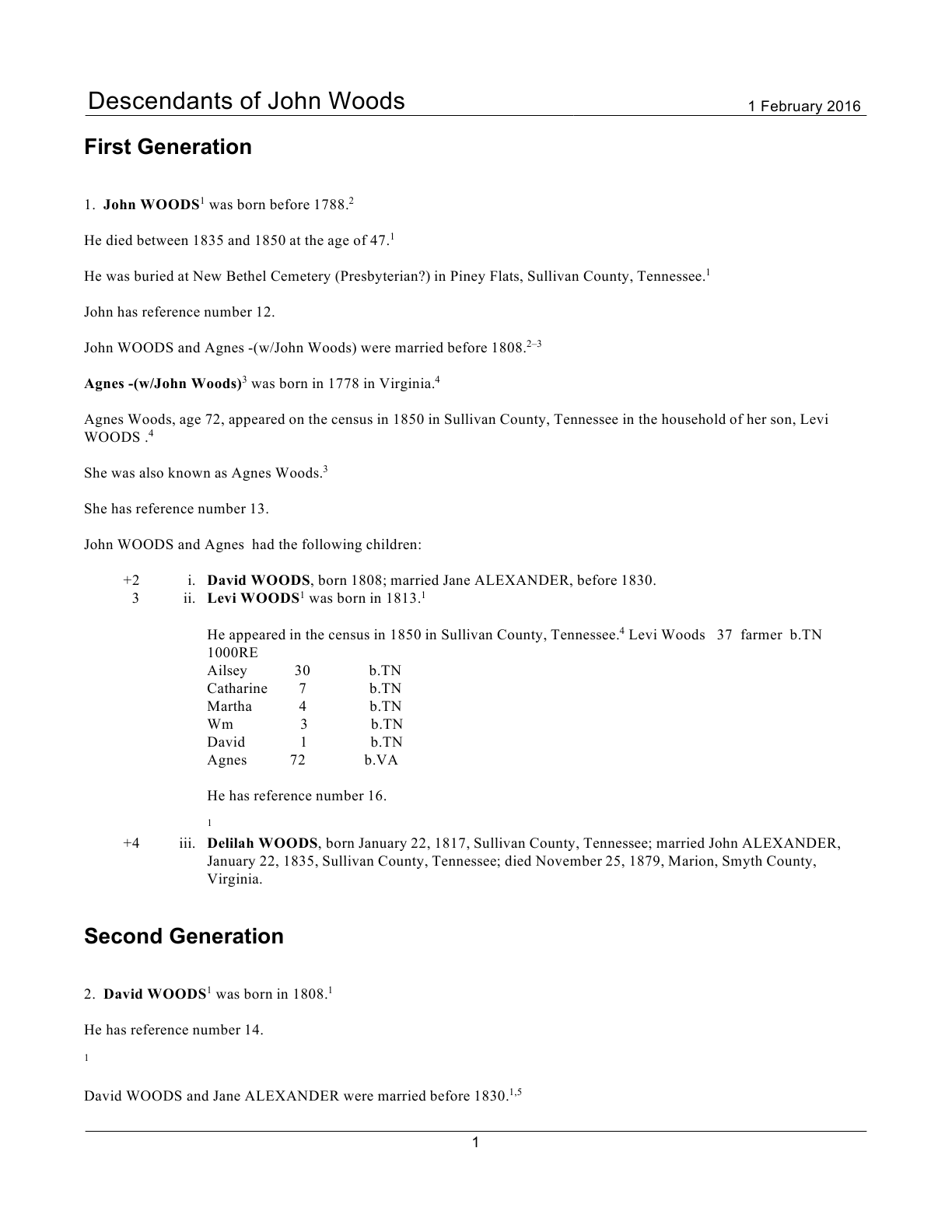
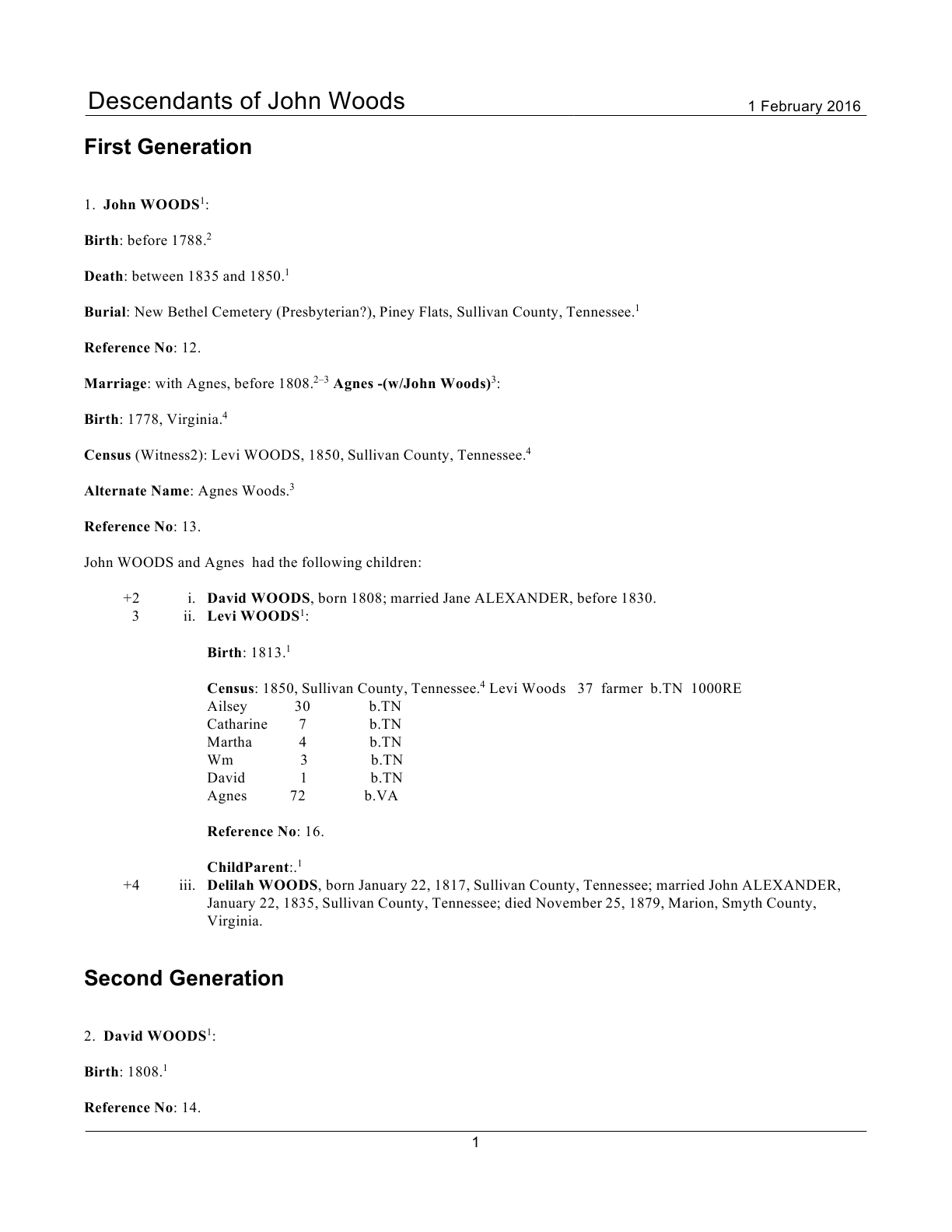
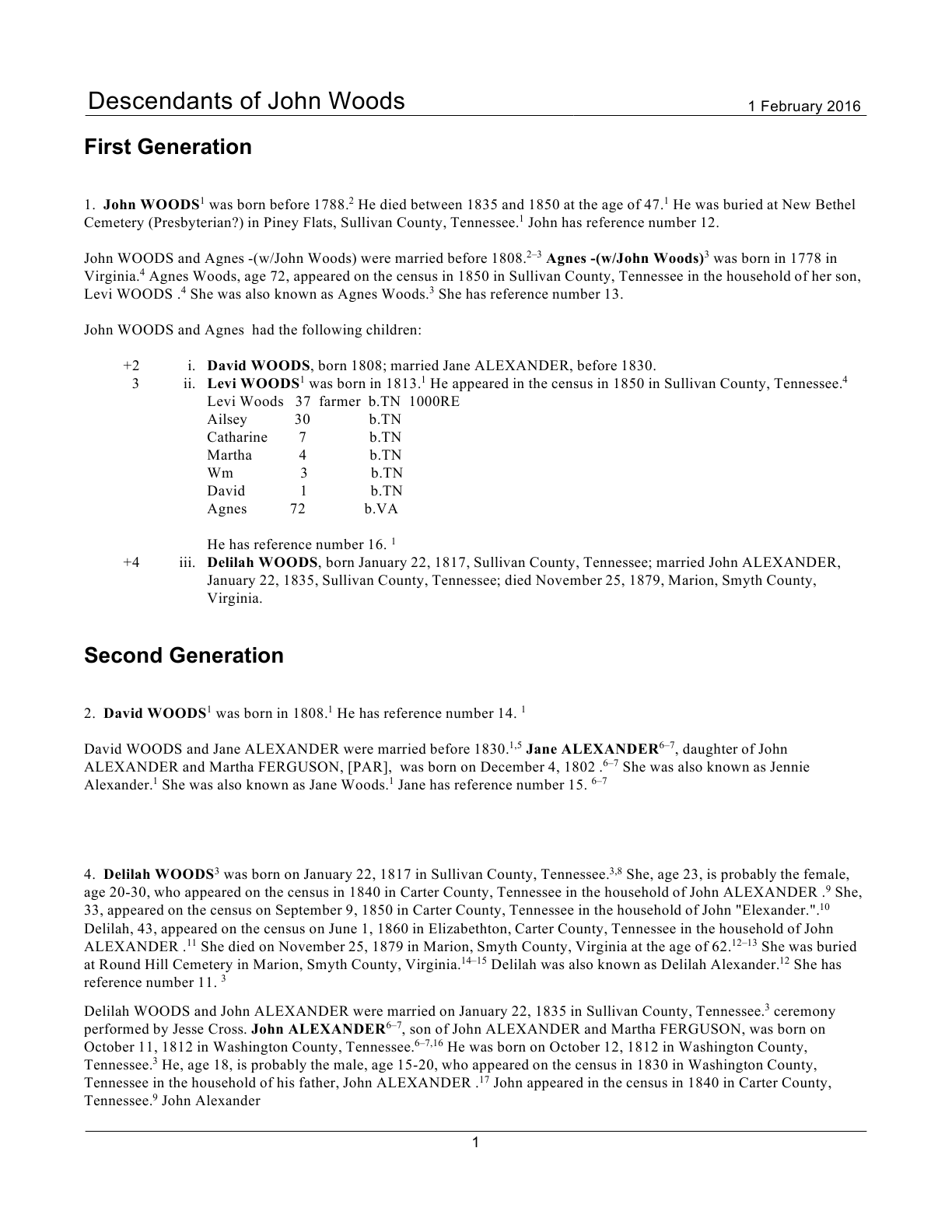
Settings Normal Point Form
Normal – “Keep facts in same paragraph”Point Form – space character starts fact, 0 Carriage Returns

Note that for all examples of Point Form, the RootsMagic report settings option for paragraphing is set to “Keep facts in same paragraph”.

Although the Point Form is not strictly point form because the facts run together in the same paragraph, it is actually better for fast reading than is the Normal report because there are fact names that catch the eye, the ‘sentences’ are terse and consistent and it is the most efficient in use of space and paper.

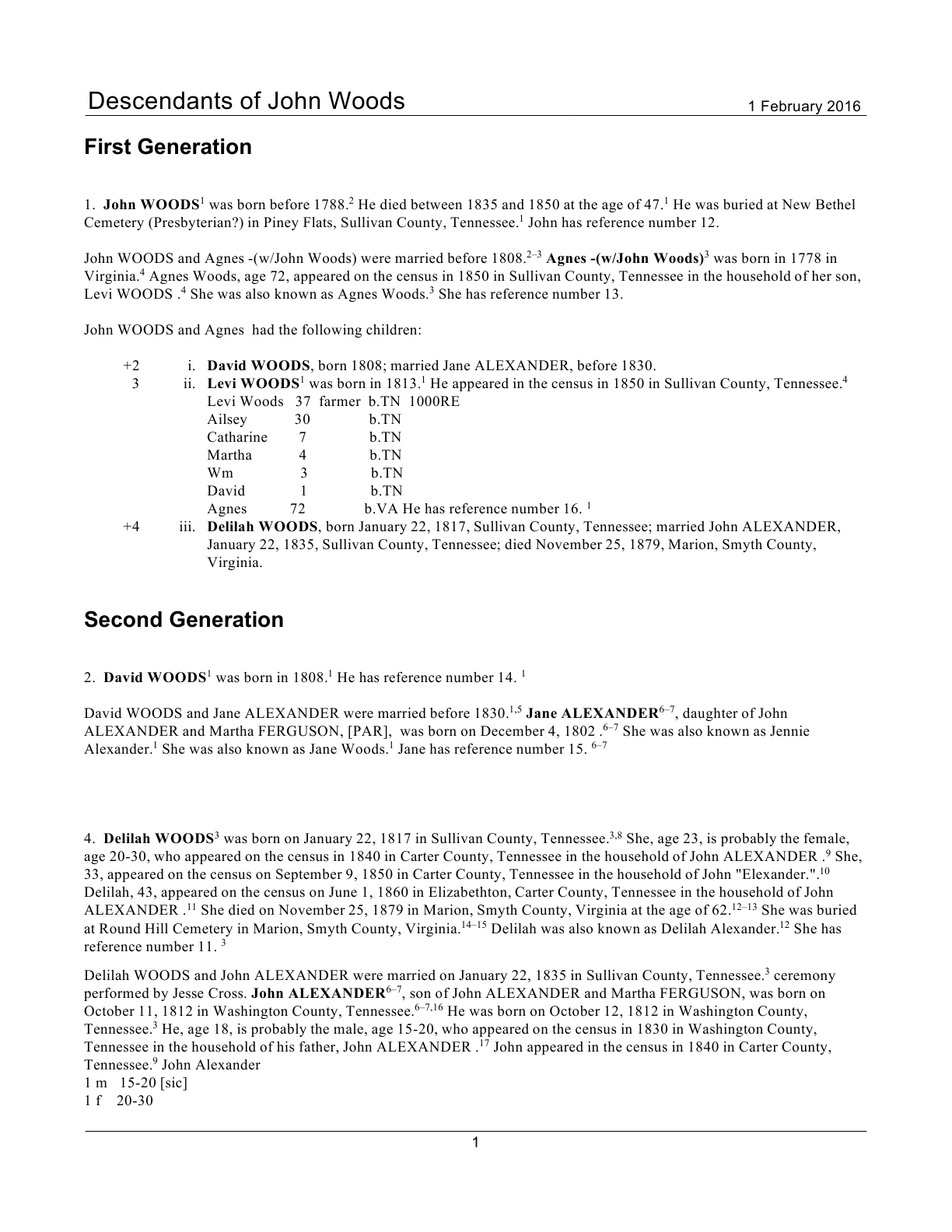
DescNarrJohnWoods-Normal0DescNarrJohnWoods-Normal0.png DescNarrJohnWoods-PointForm0DescNarrJohnWoods-PointForm0.png
Normal – “New paragraph after every fact”Point Form – 2 Carriage Returns start fact

Both of these waste trees!

DescNarrJohnWoods-Normal1DescNarrJohnWoods-Normal1.png DescNarrJohnWoods-PointForm2DescNarrJohnWoods-PointForm2.png
Normal – “New paragraph after facts with notes”Point Form – 1 Carriage Return starts fact

This Point Form layout is the most attractive of the three or, at least, comes closest to the concept of a hybrid of the Individual Summary and Narrative report.

DescNarrJohnWoods-Normal2DescNarrJohnWoods-Normal2.png DescNarrJohnWoods-PointForm1DescNarrJohnWoods-PointForm1.png

Features:

  • Backs up key tables or parts thereof to ‘x’ versions which are used by the complementary script to restore back to the previous format.
  • User control* over fact/event sentence heading format: one of plain, bold, italics, underlined.
  • User control* over fact/event sentence lead-in carriage returns.
  • Changes default sentences to point form without [person] variables.
  • Default sentences begin with the fact type name as a heading. This is the name defined in Lists>Fact Type List; the user can edit user-defined fact types in RootsMagic.
  • Alternate Names are labelled by their type, if assigned in the Edit Person screen.
  • Shared events show the role names of the sharers.
  • Adds _Heading event to provide the initial [person] sentence as the first ‘fact’ so each person’s section will start with the person’s name and not be stated as ‘factless’. Version 2 does not do this; instead it uses a Jerry Bryan trick of putting a line feed/carriage return after the [Person] variable for the Birth sentence template, normally the person’s first event. This does require a Birth event as the first event to be output to the narrative report.
  • Adds two trailing CR/LF to the Note field of the last family event (by SortDate) of each couple to force the spouse’s subsection of a person’s report section to start a new paragraph. (V2)

*The script works best with a SQLite manager that supports run-time variables such as SQLite Expert Personal to provide control over the format of fact headings and fact paragraphing. Those that do not support them, such as SQLiteSpy, default to bold and no <CR>s. In either case, a RMNOCASE collation extension is needed. To add the RNMOCASE collation extension, see either:

Version 2
Reports-PointFormNarrativeSetup2.sql
Reports-RestoreAfterPointForm2.sql
Version 1
Reports-PointFormNarrativeSetup.sql
Reports-RestoreAfterPointForm.sql

Use:

  1. Open your database (safer to use a copy) with your SQLite manager.
  2. Load the RMNOCASE extension.
  3. Load the SQLite script Reports-PointFormNarrativeSetup.sql.
  4. Execute the script.
  5. SQLite will throw an error if the database has been previously modified by this script without subsequently running Reports-RestoreAfterPointForm.sql. Load and run the latter and return to step 3.
  6. If prompted for a value for $FactNameFormat_ibun, type in one of the letters: italics, bold, underline, no and OK. Any value other than i, u, n is the same as b.
  7. If prompted for a value for $ParagraphCR_0_1_2, type in one of the numbers 0,1,2 to define the number of Carriage Returns prepended to the sentence. Any value other than 1 or 2 is the same as 0 – a leading space character.
  8. On successful completion the results window will display a status message so reporting.
  9. Open RootsMagic and generate narrative reports. Use the Report Settings Option “Keep fact sentences in same paragraph” to start, especially if you have chosen to have lead-in carriage returns.
  10. You can leave the report preview open and rerun the scripts to switch back to original and to different point form formats. After each execution of a script, you can quickly see its effects from report view with Alt-t to return to Report Settings and <Enter> to regenerate the report with the changes.
  11. You may want to try some other scripts that affect reports after having set up your database for point-form reports: