Facts – Add custom MRIN event to each family #facttypes #events #mrin

Why? How?

Event-MRIN_EditPerson.PNG
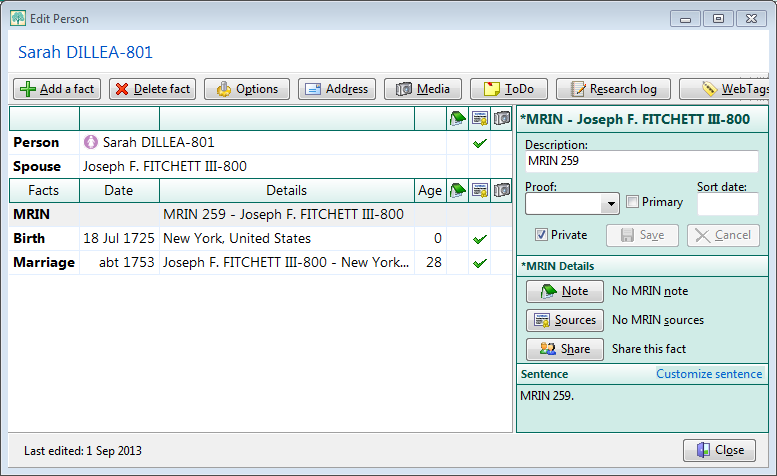
Example of an MRIN event added by the script. (click for full size)

Main Script | Mismatched FMNO Report | Earlier GEDCOM Solution

RootsMagic 6 hides the record number commonly known as MRIN except as an option in the title of the Family Group Sheet and in the Marriage List report. This is not good enough for some users who, perhaps migrating from experience with other family tree software, have a document filing system organised on MRIN. In RM, the “MRIN” comes from the FamilyID in the FamilyTable and is not based on a Marriage event; hereafter, I refer to it as FMNO. It is not preserved in data transfers via GEDCOM or drag’n’drop between RM databases, except in special circumstances. With that caveat, the following SQLite script creates a custom FMNO family event and adds it to every couple and single parent with their FamilyID number stored in the event description with the prefix “FMNO “. A second script reports on mismatches between the FamilyID number and the FMNO event value as could arise from a transfer to another database. And to round things out showing that there is always more than one way to accomplish something, see a non-SQLite method for batch creation of the FMNO events at the bottom of the page.

Main Script

Events-FMNO.sql

-- Events-FMNO.sql
-- 2013-10-15 Tom Holden ve3meo
-- 2013-10-16 changed from MRIN to FMNO
/*
Exposes otherwise invisible FamilyID (except optionally in title of FGS)
by adding an event to each spouse containing the FamilyID.
The event added is a custom Family event named *FMNO, abbreviated FMNO which is
first created by the script if one having the same abbreviation does not exist.
*/
-- Add a FMNO fact type if none exists
INSERT
    OR IGNORE
INTO FactTypeTable(OwnerType, NAME, Abbrev, GedcomTag, UseValue, UseDate, UsePlace, Sentence, Flags)
SELECT 1
    ,'*FMNO'
    ,'FMNO'
    ,'EVEN'
    ,1
    ,0
    ,0
    ,CAST('[Desc].' AS BLOB)
    ,- 1
WHERE (
        SELECT FactTypeID
        FROM FactTypeTable
        WHERE ABBREV LIKE 'FMNO'
            AND OwnerType = 1
        ) ISNULL;
 
-- Delete all FMNO events  N.B. RM will delete all events for a FactType that you delete through it.
-- DELETE FROM EventTable WHERE EventType IN (SELECT FactTypeID FROM FactTypeTable WHERE ABBREV LIKE 'FMNO' AND OwnerType=1);
-- Add FMNO event to each couple without such an event, description to contain FamilyID (invisible FMNO)
INSERT
    OR
 
ROLLBACK
INTO EventTable(EventType, OwnerType, OwnerID, FamilyID, PlaceID, SiteID, DATE, SortDate, IsPrimary, IsPrivate, Proof, STATUS, EditDate, Sentence, Details, Note)
 
SELECT (
        SELECT FactTypeID
        FROM FactTypeTable
        WHERE ABBREV LIKE 'FMNO'
            AND OwnerType = 1
        ) AS EventType
    ,1 AS OwnerType -- a Family event is type 1
    ,FamilyID AS OwnerID
    ,0 AS FamilyID
    ,0 AS PlaceID
    ,0 AS SiteID
    ,'.' AS DATE
    ,1 AS SortDate -- places event at or near top of list in Edit Person screen
    ,0 AS IsPrimary
    ,1 AS IsPrivate -- presumably having this event set as private will provide needed output control
    ,0 AS Proof
    ,0 AS STATUS
    ,(
        SELECT JULIANDAY('now', 'localtime') - 2415018.5
        ) AS EditDate -- does not affect Date last edited in People view
    ,NULL AS Sentence
    ,'FMNO ' || FamilyID AS Details -- having the prefix "FMNO" helps to stand out in tabular reports
    ,NULL AS Note
FROM FamilyTable
WHERE FamilyID -- don't add an FMNO event to those couples already having one
    NOT IN (
        SELECT DISTINCT OwnerID -- list of all FamilyID's already having the FMNO event
        FROM EventTable
        WHERE OwnerType = 1
            AND EventType IN -- in case there is more than one FMNO family fact type
            (
                SELECT FactTypeID
                FROM FactTypeTable
                WHERE ABBREV LIKE 'FMNO'
                    AND OwnerType = 1
                )
        );


Mismatched FMNO Report
Events-MismatchedMRIN.PNG
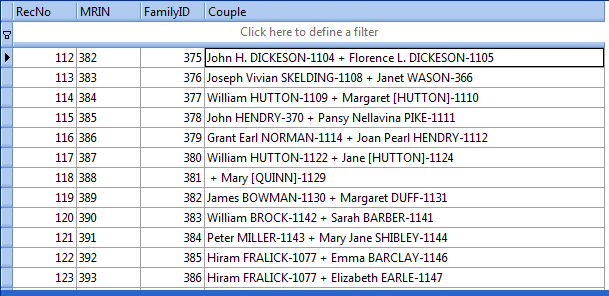
Example of mismatches after a drag’n’drop transfer to a new database, as displayed in SQLite Expert. (click for full size)

Unfortunately, a drag’n’drop of Everyone from one database to a new, empty database does not necessarily preserve all FamilyID and PersonID numbers. Many were preserved but many not, as seen in this extract from the following script’s output; fully 1/3 of almost 400 FamilyIDs were changed while PersonID changes were many more. What happens is that new PersonTable and FamilyTable tables are generated and records unused in the originating database are reused in the new, thus shifting the record numbers down. GEDCOM import into an empty database offers the option to Preserve record numbers but this only applies to the person, not the family. A document filing system based on either or both the MRIN/FMNO and RIN of the originating database will be out of sync with the internal record numbers for many couples and, probably, persons in the target database. Carrying over the FMNO and RIN as events to the target database preserves the document trail for as long as those events are preserved and helps to realign the filing system with the database. Also see Copy RIN to REFN.

Events-MismatchedFMNO.sql

-- Events-MismatchedFMNO.sql
-- 2013-10-15 Tom Holden ve3meo
-- 2013-10-16 changed from MRIN to FMNO
/*
Compares the OwnerID for Family events having the Abbrev "FMNO" against
the value stored in the event description, listing those that do not match
along with the names and RINs of the couple.
Used in conjunction with Events-FMNO.sql.
*/
SELECT SUBSTR(CAST(E.[Details] AS TEXT), 6) AS FMNO -- extracts everything after "FMNO "
    ,E.[OwnerID] AS FamilyID
    ,ifnull(N1.Given || ' ' || UPPER(N1.[Surname]) || '-' || FM.FatherID, '')
   || ' + ' ||
   ifnull(N2.Given || ' ' || UPPER(N2.[Surname]) || '-' || FM.MotherID, '') AS Couple
FROM EventTable E
INNER JOIN FactTypeTable FT ON E.EventType = FT.FactTypeID
INNER JOIN FamilyTable FM ON E.OwnerID = FM.FamilyID
LEFT JOIN NameTable N1 ON FM.FatherID = N1.OwnerID
    AND + N1.IsPrimary
LEFT JOIN NameTable N2 ON FM.MotherID = N2.OwnerID
    AND + N2.IsPrimary
WHERE E.OwnerID NOT LIKE SUBSTR(Details, 6)
    AND E.OwnerType = 1 -- Family event
    AND FT.[Abbrev] LIKE 'FMNO';

Earlier GEDCOM Solution

I discovered Alfred’s 9 April 2009 solution using Microsoft Word wildcard search and replace on the GEDCOM and Romer’s 8 July 2009 reiteration of that after having developed the SQLite scripts.
Source Templates – Set Quotation Punctuation to ‘UK’ or ‘Logical’ Placement #sourcetemplates #update

Most of the built-in source templates have the comma or period separating a quotation from the rest of a Footnote, Short Footnote or Bibliography sentence (or ending the sentence with a quotation) inside the quotation marks. This is known as ‘US’ style or convention. ‘UK’ or ‘logical’ convention places them outside the quotation. This query attempts to find all such instances and move them to the ‘UK’ position.

These names for the two styles do not indicate exclusive use in either country. There are divergences in practice not only trans-Atlantic but also north-south, between sectors, fiction and non-fiction et al according to Grammar-Monster.com. It characterises the innie-outie placement of periods and commas relative to the quotation as US vs UK convention, granting that that is just a convenient oversimplification. An article by Grammar Girl echoes that and cites references that indicate the ‘US’ practice follows that of early typesetters and compositors using now-obsolete technology while the ‘UK’ practice is “logical”. Note that I placed the period ending the previous sentence outside the quotes; I cannot see any reason that it should be within.

I learned my grammar in the 50’s and 60’s in Canada which some have said is culturally mid-Atlantic, also an over-simplification, but, always trying to be logical, I evidently use “UK rules”. Apparently, Canadian practice has evolved: the government’s own guide to “The Canadian Style” encourages placing period and comma within the quotes except “when a very high degree of accuracy is required” in which case ‘logical’ placement is used. I would argue that Evidence style citations are supposed to be accurate and, therefore, …

SourceTemplates-SetUKquotePunctuation.sql
This query requires the REGEXP function which is supported in SQLiteSpy but not by SQLite Expert Personal without loading an extension.

Source Templates – Revision Utilities #sourcetemplates

RootsMagic invited users to submit any issues they are having with the built in source templates as of version 6.3.0.3 in the Forum thread Sentence Templates To Be Fixed on 20 Sep 2013. Extraneous punctuation and text when one or more fields is left empty was identified as an issue and one that the RootsMagician intends to fix, at least for those templates so used more than rarely. It’s not clear what other issues might be addressed but new/modified functionality was ruled out from this round.

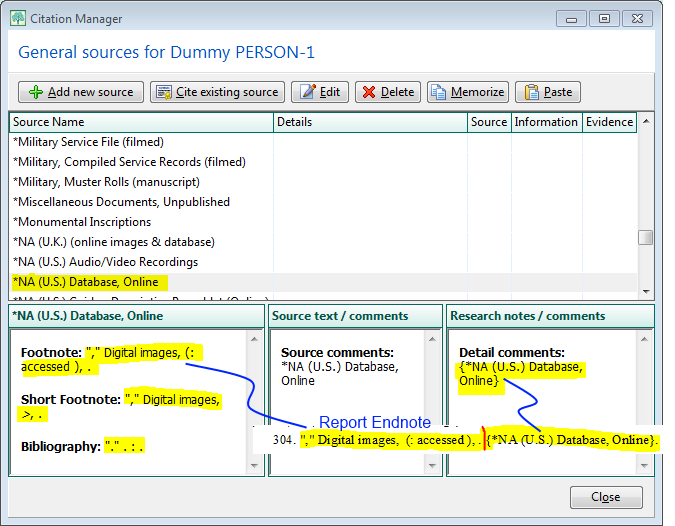
In an attempt to identify the scope of the extraneous characters problem, a series of queries were developed that readily show the outputs for empty citations of empty sources for each of the built-in source templates. The result lends itself to editing the templates and may be helpful in identifying and resolving other issues.

SourceTemplateRevisionUtilities-CitationManager+EndNote.png
Empty citations on copies of built-in source templates showing extraneous punctuation and text from one and its resulting report endnote.

SourceTemplateRevisionUtilities.sql rev 2013-09-25

-- SourceTemplateRevisionUtilities.sql
/* 2013-09-24 ve3meo
2013-09-25 added ripple update of the name of the source template through to the citation comment
 
This series of queries is intended to facilitate review and editing of
copies of the builtin source templates to remove extraneous punctuation
and text when fields are left empty. The series assumes a clean database
with one person RIN=1 to whom an empty citation using each source template
will be linked. The series:
1. Creates a copy of each builtin source template which can then be edited in RM, name prefixed with *
2. Creates an empty source for each copy of the builtin source templates, source name = template name
3. Creates an empty citation of each source linked to a person whose RIN is 1.
4. Ripples the name of the source template through to citation comment for use in end notes.
 
The database can be opened by RM on the Citation Manager for Person 1. The names of the sources
are ordered alphabetically to match the order in the Source Template List. Selecting a citation
shows the three sentences resulting from the empty source citation. Using an external SQLite manager,
the SourceTemplateTable sentence templates for Footnote, Short Footnote and Bibliography can be edited,
thus saving much drilling up and down in RM. Simply selecting another citation in RM and returning
refreshes the sentence generation to catch up to the changes in the template.
 
Of course, there may other ways of working effectively, such as two instances of RootsMagic (resident and portable)
open on the common database, one in the Citation Manager, the other in the Source Templates window.
*/
 
-- Create a copy of each builtin source template
INSERT INTO SourceTemplateTable
SELECT TemplateID + 10000
    ,'*' || NAME
    ,Description
    ,Favorite
    ,Category
    ,Footnote
    ,ShortFootnote
    ,Bibliography
    ,FieldDefs
FROM SourceTemplateTable
WHERE TemplateID < 10000;
 
-- Create an empty source for each copy of the builtin source templates
INSERT INTO SourceTable
SELECT NULL AS SourceID
    ,NAME
    ,'' AS RefNumber
    ,'' AS ActualText
    ,'' AS Comments
    ,0 AS IsPrimary
    ,TemplateID
    ,(
        SELECT CAST('<?xml version="1.0" encoding="UTF-8"?>
<Root><Fields></Fields></Root>' AS BLOB)
        ) AS FIELDS
FROM SourceTemplateTable ST
WHERE ST.TemplateID > 10000;
 
-- Create an empty citation for each empty source based on copies of the builtin source templates
-- all these citations are to the person with RIN=1
INSERT INTO CitationTable
SELECT NULL AS CitationID
    ,0 AS OwnerType
    ,SourceID
    ,1 AS OwnerID
    ,'[[user:ve3meo]]' AS Quality
    ,0 AS IsPrimary
    ,'' AS Comments
    ,'' AS ActualText
    ,'' AS RefNumber
    ,0 AS Flags
    ,(
        SELECT CAST('<?xml version="1.0" encoding="UTF-8"?>
<Root><Fields></Fields></Root>' AS BLOB)
        ) AS FIELDS
FROM SourceTable S
WHERE S.TemplateID > 10000
ORDER BY S.NAME;
 
/* Ripple SourceTemplate name through to Citation comments
 via Source comments for listing in end notes. Having the name
 in Source comments may also be convenient.
*/
UPDATE SourceTable
SET Comments = (
        SELECT ST.NAME
        FROM SourceTemplateTable ST
        WHERE SourceTable.TemplateID = ST.TemplateID
        );
 
UPDATE CitationTable
SET Comments = CAST(x '0A' AS TEXT) || '{' || (
        SELECT NAME
        FROM SourceTable S
        WHERE CitationTable.SourceID = S.SourceID
        ) || '}';

Media – Set Primary Photo for Persons #media #update

This query responds to a problem with an import from Family Historian via FTM-flavoured GEDCOM reported by Stewartrb in the RootsMagic Forums thread GEDCOM import with media. The images linked to the person in Family Historian were ultimately tagged as such in RootsMagic but none was marked as the Primary photo. Consequently, none showed on the main screen nor in reports other than Scrapbooks. This query sets the last-tagged image-type media file among those that have been tagged to a person as that person’s Primary photo, when none of the tags for that person have been so checked. It could be readily modified to be the first tag added to the person rather than the last.

-- MediaTags-SetPrimaryForPersons.sql
/* 2013-09-23 ve3meo
Sets the last mediatag as the Primary photo for a person with 1 or more tags for image-type media, none of which are so checked.
Rev 2026-08-03 Tom Holden
Updated to replace old SQLite behaviour from 2013: sorting rows in an inner subquery (ORDER BY ML.OwnerID, ML.IsPrimary) and 
expecting GROUP BY OwnerID in the outer query to return the last ordered row. Not guaranteed by the current SQLite engine.
Now uses aggregate functions which is simpler, faster and more reliable code. 
Tested on RM11 database and should be backward compatible to RM4.
*/
UPDATE MediaLinkTable
SET IsPrimary = 1
WHERE LinkID IN (
    SELECT MAX(ML.LinkID)        -- latest mediatag for Person. Change to MIN(ML.LinkID)for the earliest tag to be set Primary
    FROM MediaLinkTable ML       -- mediatag links
    INNER JOIN MultiMediaTable MM -- links to media files
	ON ML.MediaID = MM.MediaID   -- relates mediatags to media items
    WHERE ML.OwnerType = 0       -- Person
      AND MM.MediaType = 1       -- Image
    GROUP BY ML.OwnerID          -- PersonID
    HAVING MAX(ML.IsPrimary) = 0 -- Only persons with NO primary photo assigned.
    )	
;

Group – Persons with Text Dates #date #namedgroup

  • Creates a Named Group in the open database with the name “SQL: Text Dates” if one does not already exist
  • Deletes all members from that named group
  • Populates that named group with persons having an event date that is backgrounded in yellow on the Edit Person screen, i.e., an invalid date format interpreted by RootsMagic as Text

To refresh the named group’s membership list to reflect corrections you have made to the format of event dates, rerun the query to regenerate the RootsMagic group table and then, in RootsMagic, select a different group and then re-select the “SQL: Text Dates” group. You should see that names have disappeared from the group, provided you have corrected all the text dates for the persons you worked on.

Voila! A Dynamic Group! Just a few clicks more than if RootsMagic had it built in.

Group-PersonsWithTextDates-RM10 2024-10-08 for #RM10 & probably suitable for RM8 and RM9

Group-PersonsWithTextDates.sql for all versions RM4-RM7
2013-09-01 superseded PersonsWithTextDates.sql which was flawed and incomplete.
rev 2018-07-07 bug fixed when no other existing group

Bundled Utilities – RMtrix #application #visualc

RootsMagic 8 has changes to its database design that render many of the items in RMtrix unusable. It will throw an unhandled exception error in most, if not all, cases.

RMtrix.png
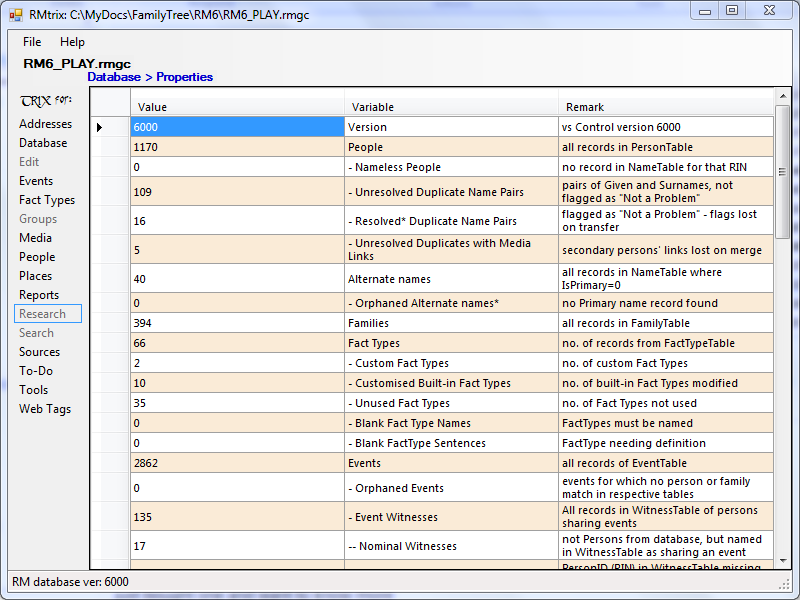
RMtrix collects a bunch of SQLite queries under a simple, easy-to-use interface. It does many of the queries reported on this wiki – some of the menu items are dormant. RMtrix is intended to progress the development of a more comprehensive set of utilities going beyond the limitations of the database language by itself and make them available to and usable by the average user of the RootsMagic software.

Kim Mills has done a very clear, well illustrated explanation of how to use functions in RMtrix to split shared events prior to exporting and uploading to Rootsweb and Ancestry.com trees. Read it on her Footsteps of the Past blog.

Alpha-7 21 Jan 2013

Alpha-7 has many additional tricks gathered from the last nine months of SQLite Tools for RootsMagic..

RMtrixDatabaseProperties-screen.PNG
Screenshot from RMtrix alpha-7 querying the properties of the RootsMagic 6 database stored in the file “RM6-PLAY.rmgc”. Now uses a RM6.0.0.4 database (reported as 6000) as the reference for comparing source templates, fact definitions, etc.

Note that you can sort on any column by clicking on the header and you can change the order of the columns by dragging one at a time. These arrangements do not persist through to the next running of the query.

The following menu items are active (red text signifies a change from alpha-6, 9 Mar 2012):

  • File > Select
  • Help > About
  • Addresses > Identify Blank Names | How Used
  • Database > Analyze | De-Analyze | Integrity Check | Reindex | Properties| Vacuum
  • Events > Set same date sort order | Shared events with missing witnesses | Sharable events
  • | Birth Year Mismatch List | Death Year Mismatch List | UPDATE Birth and Death Years
  • | Convert Shared to Individual (SPLIT Shared to Individual | UNSHARE | UNDO Splits and RESHARE | HIDE Tracks)
  • Fact Types > View current outputs | Set all to GEDCOM | Snapshot current | View snapshot outputs | Restore from snapshot | Delete snapshot
  • Media > File Links | Media List | DELETE Unused | RESET Media Type
  • | Media Tags (COPY from Shared Events to Individual | DELETE Personals duplicating Events)
  • People > Duplicate Name Search | Resolved Duplicate Names | Multiple spouses | Nameless People – DELETE
  • | Alternate Names (List | Delete Orphans | SET Type “Married” | ADD “Married”)
  • Places > Errors | Having Place Details | Unused Places | Orphaned Place Details (List | Delete) | DELETE Unused
  • Reports > Paragraphing Strip|Add | Dummy family Add|Delete | LifeLines
  • Sources > Master Sources | Source List | Invisible Name Citations (List | Convert to Personal Citations)
  • To-Do > To-do List
  • Tools > DELETE Phantoms
  • Web Tags > MAKE WebTags from citation Comments | COPY from Citations to Persons | DELETE Duplicates

Sorry! No Help screens yet…

Caveat Emptor!

I’m a novice at Visual Studio and C# and have not taken steps to automatically protect or backup your database. So get to know RMtrix by using it on a copy of your database. Some of these functions modify your database and are so flagged in the Tool Tip popup when the mouse pointer hovers over the menu item.

Integrity Check, Reindex and Vacuum – Beware!

The Integrity Check will almost invariably report errors on a RootsMagic database that has NOT been Reindexed or Vacuumed by RMtrix. And RootsMagic 5 will almost invariably report errors on a database that HAS been Reindexed or Vacuumed by RMtrix. That is because RootsMagic 4 and 5 use a secret multilingual collation sequence for comparing strings of text and putting them in order. RMtrix uses a simpler collation; indexes produced by two different collation sequences will sometimes differ. Therefore, it is recommended that:

  1. RM5 & 6 databases may be Reindexed or Vacuumed in RMtrix for its use and then, on return to working with RM5, use its File > Database Tools > Rebuild Indexes.
  2. RM4 databases should NOT be Reindexed or Vacuumed in RMtrix.

At some future stage of development, hopefully there will be protections built in to prevent changes to RM4 databases that could result in indexing errors.

Download and Installation

RMtrix32.zip  RMtrix64.zip zip files dated 21 Jan 2013 ver 0.1.7

Download the 32 bit or 64 bit version (match your computer’s operating system) to a temporary location on your computer. If your operating system does not open the zip file, you will need an unzip utility to extract all the files and sub-folders to another temporary location. Then open the file “setup.exe”. If your computer does not have the .NET Framework 4 already installed, the installer program should automatically download it from Microsoft and install it before completing the installation of RMtrix. If the installation is successful, RMtrix should open on screen. You should also find a RMtrix folder in your Start Menu.

Please report successful or problem installation to me at ve3meo at gmail dot com and indicate which version of Windows is on your computer and whether 32 or 64 bit. This will help confirm that I have correctly used the Visual Studio Publish tool.

Won’t run?

Getting an error message when you select a database along the lines of “Could not load file or assembly ‘System.Data.SQLite … or one of its dependencies”?

I have an older ThinkPad running Windows XP which was giving me this problem getting the 32-bit version of RMtrix to work. The same issues might pertain to computers running later versions of Windows with either the 32 or 64 bit version of RMtrix. I develop on a 64-bit Windows 7 computer with all the bells and whistles of .NET Framework 4 and the full system.data.SQLite install so getting it to work there does not necessarily guarantee that it will work on other systems.

RMtrix uses the version of SQLite that requires Windows .NET 4 Framework (not just the Client). The installation of RMtrix may not have resulted in the appropriate version of .NET, so Install .NET 4 Framework, the full version, not the Client. You will be given a choice of three things to install – you only need the first of the three, unless you are a developer, the one for running applications.

Even though I distribute the appropriate version of System.Data.SQLite.dll in the installation zip files and it is installed along with RMtrix, that does not seem to be sufficient. I have not found a way in Visual Studio to make the installed app find the DLL. So it is necessary to visit the System.Data.SQLite Downloads page and download and install the package that is appropriate for your computer:
sqlite-netFx40-setup-bundle-x86-2010-1.0.79.0.exe or later, for 32-bit Windows,
sqlite-netFx40-setup-bundle-x64-2010-1.0.79.0.exe or later, for 64-bit Windows.
If you have not previously installed the correct version of .NET 4, System.Data.SQLite will not install.

Discussions & comments from Wikispaces site


thejerrybryan

Installed 64 bit version

thejerrybryan
17 February 2012 02:59:54

The install was fine – totally uneventful.

I’ve played with the functionality slightly, and I have no comments at this time because I haven’t had time to play enough just yet. The packaging is the first thing that needs to be right, and then the functionality can be developed from there. The packaging seems to be doing well.

Jerry


ve3meo
ve3meo
17 February 2012 03:15:30

Thanks for the report, Jerry. I have also received private confirmation of a successful 32 bit and another 64 bit installation so the distribution mechanics seem to be right. I’ve had one report of a 32 bit installation failure – program starts but no query works – which I hope is due to it being installed on a 64 bit machine/OS.

FYI, I am building on a 64 bit Win 7 platform with the sqlite.interop.dll and system.data.sqlite.dll from the 64 bit distribution. That’s needed to debug and run on my computer and for the 64 bit published version. However, on 32 bit machines, the 32 bit system.data.sqlite.dll is required, but I cannot debug and build with it. So I replace the 64 bit dll with the 32 bit dll in the source directory and re-publish, ignoring the warning about a mismatch. I could simply tell people to install the 64 bit version and replace the dll but Windows One Click installs it deep in an unsearchable area.

That info may be helpful to you when you are ready to publish your Group and Color-coding Manager.

Tom


Geraniums


After installing

Geraniums
19 March 2012 16:49:30

Is it OK to delete the RMtrix64 set up files after installing the program?


ve3meo


ve3meo
19 March 2012 17:26:25

Yes. For the next upgrade, download to the same place you installed this version from else it will not let you upgrade without uninstalling.


Pheney


RMTrix64.zip

Pheney
28 December 2015 06:47:04

After some fiddling and false starts, probably because I have not worked with RMTrix for a while, I have installed RMTrix under Windows 10 64-bit. It has already helped identify the broken links in my media album. Thanks, Tom!
Rex Sinnott


ve3meo


ve3meo
28 December 2015 13:16:43

I’m relieved to hear that, Rex, because I had no idea how to figure out what went wrong.


ve3meo


Comment: “The following menu items are active (red text…”

ve3meo
03 September 2018 20:04:44

ve3meo Feb 14, 2012

I have been busy adding more of the queries from the wiki. Some wrinkles here and there but progressing, including some that DO modify the database. Didn’t have time to build the 32 bit version – maybe tomorrow night – so holding off on the upload.

But don’t let that deter you from installing the current version – I’d like to know that the package is complete and installs successfully on both 32 bit and 64 bit systems.

Source Code

Here’s the source code for the Visual Studio 10 C# Project in one 7Z compressed file (9MB). You are welcome to use it as you see fit. I have not touched Visual Studio in years so I cannot offer any assistance.

Tom Holden
2021-06-22

Sources – Merge Duplicate Masters #merge #sources

Why?

The RootsMagic Source List window has an AutoMerge function that can merge Master Sources that are identical in every respect, including the pointer to the Source Template and the name of the Master Source. Thus it fails to merge sources that are practically identical and that we would wish were merged. Source Templates – Merge Duplicates addresses the first barrier for Source AutoMerge. The script below offers an external Source AutoMerge that does not mind if:

  • the Master Source names are different
  • there are white space differences around or within Source Text or Comments but the non-blank texts are otherwise identical

It is more forgiving than the built-in Source AutoMerge yet does not corrupt the core properties of the final, common Master Sources.

Practically Identical Master Sources

Under what conditions can such practically identical sources arise that RootsMagic’s Source AutoMerge does not recognise them?

  • Sources added to a person within FamilySearch Family Tree have their name prefixed by the person’s name. When imported into RootsMagic via its Share Data utility, that becomes the Master Source name. Thus, the same source assigned to two different persons will have different Master Source names.
  • Sources that have outer white space following the Master Source Text or Comments lose that on export or transfer via drag’n’drop. Should these sources return to the database through collaboration with another party, SmartMerge will merge the persons but not the sources because of this differing white space.
  • The Ultimate Splitting tool described on Sources – Adventures in Extreme Splitting adds person name(s) and event to the name of the split Master Source, which, in many instances, will be identical to other Master Sources.split from a common lumpy Master Source.


Outcomes

An example of a small database, starting with lumpy sources:

State Sources Citations
Original 13 58
after Ultimate Split 71 116
after Delete Lumpies After Split 58 58
after RM Source AutoMerge 58 58
after SQLite Sources – Merge Duplicates 28 58


Download

Sources-MergeDuplicates.sql Rev, 2013-08-08 now ignores differences in white space within Source Text and Comments

Usage

  1. Make a copy of your database on which you can run these procedures so that you can return to the original if you are not satisfied with the results.
  2. Open the database in your SQLite manager with a RMNOCASE extension.
  3. REINDEX the database using SQLite.
  4. Sources-MergeDuplicates.sql does require that the sources use the same Source Template and so Source Templates – Merge Duplicates should be run first if there is any thought that there may be duplicate source templates.
  5. It is also advisable to run the SQLite Delete Phantoms to clean up the database for faster execution of the following script but this may be more aggressive than you might like.
  6. Execute Sources-MergeDuplicates.sql to merge the practically identical sources; this is a very intensive series of SQL statements and may be rather slow.
  7. In RootsMagic, run File > Database tools > Rebuild Indexes on this database; not needed if its “Test database integrity” reports OK.

Delete Phantoms #database #delete #phantom

Rev 2019-02-12

Whether you have deleted or merged within RootsMagic itself or used one of the Delete Many procedures, there remain in various tables residues from the deleted targets that unnecessarily clutter the database and may give rise to phantom appearances related to the deleted targets. For very large databases built from many merges, the clutter may adversely affect performance. This procedure cleans up most of these artifacts.

WARNINGS:

  1. The procedures are not reversible and there is no guarantee that the results are perfect or what you may want. Use at your own risk and MAKE A BACKUP first.
  2. Shared events are deleted from all sharees if the Principal is not found.
  3. Unused Media, Sources, Places, Addresses are deleted.

This procedure must be followed by these steps:

  1. RootsMagic > File > Database Tools:
    1. Rebuild Indexes
    2. Compact database

DeletePhantoms.sqlRMtrix_tiny_check.pngOriginal query, fairly comprehensive and aggressive but overlooked unused Sources and Repositories.
DeletePhantoms2.sql As original except less aggressive as it does not delete unused Media, Places…
DeletePhantoms3.sql More comprehensive and aggressive than original, deleting unused Sources, Repositories, unused custom Fact Types and Roles not associated with a remaining fact type. 2013-08-07 corrected error where repository use was mistakenly based on CitationID not SourceID. 2019-02-12 now deletes orphaned TreeShare links.

-- DeletePhantoms.sql
/*
2012-10-27 Tom Holden ve3meo
2012-11-13 added query to correct PersonTable.SpouseID to 0 for those whose family (spouse)
was deleted.
 
Cleans database of unused records in most tables,
some of which may give rise to phantoms in displays and reports.
These arise from incomplete cleanup by RootsMagic when persons, families, places, sources
are deleted directly or by merging and, most certainly, by simple SQLite deletions
such as DeleteByColorCode.
 
Users may find this cleanup to be too aggressive and are advised to comment out
any sections that would delete unused items they may wish to preserve, e.g.,
unused sources or places.
 
There is an as-yet-unaddressed problem with shared events arising from the deletion of the Principal;
the event is deleted so there is nothing to share. It would be desirable to convert shared events to
unshared singular events for every sharee.
 
*/
-- Set SpouseID=0 for persons with invalid FamilyID (TAH 2012-11-13)
UPDATE PersonTable SET SpouseID=0
  WHERE SpouseID NOT IN (SELECT FamilyID FROM FamilyTable)
;
 
-- Delete Child from ChildTable if Child does not exist in PersonTable
DELETE FROM ChildTable WHERE ChildID NOT IN (SELECT PersonID FROM PersonTable);
 
-- Delete Child from ChildTable if FamilyID gone from FamilyTable
DELETE FROM ChildTable WHERE FamilyID NOT IN (SELECT FamilyID FROM FamilyTable);
 
-- Delete Names from NameTable if OwnerID is not a PersonID in PersonTable
DELETE FROM NameTable WHERE OwnerID NOT IN (SELECT PersonID FROM PersonTable);
 
-- Delete Individual's Events from EventTable if OwnerID not in PersonTable
DELETE FROM EventTable WHERE OwnerType = 0 AND OwnerID NOT IN (SELECT PersonID FROM PersonTable);
 
-- Delete Family Events from EventTable if OwnerID not in FamilyTable
DELETE FROM EventTable WHERE OwnerType = 1 AND OwnerID NOT IN (SELECT FamilyID FROM FamilyTable);
 
-- Clean out Citations that no do not link to an active record
-- Personal
DELETE FROM CitationTable WHERE OwnerType = 0 AND OwnerID NOT IN (SELECT PersonID FROM PersonTable);
-- Family
DELETE FROM CitationTable WHERE OwnerType = 1 AND OwnerID NOT IN (SELECT FamilyID FROM FamilyTable);
-- Event citations
DELETE FROM CitationTable WHERE OwnerType = 2 AND OwnerID NOT IN (SELECT EventID FROM EventTable);
-- Alternate Name citatoins
DELETE FROM CitationTable WHERE OwnerType = 7 AND OwnerID NOT IN (SELECT NameID FROM NameTable WHERE NOT IsPrimary);
 
-- Delete Citations having lost their Source
-- DeleteUnsourcedCitations.sql
-- 2010-01-29 ve3meo
DELETE FROM CitationTable
  WHERE CitationID IN
   (SELECT CitationID FROM CitationTable c
      LEFT JOIN SourceTable s ON c.SourceID=s.SourceID
      WHERE s.SourceID ISNULL);
 
 
-- Clean up addresses
-- Addresses that are linked to non-existant persons or families
DELETE FROM AddressTable
 WHERE AddressID NOT IN
 (
  -- Addresses that are linked to existing persons
  SELECT AddressID FROM AddressLinkTable WHERE OwnerType = 0 AND OwnerID IN (SELECT PersonID FROM PersonTable)
  UNION
  -- Addresses that are linked to existing families
  SELECT AddressID FROM AddressLinkTable WHERE OwnerType = 1 AND OwnerID IN (SELECT FamilyID FROM FamilyTable)
  )
 AND
  AddressType = 0
  ;
 
-- Remove orphaned records from AddressLinkTable
  -- Links to non-existing persons
  DELETE FROM AddressLinkTable WHERE OwnerType = 0 AND OwnerID NOT IN (SELECT PersonID FROM PersonTable);
  -- Links to non-existing families
  DELETE FROM AddressLinkTable WHERE OwnerType = 1 AND OwnerID NOT IN (SELECT FamilyID FROM FamilyTable);
  -- Links to non-existing addresses
  DELETE FROM AddressLinkTable WHERE AddressID NOT IN (SELECT AddressID FROM AddressTable);
 
-- Delete Unused Media
DELETE FROM MultimediaTable
 WHERE MediaID NOT IN
 (
-- Person media
  SELECT MediaID FROM MediaLinkTable WHERE OwnerType = 0 AND OwnerID IN (SELECT PersonID FROM PersonTable)
  UNION
-- Family media
  SELECT MediaID FROM MediaLinkTable WHERE OwnerType = 1 AND OwnerID IN (SELECT FamilyID FROM FamilyTable)
  UNION
  -- Event Media
  SELECT MediaID FROM MediaLinkTable WHERE OwnerType = 2 AND OwnerID IN (SELECT EventID FROM EventTable)
  UNION
  -- Master Source Media
  SELECT MediaID FROM MediaLinkTable WHERE OwnerType = 3 AND OwnerID IN (SELECT SourceID FROM SourceTable)
  UNION
  -- Citation Media
  SELECT MediaID FROM MediaLinkTable WHERE OwnerType = 4 AND OwnerID IN (SELECT CitationID FROM CitationTable)
  UNION
  -- Place Media
  SELECT MediaID FROM MediaLinkTable WHERE OwnerType = 5 AND OwnerID IN (SELECT PlaceID FROM PlaceTable)
  );
 
-- DELETE Orphaned MediaLinks
  -- Having a non-existant MediaID
  DELETE FROM MediaLinkTable
  WHERE MediaID NOT IN
  (SELECT MediaID FROM MultiMediaTable);
 
  -- Having a link to non-exsiting
    -- Person media
    DELETE FROM MediaLinkTable WHERE OwnerType = 0 AND OwnerID NOT IN (SELECT PersonID FROM PersonTable);
    -- Family media
    DELETE FROM MediaLinkTable WHERE OwnerType = 1 AND OwnerID NOT IN (SELECT FamilyID FROM FamilyTable);
    -- Event Media
    DELETE FROM MediaLinkTable WHERE OwnerType = 2 AND OwnerID NOT IN (SELECT EventID FROM EventTable);
    -- Master Source Media
    DELETE FROM MediaLinkTable WHERE OwnerType = 3 AND OwnerID NOT IN (SELECT SourceID FROM SourceTable);
    -- Citation Media
    DELETE FROM MediaLinkTable WHERE OwnerType = 4 AND OwnerID NOT IN (SELECT CitationID FROM CitationTable);
    -- Place Media
    DELETE FROM MediaLinkTable WHERE OwnerType = 5 AND OwnerID NOT IN (SELECT PlaceID FROM PlaceTable);
 
-- Delete Unused Places and Place Details
 -- Places
 DELETE FROM PlaceTable WHERE PlaceID IN
 (SELECT PlaceID FROM PlaceTable WHERE PlaceTable.PlaceType = 0 EXCEPT SELECT PlaceID FROM EventTable) ;
 -- Place Details
 DELETE FROM PlaceTable WHERE PlaceID IN
 (SELECT PlaceID FROM PlaceTable WHERE PlaceTable.PlaceType = 2 EXCEPT SELECT SiteID FROM EventTable) ;
 -- Orphaned Place Details having no Master Place
 DELETE FROM PlaceTable WHERE PlaceType = 2 AND MasterID IN
 ( SELECT MasterID FROM PlaceTable WHERE PlaceTable.PlaceType = 2 EXCEPT SELECT PlaceID FROM PlaceTable) ;
 
 
-- Delete orphaned Tasks
  -- individuals
  DELETE FROM ResearchTable WHERE OwnerType = 0 AND OwnerID NOT IN (SELECT OwnerID FROM PersonTable);
  -- families
  DELETE FROM ResearchTable WHERE OwnerType = 1 AND OwnerID NOT IN (SELECT FamilyID FROM FamilyTable);
 
-- Delete Headless Witnesses
DELETE FROM WitnessTable
WHERE WitnessTable.PersonID > 0
AND WitnessTable.PersonID
NOT IN
(SELECT PersonID FROM PersonTable)
;
 

Search & Replace #rmnocase #search #replace #update

Restricted in RootsMagic

RootsMagic 4 users are sometimes frustrated that they cannot do a search or search/replace on certain fields within the application. RM4’s Search & Replace is especially restricted to a small set of fields: Person name fields, Place name, Multimedia filenames and Notes (General, Family & Facts). SQLite opens up all fields to searching and, at least, some fields for replacing. This page gives some examples of search and replace in a RootsMagic database using SQLite.

Wide open with SQLite

If the SQLIte manager supports a fake RMNOCASE collation, then all fields can be modified else only those fields in a table that are not collated by RMNOCASE. Most managers do not and that includes all free software except SQLite Expert Personal with an extension or SQLiteSpy with its extension. SQLite Developer also does but costs $30. There are attendant risks in faking RMNOCASE. This page was written while using the free SQLiteSpy before the fake RMNOCASE extension became available.

Tables that can be fully edited using SQLite3 without RMNOCASE (including record deletions and additions) comprise 10 of the 22 making up a RootsMagic 4 database:

  • AddressLinkTable, ChildTable*, CitationTable*, ConfigTable*, EventTable*, ExclusionTable, FamilyTable*, GroupTable, LinkTable*, PersonTable*

* tables so marked have one or more fields of type BLOB, stored in binary format, requiring special treatment. These inlude ActualText, Comments and the XML data stored in the FIELDS field for each citation (the fields and data seen in the Source Details part of the Source screen), fields not accessible from RM4’s S&R.

Search

Every prior SQLite query on this wiki has an example of a more or less complex combination of displayed fields and conditional expressions of the form:

SELECT list_of_fields FROM TABLES WHERE some_condition;

The WHERE clause is the filter which is the basis of our search: we can set the condition to some_field comparator some_expression and only those records having a value satisfying the comparison will be displayed. Unfortunately, the sought-for word or phrase won’t be highlighted but, at least, we have reduced the number of records displayed.

For a complete list of the comparators and the format of SQLite expressions, see SQL As Understood By SQLite. For text searches, the LIKE, GLOB and REGEXP operators are most useful, in increasing order of power and complexity. MATCH is not supported by SQLiteSpy. Suppose we want to find records with the abbreviated “obit” for the full word “obituary” in the Notes field for Persons. These queries will give similar, but not necessarily identical, results:

SELECT Note FROM PersonTable WHERE Note LIKE '%obit %';
--> 312 records
 
SELECT Note FROM PersonTable WHERE Note GLOB '*obit *';
--> 305 records
 
SELECT Note FROM PersonTable WHERE Note REGEXP '.+obit .+';
--> 299 records
 
SELECT Note FROM PersonTable WHERE Note REGEXP '.*[Oo][Bb][Ii][Tt][^U^u].*';
--> 357 records

The first three SELECTs look for “obit “, i.e. “obit” followed by a space. LIKE is case insensitive and does not care where the search pattern occurs; it can match a single or any number of unknown character using the wildcards ‘_’ and ‘%’, respectively. GLOB is like LIKE but is case-sensitive and can also match a character in a group of characters enclosed in square braces, e.g. ‘[CB]’ – note that GLOB use different wildcard characters ‘?’ and ‘*’. The first REGEXP search pattern is case and position sensitive – the .+ wildcard requires one or more characters so “obit ” at the beginning or end of the value is ignored; had we used ‘.*obit .*’ pattern, the results would have been identical to GLOB (the .* wildcard matches 0 or more characters).

The second REGEXP search pattern sweeps up every case-insensitive pattern of “obit” not followed by a “u”, e.g., “obit)”, “obits”, etc., not found by the other comparisons. REGEXP is much more flexible and powerful; for the regular expression syntax almost fully supported by SQLiteSpy, see the ICU User Guide.

BLOBs

Curiously, while the PersonTable NOTE field is defined as type BLOB, SQLiteSpy quite happily displays and operates on it as text without special measures. Such is not the case for all BLOB fields – the FIELDS field of CitationTable, for example, is displayed in the spreadsheet view with a hexadecimal value and the value display below merely says “Blob”. Some other SQLite managers have a BLOB interpreter or editor that automatically opens on a BLOB field value. To read the FIELDS field, we need to temporarily change the values to type TEXT:

SELECT CAST(FIELDS AS TEXT) FROM CitationTable;

For string comparisons, we must likewise cast the value as text:

SELECT CAST(FIELDS AS TEXT) FROM CitationTable
 WHERE CAST(FIELDS AS TEXT) GLOB '*Page</Name><Value>Vol. 20*';

This searches citations for the Page field value beginning with “Vol. 20”.

Replace

Having identified a set of records that satisfy some search criterion, we could proceed to edit each one manually using SQLiteSpy’s editing tools. Keep the results in one screen and open a second SQL page on the table for editing. Use the rowid (add ROWID to the SELECTs above) from the query to find the record in the table editor. This could be tedious for a large set so we would like a way to do a global replace.

While I was disappointed to find that one cannot use a regular expression search and replace in SQLiteSpy, SQLite does support a string search and replace function replace(x,y,z), described under Core Functions of SQL As Understood By SQLite. These three queries demonstrate:

  1. the modification of the FIELDS value in just the result set as text, where “Vol. 20” is replaced by “Vol.XXX 20”,
  2. then those results cast as BLOB (note that “AS BLOB” is unnecessary by default, written here for clarity),
  3. and the next shows how we store the modified field to the database:
-- show replace() operating on results only
SELECT REPLACE(CAST(FIELDS AS TEXT),'Page</Name><Value>Vol. 20', 'Page</Name><Value>Vol.XXX 20')
 FROM CitationTable
  WHERE CAST(FIELDS AS TEXT) LIKE '%Page</Name><Value>Vol. 20%';
 
-- show casting above back to BLOB
SELECT CAST(REPLACE(CAST(FIELDS AS TEXT),'Page</Name><Value>Vol. 20', 'Page</Name><Value>Vol.XXX 20') AS BLOB)
 FROM CitationTable
  WHERE CAST(FIELDS AS TEXT) LIKE '%Page</Name><Value>Vol. 20%';
 
-- show record being updated with revised BLOB
UPDATE CitationTable
 SET FIELDS = CAST(REPLACE(CAST(FIELDS AS TEXT),'Page</Name><Value>Vol. 20', 'Page</Name><Value>Vol.XXX 20') AS BLOB)
  WHERE CAST(FIELDS AS TEXT) LIKE '%Page</Name><Value>Vol. 20%';

In the UPDATE query, we could have deleted the WHERE clause without affecting any other record. If REPLACE() does not find a search string in the target, it merely returns the target.

Rebuild Indexes and Update Birth and Death Years #update #date #birth #death #index #speed #rmnocase

Rebuilding the indexes of large databases using RootsMagic’s File > Database tools > Rebuild Indexes function is ponderously slow, still at version 6.0.0.2. A 162000 person database took over 100 minutes. This page provides procedures that take but a few minutes.

In RootsMagic version 5.0.2, the Rebuild Indexes tool was introduced under Menu > File > Database Tools; it not only rebuilds the SQLite database indexes which must be kept accurate but also updates the BirthYear and DeathYear columns of the NameTable. These values are displayed optionally in the sidebar Index and are used in some other views and reports. Prior to 5.0.2, there was no tool to rebuild the SQLite indexes and when the sidebar BirthYear and the Birth fact got out of sync (they still can), the only way to update them in RM was to edit the Birth fact and save it. To help find such mismatches, the following procedures were developed:

I do not recall for certain why no batch update procedure was published at the time. Perhaps it had something to do with the RMNOCASE issue, now worked around by RMNOCASE – faking it in SQLite Expert, command-line shell et al or RMNOCASE – faking it in SQLiteSpy and the fact that whatever index discrepancies between the fake and the real collation can be resolved by running RM’s Rebuild Indexes!

I suspect that what takes RM so long is not the SQLite Re-indexing but rather the recalculating and display of the Birth and Death years because re-indexing with the fake collation in SQLiteSpy takes less than two minutes with this big database. So the shortcut procedure outlined here relies on the assumption that RootsMagic’s SQLite database engine is as efficient as SQLiteSpy’s and completes the critical database indexing in a similar length of time, if such re-indexing is required.

  1. Run RM’s Menu > File > Database tools > Test database integrity. Despite the warning, you can expect it to complete in tens of seconds, not tens of minutes, on even a fairly low end computer, varying with size.
  2. If the result of 1 is OK, skip the next step.
  3. If the result of 1 is NOT OK, then run RM’s Rebuild Indexes. After a few minutes, use the Windows Task Manager to stop RootsMagic. Return to step 1.
  4. Once database integrity is OK, then it is safe to proceed with SQLiteSpy to update the Birth and Death Years using the query below.
  5. Having completed the SQLite query, close and reopen RootsMagic Explorer to view the results. Retest database integrity to be satisfied.

UpdateBirthDeathYears.sqlRMtrix_tiny_check.png
2012-12-06
Rev A: revised to respect the Primary fact if there are multiples. Completed update of 162,000 person database in 25 seconds.
Rev B: Christen, Baptism and Burial, Cremation now alternate Birth, Death dates in that order. BC dates. Update time doubled to 55 seconds.
Some may prefer the faster, leaner version.

-- UpdateBirthDeathYears.sql
/*
2012-11-14 Tom Holden ve3meo
2012-12-06 revA: priority to first record set to Primary, else first record
 when multiple Birth or Death facts.
           revB: incorporated Christen, Baptism as alternate Birth facts; Burial, Cremation
 as alternate Death facts - in that order. Same priority for Primary facts in same type.
 Now supports BC dates.
 
Sets Birth and Death years as seen in the sidebar index and various other
reports and displays to match the corresponding facts.
 
Close and reopen RootsMagic Explorer to see the results.
 
*/
UPDATE NameTable
  SET
    BirthYear=
    (
      SELECT BirthYear
      FROM
      (
       SELECT
        E.OwnerID,
        CASE
          WHEN E.DATE REGEXP '[DR]..dddd.+'
          THEN CAST(MAX(SUBSTR(E.DATE,3,5),0) AS NUMERIC)
          ELSE 0
        END AS BirthYear, E.IsPrimary
       FROM
         Nametable N ,
         Eventtable E
       WHERE
         N.Ownerid = E.Ownerid AND E.Eventtype IN (1,3,7) AND E.Ownertype = 0 AND +N.IsPrimary
       ORDER BY E.OwnerID, E.EventType, +E.IsPrimary DESC
       ) AS Births
      WHERE NameTable.OwnerID = Births.OwnerID
     ),
    DeathYear=
    (
      SELECT DeathYear
      FROM
      (
       SELECT
        E.OwnerID,
        CASE
          WHEN E.DATE REGEXP '[DR]..dddd.+'
          THEN CAST(MAX(SUBSTR(E.DATE,3,5),0) AS NUMERIC)
          ELSE 0
        END AS DeathYear, E.IsPrimary
       FROM
         Nametable N ,
         Eventtable E
       WHERE
         N.Ownerid = E.Ownerid AND E.Eventtype IN (2,4,5) AND E.Ownertype = 0 AND +N.IsPrimary
       ORDER BY E.OwnerID, E.EventType, +E.IsPrimary DESC
       ) AS Deaths
      WHERE NameTable.OwnerID = Deaths.OwnerID
    )
;

Discussions & comments from Wikispaces site


ve3meo

Inline comment: “A 162000 person database took over ‍100 minutes‍”

ve3meo
04 September 2018 01:44:23

ve3meo Dec 6, 2012

This is now questionable. I have seen Rebuild Indexes with RM 6.0.0.2 complete in 2-3 minutes on some versions of this large database. I suspect there may have been interference from a background backup procedure causing the earlier prolonged result.

Inline comments


ve3meo

Comment: This is now questionable. I have seen…

ve3meo
06 December 2012 22:34:20

This is now questionable. I have seen Rebuild Indexes with RM 6.0.0.2 complete in 2-3 minutes on some versions of this large database. I suspect there may have been interference from a background backup procedure causing the earlier prolonged result.