SQLite Tools for RootsMagic
Exploit your RootsMagic family tree database with SQLite Tools
Census Needed – Named Group #namedgroup #census
Intro
Builds a group of persons whose lifetime probably spanned a user-defined Census Year and who had some event in the user-defined jurisdiction but not a Census fact for that year. The same script can be used for many named groups having different Census Years and target locations. The script includes examples of building lists of RINs that behave like RM’s manual marking and unmarking of persons for a group.
Download
2021-11-25 adapted for #RM8
CensusNeededGroup.sql (for RM4 to pre-RM8)
– initial query works on individual facts only.
CensusNeededGroup2.sql (for RM4 to pre-RM8)
rev. 2020-05-16 to correct misuse of LabelID
– this query works on all types of facts, individual, family and shared by re-using the LifeLines query – a bulldozer solution for a shovel sized pile, but, what the heck!, it was all ready to use.
Usage
- Backup your database before you do this every time until you are confident that it does no harm.
- In RM, create a named group having the words “Census needed” and “#”CensusYear and Jurisdiction (in that order and without the quotes), where CensusYear is the year of the census, Jurisdiction is the country, or province/state, or municipality.
e.g., “*Census needed #1871 Canada” - Open your RM database with SQLite Expert Personal and load CensusNeededGroup.sql or CensusNeededGroup2.sql for RM4-preRM8 or, for RM8 databases, CensusNeededGroup2-RM8.sql into the SQL editor.
- Execute the query (F5)
- You will be prompted to enter a value for @CensusYear. In this example, enter “1871” (without quotes and without the leading #).
- You will be prompted to enter a value for @Jurisdiction. In this example, enter “Canada”.
- When the query has finished, you will need to refresh the RM4 sidebar view of your group by selecting another group and then re-selecting it.
Discussion
The script looks for the group name that matches its search string. If it does not find a match, nothing happens. Otherwise, the current members list for the group is deleted and the script proceeds to build the new list. Each group has to have a unique name matching the rules above; the user of the script enters the variables year and jurisdiction for it to act on any one of the groups.
Persons having neither a Birth or Death date are ignored by the script as it cannot determine anything about their probability of being alive in the Census Year. Persons having both dates are readily evaluated against the Census Year while those having only one date are given a lifespan of 75 years – that number can be easily found in the script and changed. It could also be incorporated as a parameter specified at run time.
The @Jurisdiction parameter is used to search events with a place name containing the search string. This could be as broad as a country “Canada” as in the example; a state “, OH,” if you used abbreviations (and the leading and trailing punctuation would be needed to avoid picking up every place with “oh” in the name), or a town. If any event occurred in a matching place, that person will be selected unless they have a Census fact for that year.
Thus it is important that there be at least an estimated Birth date and/or an estimated Death date and a guess at the Place of one of these or any other individual event.
To add selected persons that are to be included or excluded from the group, look to the last two sql statements (commented out) in the CensusNeededGroup.sql script. They show how to build the lists and actually carry out the marking and unmarking of the same RINs (net change = 0).
Places – first name exploit for improved narratives #places #reports
Unlike the names of persons, RootsMagic 6 does not yet have any mechanism for automatically revolving through Place names in reports, i.e., using the full place name only if it has not been previously used for a person while taking advantage of the first or lowest level place name or the abbreviated place name for subsequent instances in the person’s narrative. It is up to the user to modify default sentences for Facts and Roles and to create custom sentences for events in order to take advantage of the :first and :short options for the Place field and thus reduce needless repetition of higher level place values such as county, state/province/shire, country. And exacerbating repetition of country is an effect of RootsMagic’s own County Checker and Gazetteer which want to populate the Place field with country.
To mitigate such repetition with a token effort, this script automatically edits the default sentence templates to use [Place:first] instead of [Place] and then goes on to generate custom sentence templates or modify existing ones for all first instances of a place in each person’s chronology to use [Place] instead of [Place:first]. That leaves all subsequent instances of the place for that person to be the default sentence having [Place:first] or to be so modified, which it also does.
For a person who was born, was schooled, worshipped, worked, married, resided, died and was buried in the same Place, his narrative will have but one instance of the full Place name (city, county, state, country) for his birth; all other instances will be just the city. More or less! A “less” is where the person appears as a child below his parent’s narratives as these phrases are not subject to any accessible template.
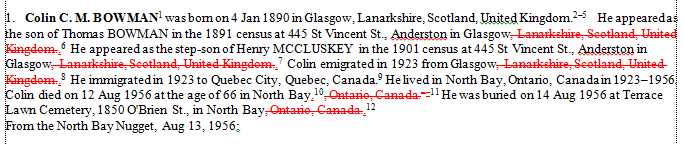 |
| Screenshot from MS Word comparing the revised narrative to the original. |
In the before/after example above, the Birth event was detected as the first use of Glasgow so a custom sentence for the event was generated that was the same as the original default sentence with the full Place. All the subsequent events in Glasgow, including the shared or witnessed census events, used the new default sentences having [Place:first] so “, Lanarkshire, Scotland, United Kingdom” appears deleted (red strikethrough). The one Quebec City event is a first and only so it received a custom sentence with full Place name. Then North Bay appears three times, the first with a full Place custom sentence, the rest using the first place value per the revised default sentence template.
This utility is not the be all and end all for narratives but it should be useful as a quick streamliner and a basis on which further customisation of sentence templates can deliver further improvement. It does not address all the combinations of options that can be added to [Place] because there could be many. SQLite does not have a regular expression search and replace function which would be necessary to deal with them efficiently and comprehensively.
-- Places-FirstNameExploit.sql
/*
2013-03-29 Tom Holden ve3meo
rev 2013-03-30 added [Place:plain] update to [Place:plain:first] for defaults only.
    needs regexp search & replace to deal with all combinations of Place modifiers

Exploits the Place:first option for Place names in narratives by
setting default sentences to Place:first and customising to Place
only for the first event for a person in any place.

This makes the narrative less wordy and repetitious of the higher levels
in a Place name. However, it has no effect on the phrases used in the
Children list at the bottom of a person's narrative which continue
to use the full place name.
*/
-- Set default Fact sentences to use the first Place name.
UPDATE FactTypeTable
SET Sentence = REPLACE(Sentence, '[Place]', '[Place:first]');
UPDATE FactTypeTable
SET Sentence = REPLACE(Sentence, '[Place:plain]', '[Place:plain:first]');

-- set default role sentences to use the first Place name
UPDATE RoleTable
SET Sentence = REPLACE(Sentence, '[Place]', '[Place:first]');
UPDATE RoleTable
SET Sentence = REPLACE(Sentence, '[Place:plain]', '[Place:plain:first]');

-- create table of first event in a place for a person including shared events
DROP TABLE
IF EXISTS xFirstPlaceEvents;

CREATE TEMP TABLE
IF NOT EXISTS xFirstPlaceEvents AS
    SELECT *
    FROM (
        -- INDIV events
        SELECT EventID
            ,0 AS isSharer
            ,PlaceID
            ,OwnerID
            ,SortDate
        FROM EventTable
        WHERE OwnerType = 0
            AND PlaceID > 0

        UNION

        -- Husband events
        SELECT EventID
            ,0 AS isSharer
            ,PlaceID
            ,FatherID AS OwnerID
            ,SortDate
        FROM EventTable
        INNER JOIN FamilyTable ON EventTable.OwnerID = FamilyTable.FamilyID
            AND OwnerType = 1
            AND PlaceID > 0

        UNION

        -- wife events
        SELECT EventID
            ,0 AS isSharer
            ,PlaceID
            ,MotherID AS OwnerID
            ,SortDate
        FROM EventTable
        INNER JOIN FamilyTable ON EventTable.OwnerID = FamilyTable.FamilyID
            AND OwnerType = 1
            AND PlaceID > 0

        UNION

        -- shared events
        SELECT WitnessID
            ,1 AS isSharer
            ,EventTable.PlaceID AS PlaceID
            ,WitnessTable.PersonID AS OwnerID
            ,EventTable.SortDate AS SortDate
        FROM WitnessTable NATURAL
        INNER JOIN EventTable
        WHERE EventTable.PlaceID > 0
        ORDER BY OwnerID
            ,SortDate DESC -- so next GROUP BY will pick up the smallest SortDate or first event in the group
        )
    GROUP BY OwnerID
        ,PlaceID
    ORDER BY EventID; -- so the IN() expression in the following queries will see an ordered list

-- set all first events for a person to use the default sentence customised with the full Place
-- except those already with custom sentences
UPDATE EventTable
SET Sentence = (
        SELECT REPLACE(FactTypeTable.Sentence, '[Place:first]', '[Place]')
        FROM EventTable Events
        INNER JOIN FactTypeTable ON Events.EventType = FactTypeID
        WHERE EventTable.EventID = Events.EventID
        )
WHERE EventID IN (
        -- EventIDs of first events having a PlaceID for all persons
        SELECT EventID
        FROM xFirstPlaceEvents
        WHERE isSharer = 0
        )
    AND EventTable.Sentence LIKE '' --change this to OR with a match to the default
    OR EventTable.Sentence LIKE (
        SELECT REPLACE(FactTypeTable.Sentence, '[Place:first]', '[Place]')
        FROM EventTable Events
        INNER JOIN FactTypeTable ON Events.EventType = FactTypeID
        WHERE EventTable.EventID = Events.EventID
        );

-- set all other custom sentences for first events to use the full name
UPDATE EventTable
SET Sentence = REPLACE(Sentence, '[Place:first]', '[Place]')
WHERE EventID IN (
        -- EventIDs of first events having a PlaceID for all persons
        SELECT EventID
        FROM xFirstPlaceEvents
        WHERE isSharer = 0
        );

-- set all other custom sentences for non-first events to use the first name
UPDATE EventTable
SET Sentence = REPLACE(Sentence, '[Place]', '[Place:first]')
WHERE EventID NOT IN (
        -- EventIDs of first events having a PlaceID for all persons
        SELECT EventID
        FROM xFirstPlaceEvents
        WHERE isSharer = 0
        );

--DO The Same steps for shared events
-- set all first witness for a person to use the default sentence customised with the full Place
-- except those already with custom sentences
UPDATE WitnessTable
SET Sentence = (
        SELECT REPLACE(RoleTable.Sentence, '[Place:first]', '[Place]')
        FROM WitnessTable Witness
        INNER JOIN RoleTable ON Witness.ROLE = RoleTable.RoleID
        WHERE WitnessTable.WitnessID = Witness.WitnessID
        )
WHERE WitnessID IN (
        -- EventIDs of first events having a PlaceID for all persons
        SELECT EventID
        FROM xFirstPlaceEvents
        WHERE isSharer = 1
        )
    AND WitnessTable.Sentence LIKE '' --change this to OR with a match to the default
    OR WitnessTable.Sentence LIKE (
        SELECT REPLACE(RoleTable.Sentence, '[Place:first]', '[Place]')
        FROM WitnessTable Witness
        INNER JOIN RoleTable ON Witness.ROLE = RoleTable.RoleID
        WHERE WitnessTable.WitnessID = Witness.WitnessID
        );

-- set all other custom sentences for first witness events to use the full name
UPDATE WitnessTable
SET Sentence = REPLACE(Sentence, '[Place:first]', '[Place]')
WHERE WitnessID IN (
        -- EventIDs of first events having a PlaceID for all persons
        SELECT EventID
        FROM xFirstPlaceEvents
        WHERE isSharer = 1
        );

-- set all other custom sentences for non-first witness events to use the first name
UPDATE WitnessTable
SET Sentence = REPLACE(Sentence, '[Place]', '[Place:first]')
WHERE WitnessID NOT IN (
        -- EventIDs of first events having a PlaceID for all persons
        SELECT EventID
        FROM xFirstPlaceEvents
        WHERE isSharer = 1
        );
ReportNon_proven #events
List non-proven Facts.
This SQL query will report non-proven facts. This is useful when going though a non-sourced acquired database so you can go though all of the events and find a source for them.
Download: Proven.sql
Discussions & comments from Wikispaces site
Does it depend on LDS support turned on?
06 April 2013 03:05:17
Ran the query but got no results. On closer inspection, I see that there is a JOIN to the LinkTable which is empty in my database. Removing this join does get results.
Is it your intention to restrict the query to only those events that belong to and were imported from a Family Search Family Tree?
I confess to knowing next to nothing about the LDS components of the RootsMagic database.
Tom
P.S. – delighted that you have made a start on contributing to the wiki!
Places – Recombine Fractures from FTM 2012 #ancestrycom #ftm2012 #places
This is a problem with an Ancestry.com tree synchronized with Family Tree Maker 2012 (version 21.0.0.723), and exported therefrom. Places containing a forward slash (“/”) in the name are split on import into FTM into two parts. Everything after the slash goes to the Place name and all before to the Event description. The FTM2012 GEDCOM exports the fracture while the Ancestry.com direct GEDCOM does not. As only FTM2012 can automatically download media and deliver the paths via GEDCOM to RootsMagic, I am forced to use its GEDCOM.
Here’s an example:
| Ancestry.com place: | Toronto (West/Ouest) (City/Cité) Ward/Quartier No 5, Toronto (west/ouest) (city/cité), Ontario, Canada |
| FTM2012 Residence description: | Toronto (West/Ouest) (City/Cité) Ward/Quartier No 5, Toronto (west/ouest) (city |
| FTM2012 place: | Cité), Ontario, Canada |
FTM appears to parse on the last slash, which it drops.
[inline comment: “FTM appears to parse on the last slash, which it drops”
 ve3meo Mar 24, 2013
Belatedly, I worked out a procedure within FTM 2012 to recombine the fractured places. It is a bit tedious but better than editing one fact at a time; doesn’t hold a candle to direct access to the database as we have with RM and a batch process as I did with SQLite. If interested, read http://boards.ancest…/9578.2/mb.ashx. The parsing of the place on the forward slash seems to be a holdover from much earlier versions of FTM and maybe even an old version of GEDCOM which combined a fact place and description on one line, separated by the slash.
]
This may be a problem solely with places originating from Ancestry’s databases for the Censuses of Canada with the complexities of bilingual English/French wording. Healing the fractures seemed a daunting task to do manually through RootsMagic so I worked up a series of SQLite queries that seem to have cured the patient. I’ll go on to merge places and/or split out Place Details within RM.
Places-RecombineFTMfractures.sql
-- Places-RecombineFTMfractures.sql
/*
2012-03-22 Tom Holden ve3meo
Investigation into fractured Place names from FTM2012 where part of the name
is exported in the Event description (Detail) and the balance in the
Place name. Typically, these are places from Ancestry Canada Census
databases with '/' between English/French words, e.g. "west/ouest".

Recombines the fractures and deletes the event description part.

Does not carry Place Details (Site) over to the recombined Place - a revised
version could by replacing the fractured Name in PlaceTable rather than
creating a new recombined Place as this script does. Don't know why I didn't
think of that.

N.B. This is a series of queries intended to be executed one at a time in sequence
although one might go for broke and fire them off as a batch. There would be no chance
to inspect the data.
*/

/*
Find Places with just ')' in name and not the balancing parenthesis, found in the event description,
as in incorrectly exported places from FTM 2012.
*/
SELECT PlaceID
    ,NAME
FROM PlaceTable
WHERE PlaceType = 0
    AND NAME LIKE '%)%'
    AND NAME NOT LIKE '%(%';

/* Make a Table of EventIDs using the split Place names
*/
DROP TABLE

IF EXISTS xEventPlace;
    CREATE TEMP TABLE

IF NOT EXISTS xEventPlace AS
    SELECT EventID
        ,Details
        ,Event.PlaceID AS PlaceID
        ,Place.NAME AS Place
        ,Event.SiteID AS SiteID
        ,Site.NAME AS Site
    FROM PlaceTable Place NATURAL
    INNER JOIN EventTable Event
    LEFT JOIN PlaceTable Site ON (Event.SiteID = Site.PlaceID)
        AND Site.PlaceType = 2
    WHERE Place.PlaceID IN (
            SELECT PlaceID
            FROM PlaceTable
            WHERE PlaceType = 0
                AND NAME LIKE '%)%'
                AND NAME NOT LIKE '%(%'
            )
        AND Event.Details LIKE '%(%';

-- Generate recombined Place names in PlaceTable
INSERT INTO PlaceTable
SELECT DISTINCT NULL AS PlaceID
    ,0 AS PlaceType
    ,Details || '/' || Place AS NAME
    ,'' AS Abbrev
    ,'' AS Normalized
    ,0 AS Latitude
    ,0 AS Longitude
    ,0 AS LatLongExact
    ,0 AS MasterID
    ,'Generated by SQLite query from fractured FTM 2012 export: ' || Details || '/' || Place
FROM xEventPlace;

-- Revise events to point to recombined Places
UPDATE EventTable
SET PlaceID = (
        SELECT PlaceTable.PlaceID
        FROM PlaceTable
            ,xEventPlace
        WHERE PlaceType = 0
            AND PlaceTable.NAME LIKE EventTable.Details || '/' || xEventPlace.Place
            AND EventTable.EventID = xEventPlace.EventID
        )
WHERE EventID IN (
        SELECT EventID
        FROM xEventPlace
        ORDER BY EventID ASC
        );

-- Verify event places
SELECT EventID
    ,xEventPlace.Details
    ,xEventPlace.Place
    ,PlaceTable.NAME
FROM xEventPlace
LEFT JOIN EventTable USING (EventID)
LEFT JOIN PlaceTable ON (EventTable.PlaceID = PlaceTable.PlaceID)

-- Erase event descriptions
UPDATE EventTable
SET Details = ''
WHERE EventID IN (
        SELECT EventID
        FROM xEventPlace
        ORDER BY EventID ASC
        );
    -- All done
Inline comments
Phantom Spouses – Unnamed and childless #family #phantom
Tree imported from Ancestry.com via Family Tree Maker 2012 has phantom spouses. “Phantom” in this case defined as being unnamed, not existing in the PersonTable (i.e. PersonID=0) and childless. Yet they count in RootsMagic Find “Number of spouses” criterion and may cause other unwanted behaviour.
To find persons having such a phantom spouse:
SELECT FamilyID, FatherID, MotherID
FROM FamilyTable
WHERE FamilyID IN
(
SELECT FamilyID
FROM FamilyTable
WHERE FatherID=0 OR MotherID=0
EXCEPT
SELECT FamilyID FROM ChildTable
)
;
Use the FatherID or MotherID to look up in RM the person with that record number. You can then unlink the spouse one at a time.
To delete all such phantom spouses in one shot (actually deletes the family which is tantamount to the same thing as unlinking the spouse):
DELETE FROM FamilyTable
WHERE FamilyID IN
(
SELECT FamilyID
FROM FamilyTable
WHERE FatherID=0 OR MotherID=0
EXCEPT
SELECT FamilyID FROM ChildTable
)
;
Events – Merge #events #merge
Intro
John_James posted these requests for help in a post to the Home page:
- What I would like to do now is clean some data where indi’s have a death event and the gedcom contributor has used a custom “Cause of Death” event so in other words “Details” from “EventType 1021″ into “EventType 2″ where OwnerID is the same.
- The other thing I could achieve myself at present would be to change all EventType 1021 to EventType 2 but then I would have duplicate events to deal with and that is another query I would find most useful in the future.
Let’s see what we might do.
Copy Description from Cause of Death Event to Death Event Description
The Descriptions are contained in the Details column of EventTable, a TEXT type. We know the EventTable.EventType is 2 and 1021, respectively, for Death and Cause of Death (the second a custom FactType whose ID number may vary with subsequent or other imports. The only Death events we wish to modify are those for which there is a corresponding Casue of Death event, i.e., for a common person, designated by the common OwnerID. Because both Death and Cause of Death are solely individual FactTypes, not Family or other, we can safely ignore OwnerType. It’s possible there might be more than one Death event and/or Cause of Death event for a person but we will assume that is not the case. Let’s see how many pairs of the two events we have. Here is where the JOIN command is necessary.
List of Death events with corresponding Cause of Death events
Explicit JOIN
-- List of Death events with corresponding Cause of Death events
SELECT Death.OwnerID AS [RIN Death]
 ,Cause.OwnerID AS [RIN Cause]
 ,Death.DATE AS [DATE Death]
 ,Cause.DATE AS [DATE Cause]
 ,Death.Details AS [Details Death]
 ,Cause.Details AS [Details Cause]
FROM EventTable AS Death
INNER JOIN EventTable AS Cause USING (OwnerID)
WHERE Death.EventType = 2
 AND Cause.EventType = 1021
;
EventTable is given two aliases so that it can be JOINed to itself, each alias acting as an independent table with the exact same contents. The INNER JOIN of the two tables constrains the result set to only those records from the first table for which the criteria match with the second table. A LEFT JOIN would include all records from the first table.
Implicit JOIN using WHERE
Instead of the explicit JOIN command, we could have written this with an implicit JOIN as:
...
FROM EventTable AS Death
 ,EventTable AS Cause
WHERE Death.EventType = 2
 AND Cause.EventType = 1021
 AND Death.OwnerID = Cause.OwnerID
;
It would perform just as well either way.
Inspect the results
Now we can inspect the result set to see if we have any issues to be concerned about, primarily, more than one Death or Cause of Death event per person. This can be done by browsing the results but this could be tiring if the set is very large. A query of the query could be faster and make it more obvious:
SELECT COUNT()
 ,*
FROM (
 -- List of Death events with corresponding Cause of Death events
 SELECT Death.OwnerID AS [RIN Death]
 ,Cause.OwnerID AS [RIN Cause]
 ,Death.DATE AS [DATE Death]
 ,Cause.DATE AS [DATE Cause]
 ,Death.Details AS [Details Death]
 ,Cause.Details AS [Details Cause]
 FROM EventTable AS Death
 INNER JOIN EventTable AS Cause USING (OwnerID)
 WHERE Death.EventType = 2
 AND Cause.EventType = 1021
 )
GROUP BY [RIN Death]
 ,[RIN Cause]
ORDER BY COUNT() DESC
;
COUNTing, GROUPing and green light
If the COUNT() column is all 1’s (and any values > 1 will be at the top of the list), we’re good to go! The original query is wrapped inside an outer query which asks for all the columns of the inner query (the * does that) plus a count of all the records in the result set having each unique combination of the RIN for Death event and the RIN for the Cause event, the GROUP BY clause. This grouping could be simplified to count just one of the columns since the two are forced to be identical by the JOIN criterion USING (OwnerID) but I thought it would be instructive to show that multiple columns can be used to define the grouping. To put the largest counts at the beginning of the list, the query is sorted on the COUNT() column in descending order.
Construct for new Death Description
Supposing that there is but one Death fact with but one Cause fact for each person, we can then proceed to copy the value from Cause Description to the Death Description. We will want a space character between the original Death description and the appended Cause description. If the Cause Description is empty, there is no point in appending anything. If the original Death description is empty, there is no need for the space character.
Eliminate empty Cause Descriptions
We can eliminate any empty Cause descriptions by extending the constraints in the above query to include “AND Cause.Details NOT LIKE ””. To get a list of the EventIDs for Death events with mating non-empty Cause descriptions, the first query is revised thusly:
-- List of Death events having non-empty Cause of Death event Descriptions
SELECT Death.EventID
FROM EventTable AS Death
INNER JOIN EventTable AS Cause USING (OwnerID)
WHERE Death.EventType = 2
    AND Cause.EventType = 1021
    AND Cause.Details NOT LIKE '';
Cause of Death event Description for any given Death event
The Cause of Death description for any particular Death event can be found:
-- Cause of Death description for a given Death event
SELECT Cause.Details
FROM EventTable AS Cause
WHERE Cause.OwnerID = 567 --(an example of the Death event's OwnerID)
    AND Cause.EventType = 1021;
Test new Death event Description
Put together the Death Description and the Cause of Death Description with a space character between and let’s see what we get. LTRIM will clear out the space character if the Death Details field is empty. The double bars || are SQLite’s concatenate operator. Single quotes surround text so ‘ ‘ is one space character.
-- Test new Death description
SELECT Death.OwnerID AS RIN
    ,LTRIM(Death.Details || ' ' || Cause.Details) AS "New Death Description"
FROM EventTable AS Death
    ,EventTable AS Cause
WHERE Death.EventType = 2
    AND Cause.EventType = 1021
    AND Death.OwnerID = Cause.OwnerID
    AND Cause.Details NOT LIKE '';
Look up some of the persons by RIN in RootsMagic to review how the existing Death fact Description compares with the new one that will replace it.
UPDATE EventTable with new Death event Descriptions
Now let’s revise the Death descriptions (make a backup of your database first!). We have to tinker with our queries to fit within the rules of the UPDATE command:
UPDATE EventTable
SET Details = LTRIM(Details || ' ' || (
            -- Cause of Death description for a given Death event
            SELECT Cause.Details
            FROM EventTable AS Cause
            WHERE Cause.OwnerID = EventTable.OwnerID --(the OwnerID in the record being updated)
                AND Cause.EventType = 1021
            ))
WHERE EventID IN (
        -- List of Death events with corresponding Cause of Death events
        SELECT Death.EventID
        FROM EventTable AS Death
        INNER JOIN EventTable AS Cause USING (OwnerID)
        WHERE Death.EventType = 2
            AND Cause.EventType = 1021
            AND Cause.Details NOT LIKE ''
        );
The OwnerID from EventTable for the record being updated is passed to the query that returns the Cause description from the record with a matching OwnerID. Only those records in EventTable whose EventID is in the list of Death EventIDs that have related non-empty Cause of Death descriptions are updated.
Merging Events
The first half of this page addressed simply the appending of the Description (Details field) from one type of event to another. If that is all that is wanted from the one type of event, then it is a simple matter to delete all the records for that type of event. However, what if there are other elements of that event that we would like to bring over to the target event, e.g., Notes, Sources, Images? To do so involves a much more comprehensive and complicated procedure if they are not to be lost when the secondary event is deleted.
John is quite right that simply changing the event type from Cause of Death to Death could result in another problem to be addressed – now there will be two Death events where there was one before. They are more likely not complete duplicates, differing in some minor or major way, and that will make more difficult the identification of the pairs of events to be merged. Accurate and reliable pairing is fundamental to a successful automatic merging process. A general solution may require a procedure akin to RootsMagic’s Duplicate Search Merge for People, i.e., a weighted scoring for similarities between events, manual selection of the primary, and manual initiation of the merge, one pair at a time.
Let’s set that aside for John’s case where we have but one Death event with but one Cause of Death event per person. We have demonstrated above that they can be readily paired.
What do we need to do with the data from the secondary event?
- Date – discard in favour of Primary’s
- Place – discard
- Place details – discard?
- Description – append as above
- Proof – discard or take the lower of the two
- Primary – set flag
- Sort Date – discard
- Private – discard? note that merging Death and Cause of Death forces them to share one privacy setting
- Note – append as we did for Description
- Sources – add to Primary (which opens up a whole additional investigation into merging sources!)
- Images – add to Primary if not duplicate (easier to do than Sources I think)
- Shares – add to Primary
Just a bit mind-boggling…
—–more to come—–
Discussions & comments from Wikispaces site
Does not work anymore
23 November 2014 00:08:15
This does not work anymore. Was it for a older version of RootsMagic.
John_James
Reassigning Master Place to place details
20 February 2018 00:33:57
Rootsmagic has a way to split out place details but no way to correct a place details being attached to the wrong parent. I have been changing the Master ID in the Place Table to reflect the correct parent using F2 in Sqlitespy and entering the correct MasterID. This should just change the Place or even give me a duplicate place detail to deal with but even after running all the database tools in RM the changes are not reflected. I am sure I have done this before and have the RMNOCASE in place, when I check the table again the changes are fixed, what on earth am I doing wrong?
John_James
John_James
20 February 2018 19:43:16
20 February 2018 19:43:16
I found out where I was going wrong and now working to recover things
Place Names – parse and recombine #places #instr
Raison d’etre
This page responds to a request from vyger seeking a way to parse the Standardized Place name using SQLite akin to what might be done in Visual Basic with the InStr function:
...
With the RM geocoded table the Normalized is generally a 4 component field delimited by commas,
what I would like is set the Name to the substring left of the third comma and the Abbrev to
the substring left of the second comma...
SQLite now has the INSTR function!
As of SQLite 3.7.15 dated 2012-12-12, the INSTR(X,Y) function was finally included. Until that time, I do not think it would have been possible to parse a comma delimited string in SQLite without using a higher level language, either to extend SQLite or to use SQLite as a data source. Now it has become feasible with those SQLite managers that have incorporated SQLite 3.7.15 or later. Unfortunately, as of this writing, SQLiteSpy has not been updated since 2011 and thus does not support the INSTR function; a new version that will has been promised but no timeline given. To carry out the development of a suitable query, I was fortunate to find that SharpPlus SQLite Developer has undergone recent revision and therefore does support it. So does SQLite Expert but only the paid version of SQLite Developer and SQLite Expert support the fake RMNOCASE collation needed to modify the Place Name. I’m hopeful that a future version of RMtrix will incorporate the SQLite INSTR function and these queries.
Sample results of parsed Place names
 |
| Screenshot of results from PlaceParse.sql as displayed by SQLite Developer |
The results above show some of the contents of a temporary table xPlacePartsTable containing the PlaceID and Normalized columns from RM’s PlaceTable, the comma placements within the values of Normalized and the parsing of Normalized into four parts. Because it is directly and uniquely related to PlaceTable via PlaceID, it is easy to assemble the Standardized Name parts and update the working Name and Abbrev accordingly.
Where are the commas? query
PlaceCommaParse.sql This query creates an initial temporary table xPlaceCommaTable with the columns from PlaceID to Comma3:
-- PlaceCommaParse.sql
/*
2013-02-17 Tom Holden ve3meo
Creates a temporary table of non-empty Standardized Place names with the
positions of up to three commas in the string. Can be used to parse out
the 4 parts of the name for further use such as the generation of a 2-part
Abbreviation and 3-part Name for reports.
*/
DROP TABLE IF EXISTS xPlaceCommaTable;

CREATE TEMP TABLE xPlaceCommaTable AS
SELECT PlaceID
    ,Normalized
    ,Comma1
    ,Comma2
    ,Comma2 + INSTR(SUBSTR(Normalized, Comma2 + 1), ',') AS Comma3
FROM (
    SELECT PlaceID
        ,Normalized
        ,Comma1
        ,Comma1 + INSTR(SUBSTR(Normalized, Comma1 + 1), ',') AS Comma2
    FROM (
        SELECT PlaceID
            ,Normalized
            ,INSTR(Normalized, ',') AS Comma1
        FROM PlaceTable
        WHERE PlaceType = 0
            AND Normalized NOT LIKE ''
        )
    );
Parse the Standardized Place names query
PlaceParse.sql This query uses the initial temporary table to build an extended table with all the columns from the first plus the parsed parts of the Standardized Name as shown in the figure above:
-- PlaceParse.sql
/*
   2013-02-17 Tom Holden ve3meo

   Requires existence of table created by PlaceCommaParse.sql.
   Extracts the parts of a 4-part Standardized Place name and saves them
   to a temporary table
   */
DROP TABLE IF EXISTS xPlacePartsTable;

CREATE TEMP TABLE xPlacePartsTable AS
SELECT *
    ,CASE
        WHEN Comma1 > 0
            THEN SUBSTR(Normalized, 1, Comma1 - 1)
        ELSE Normalized
        END AS Place1
    ,CASE
        WHEN Comma2 > Comma1
            THEN SUBSTR(Normalized, Comma1 + 1, Comma2 - Comma1 - 1)
        WHEN Comma1 > 0
            THEN SUBSTR(Normalized, Comma1 + 1)
        ELSE ''
        END AS Place2
    ,CASE
        WHEN Comma3 > Comma2
            THEN SUBSTR(Normalized, Comma2 + 1, Comma3 - Comma2 - 1)
        WHEN Comma2 > Comma1
            THEN SUBSTR(Normalized, Comma2 + 1)
        ELSE ''
        END AS Place3
    ,CASE
        WHEN Comma3 > Comma2
            THEN SUBSTR(Normalized, Comma3 + 1)
        ELSE ''
        END AS Place4
FROM xPlaceCommaTable;
Update Place Abbreviations with two parts of the Standardized Place name
PlaceAbbrevUpdate.sql This query writes up to the first two parts of the Standardized Name to the Abbrev column of PlaceTable:
-- PlaceAbbrevUpdate.sql
/*
2013-02-17 Tom Holden ve3meo
Combines up to the first two parts of the Standardized Place name
(the Normalized column) and places the concatenated result in the
Abbrev column of PlaceTable for Places having non-empty Normalized
fields.

Requires temp xPlacePartsTable generated by PlaceParse.sql or equiv.
*/
UPDATE PlaceTable
SET Abbrev = (
        SELECT CASE
                WHEN Comma1 > 0
                    THEN Place1 || ', ' || Place2
                ELSE Place1
                END AS Abbrev
        FROM xPlacePartsTable
        WHERE PlaceTable.PlaceID = xPlacePartsTable.PlaceID
        )
WHERE PlaceID IN (
        SELECT PlaceID
        FROM xPlacePartsTable
        );
Update the working Place name with three parts
A similar query can set the working Place Name to up to the first three parts of the Standardized name:
PlaceNameUpdate.sql
-- PlaceNameUpdate.sql
/*
2013-02-17 Tom Holden ve3meo
Combines up to the first three parts of the Standardized Place name
(the Normalized column) and places the concatenated result in the
Name column of PlaceTable for Places having non-empty Normalized
fields.

Requires temp xPlacePartsTable generated by PlaceParse.sql or equiv.
AND (fake) RMNOCASE collation.
*/
UPDATE PlaceTable
SET Name = (
        SELECT CASE
                WHEN Comma2 > Comma1
                    THEN Place1 || ', ' || Place2 || ', ' || Place3
                WHEN Comma1 > 0
                    THEN Place1 || ', ' || Place2
                ELSE Place1
                END AS Name
        FROM xPlacePartsTable
        WHERE PlaceTable.PlaceID = xPlacePartsTable.PlaceID
        )
WHERE PlaceID IN (
        SELECT PlaceID
        FROM xPlacePartsTable
        );
Further ideas
With these queries as examples, others can be readily developed.
- Some may prefer just the first part of the Standardized Place name for the Place Abbreviation, i.e., typically the municipality’s name alone.
- Those whose Standardized Names are more typically only 3 levels (e.g., Canadian places when geo-coded have only municipality, province, country) may prefer just two parts for the working Place Name (municipality, province).
- Perhaps revise the UPDATE query so that the working Place Name receives 2 parts of a 3-level Place and 3 parts of a 4-level place.
- The temporary table, xPlacePartsTable, when viewed is itself useful for inspecting Standardized Place names for incomplete names. Depending on the SQLite manager, it can be sorted and filtered for special views.
- xPlacePartsTable itself can be edited. Thus Placen values can be changed in it and UPDATEs run to propagate changes to the RM database. Note that TEMP tables are lost when the SQLite manager that created them closes its connection to the database nor are they available to another SQLite manager open at the same time.
Discussions & comments from Wikispaces site
Date Formats #datadefinitions #date #sortdate
Storage formats
Within the RootsMagic 4 database, several date-related fields exist. These fields can be grouped into into four different storage types:
FLOAT, with the integer part representing number of days since 1899 Dec 31 and fractional part representing time of day
EventTable – EditDate
LinkTable – extDate (presumably)
NameTable – EditDate (presumably)
PersonTable – EditDate (actually effectively INTEGER stored as FLOAT, meaning representing number of days since 1899 Dec 31)
INTEGER, 64-bit position-coded starting 10000BC
EventTable – SortDate see Dates – SortDate Algorithm
MediaLinkTable – SortDate
NameTable – SortDate
ResearchTable – SortDate1
ResearchTable – SortDate2
ResearchTable – SortDate3
INTEGER, representing calendar year (yyyy)
NameTable – BirthYear
NameTable – DeathYear
TEXT, represented by format explained in the Date sheet within RootsMagic4DataDefs.ods
EventTable – Date
MediaLinkTable – Date
NameTable – Date
ResearchTable – Date1
ResearchTable – Date2
ResearchTable – Date3
Discussions & comments from Wikispaces site
What triggers EditDate in NameTable?
23 January 2010 14:55:51
All mine are 0, even after editing a name.
romermb
romermb
23 January 2010 17:48:20
23 January 2010 17:48:20
Tom, my notes for that table seem to indicate that I didn’t think that field was yet being used. Perhaps it’s intended for something going forward.
My other thought was that it might’ve originally been intended for use with Alternate Name facts only (as EditDate is used for other events in EventTable), but somehow was overlooked.
ve3meo
Decoding EventTable EditDate
23 January 2010 19:24:07
This appears to work, at least for EST. There might have to be other fractional fiddles for other time zones and DST.
SELECT
EditDate,
DATE(substr(EditDate,1,5)+2415018.5) AS Date,
time(+substr(EditDate,6)-0.5) AS Time,
datetime(EditDate + 2415018.5) AS 'Date/Time'
FROM eventtable ;
romermb
romermb
23 January 2010 19:50:18
23 January 2010 19:50:18
When playing around with the math last night, I’d come up with:
SELECT EditDate,
DATE(EventTable.EditDate + 2415018.5),
TIME(EventTable.EditDate + 2415018.5),
DATETIME(EventTable.EditDate + 2415018.5)
FROM EventTable
;
The 2415018.5 value is the number of days from time 0 (1 Jan 4713BC 12:00PM) in the Julian calendar to just before the EditDate value picks up.
thejerrybryan
MS Access and SQLite Functions for base 1899 dates
01 July 2011 15:24:09
MS Access has built-in functions that will handle the “base 30 Dec 1899” numeric dates such as PersonTable.EditDate. Namely, Year(PersonTable.EditDate), Month(PersonTable.EditDate), and Day(PersonTable.EditDate) “just work”. All the functions return a numeric value with the Year being the year, Month being 1 through 12, and Day being 1 through 31.
I can’t find equivalent functions on the SQLite side of the house for dealing with “base 30 Dec 1899” numeric dates. Does anybody have code for these dates that will work with SQLite?
Thanks,
Jerry
ve3meo
ve3meo
02 July 2011 04:01:33
02 July 2011 04:01:33
From a prior discussion on this page, this might be helpful:
SELECT DateTime(2415018.5 + UTCModDate),
strftime('%m', 2415018.5 + UTCModDate) as MonthNum,
substr('UnkJanFebMarAprMayJunJulAugSepOctNovDec', 3*strftime('%m', 2415018.5 + UTCModDate)+1,3) AS Month,
CASE strftime('%m', 2415018.5 + UTCModDate)
WHEN '01' THEN 'Jan'
WHEN '02' THEN 'Feb'
WHEN '03' THEN 'Mar'
WHEN '04' THEN 'Apr'
WHEN '05' THEN 'May'
WHEN '06' THEN 'Jun'
WHEN '07' THEN 'Jul'
WHEN '08' THEN 'Aug'
WHEN '09' THEN 'Sep'
WHEN '10' THEN 'Oct'
WHEN '11' THEN 'Nov'
WHEN '12' THEN 'Dec'
ELSE 'Unk'
END
AS MonthText
FROM PersonTable;
SQLite Date & Time functions are described at https://www.sqlite.org/lang_datefunc.html
Tom
Date Last Edited – UTCModDate #date #datadefinitions
RM8 replaced Edit Date with UTCModDate
Previous versions had an EditDate column in a few tables. In #RM8, these have been replaced by UTCModDate which is present in most tables and appears to serve the same functions, one of which is to populate the “Date Edited” field in the People List view. The “Date Edited” field is derived from PersonTable.UTCModDate which is updated when a record related to that person in the EventTable or NameTable is added, deleted or changed.
Another change is that the value stored is no longer modified to ‘local time’ but is Universal Coordinated Time (UTC). In both cases, the value stored is the fractional number of days since noon of 30 December 1899.
Decoding UTCModDate
The following is an example query of the EventTable.UTCModDate:
SELECT UTCModDate,
DATE(UTCModDate + 2415018.5) AS Date,
TIME(UTCModDate + 2415018.5) AS Time,
DATETIME(UTCModDate + 2415018.5) AS DateTime
FROM EventTable
;
UTCModDate        Date        Time      DateTime
44578.8881889815  2022-01-17  21:18:59  2022-01-17 21:18:59
44565.8002626505  2022-01-04  19:12:22  2022-01-04 19:12:22
Encoding UTCModDate
SELECT julianday('now') - 2415018.5 AS UTCModDate;
RM7
Decode the Last Edited Date for Persons
Although the data definition for EditDate in the PersonTable has been divined for almost as long as this wiki has existed, it seems that no one has published a SQLite query that incorporates it. Here is one that provides the algorithm using SQLite expressions described at http://www.sqlite.org/lang_datefunc.html.
SELECT PersonID
    ,EditDate
    ,DATE (EditDate + Julianday('1899-12-30')) AS "Last Edited"
FROM PersonTable;
Decode the Last Edited DateTime for Events
The EventTable uses the same representation but at higher precision, incorporating time, the value to the right of the decimal. With slight modification, the SQLite query for the date and time of the EventTable EditDate becomes:
SELECT EventID
    ,EditDate
    ,DATETIME (EditDate + Julianday('1899-12-30')) AS "Last Edited"
FROM EventTable;
The NameTable also is set up with EditDate but all values are 0.0 as of RM 6.0.0.4.
The queries might benefit speed-wise by replacing Julianday(‘1899-12-30’) with 2415018.5.
Encoding System DateTime To Update EditDate
For updating or inserting records in these tables with timestamps from the operating system, the following queries provide the appropriate timevalues:
-- for PersonTable
SELECT JULIANDAY('now', 'localtime', 'start of day') - 2415018.5 AS EditDate;

-- for EventTable
SELECT JULIANDAY('now', 'localtime') - 2415018.5 AS EditDate;
ve3meo
23 November 2014 02:12:40
The queries on this page were developed on a RootsMagic 6 database. Can you be more specific about which one(s) do not work? Have you edited the queries with the EventType (FactTypeID) of the Cause of Death fact type in your database in place of the 1021 in the examples?