MS Access Engine #msaccess #msexcel #crystalreports #odbc

I wanted to be able to create my own reports from the RM database and the custom report facility in RM has a number of shortcomings:

  • it is not very sophisticated and even quite apparenly simple reports are impossible to achieve (eg show me which census records are missing for an individual)
  • I am not familiar with the tool – but I am more familiar with other tools such as Crystal Reports, Excel and Access and the facilities they give (including a range of superior default report layouts)
  • There is an issue that any custom reports may get lost when transferring data from one RM database to another through a GED interface.

In addition, although I am familiar with SQL as a concept I have not used it beyond the basic level and therefore the manual construction of INNER, OUTER, UPPER and LOWER joins as well as UNIONS and DIVORCES meant that the use of the various SQL Lite managers was not that helpful. The facilities for automatically linking Tables within Crystal or Access allow users at my level to make the necessary Table Links without having to understand too much of the syntax or how it is achieved.

I quickly discovered that although there is a readily available ODBC driver available it could not be used directly within Crystal Reports (throwing up error internal error messages). Although it did work when using it within VB or Visual Studio. Unfortunatley the latter options then meant the manual coding of the SQL syntax.

After much experimentation and thought i realised that MS Access could be used to link to the RM database using the OBDC driver. This provides a number of benefits to those who may want to have more access to the internals of the RM database:

  • many users will have MS Office installed including those with the Access option
  • MS Access provides simplified, visual Table linking options and removes much of the need to know SQL syntax
  • the MS Access tables are readily understood by most programmes that read databases (unlike SQL Lite). So once you have linked to the RM Database via Access you can get to the data from many, many other programmes; eg EXCEL, WORD and so on. This opens a lot of opportunities to Users who have a modest amount of IT literacy without being full-blown experienced programmers

There a a few quirks to oversome however. Nonetheless, it will take no more than 10 minutes to create a working Access link to the live RM data and a futher 20-30 minutes will both iron out odd quirks to allow flexible access, selection and formatting of reports from your live RM data. This is ‘one-time’ effort – once it is done then new reports can be created or existing reports amended very easily – using the tools you are familiar with.
.
How To Do It.

PLEASE NOTE: I am using MS Access V7. If you have earlier versions there is no specific reason this will not work but some of the dialogs within MS Access have changed and you wil have to select the appropriate options accordingly.

PLEASE NOTE. I have used this on two computers; one running Microsoft Vista and the other Windows 7.

PART ONE – Installing the ODBC Driver.

The ODBC driver for SQL Lite is available free from here.

There are a number of versions of the driver available but unless you are running some old software you would usually select the latest version at the top (this is the version I used).

Download and install the driver. (This was entirely trouble free for me – but if you have any problems you may want to check you are logged on with Administrator priviledges).

PART TWO – Creating the Access Database and Linking to RM

Launch MS Access. Select the option to create a new database and name it and save it.

Select the “External Data” tab at the top and click on the “more” option. You will be given a list of options. Select the top one “ODBC Database”.

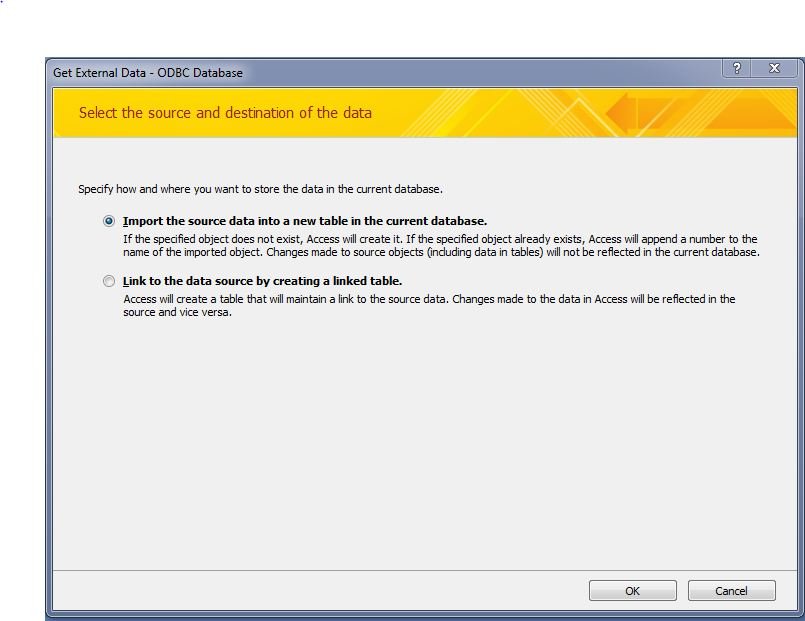
You will be presented with a screen asking if you want to Import the Data or Link to the data
Capture1.JPG

If you choose to IMPORT the data you will, when the process is complete, just have a copy of your data in the Access database. This will not be automatically updated when you change your live data. It is unlikely you will want to use this option unless you intend to manipulate and update the data.in a safe environment.

If you select the ‘LINK to Data source by creating a Linked Table’ option then no data will be put in the Access database and program will always go to your live database to get the information you want. This is the option to select if you want to be able to most easily report on the live data in your RM database. After you have selected this option click the OK button.

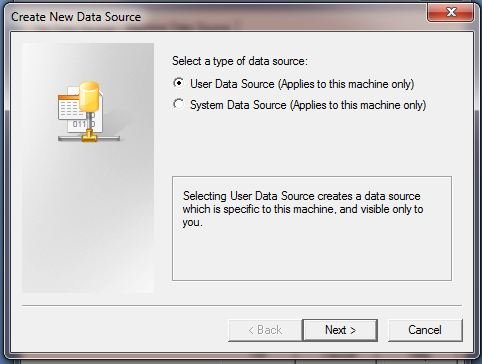
You will then be presented with a “Create New Data Source” dialog; select the appropriate option and click OK.
Capture3.JPG

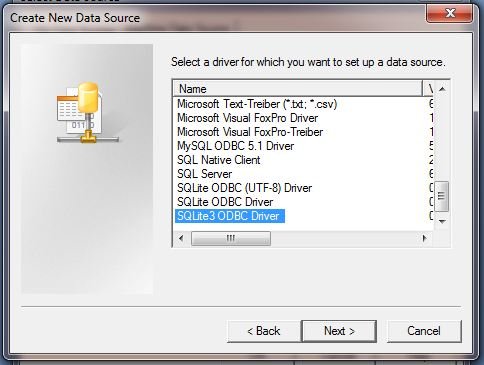
You will then be presented with a further “Create New Data Source” dialog; scroll down and select the ‘SQLite3 ODBC Driver’ and click OK.
Capture4.JPG

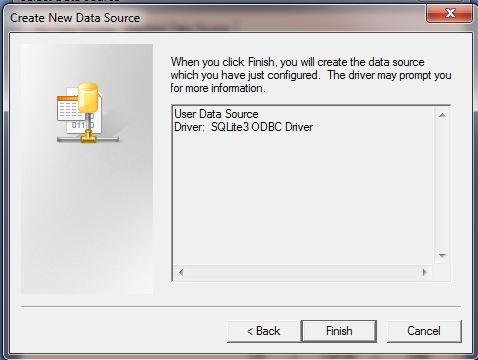
You will then be presented with a further dialog – just click the Finish button.
Capture5.JPG

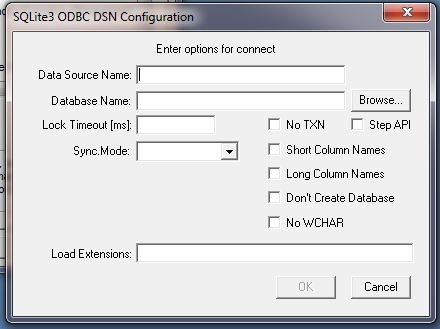
You will then be presented with a ‘SQLite3 ODBC DSN Configuration’ dialog. Enter into the Data Source Name field a user friendly name that you want to remember the database by; eg ‘Live RM Data’.
Capture6.JPG

Then use the Browse button to go and select your live (or test) RM database that you actually want to link to.

Ignore all the other fields and press the OK button.

You will then be returned to you previous ODBC dialogs which you can now close with the OK buttons.

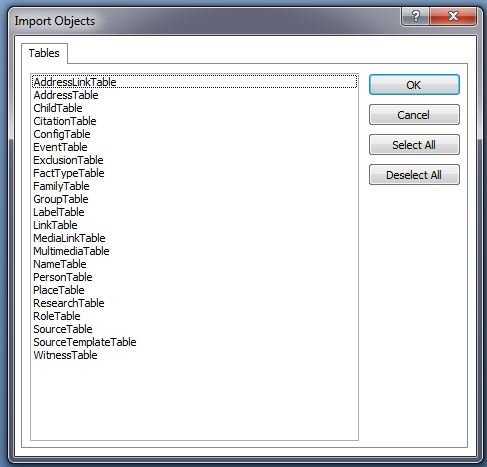
Finally you will return to MS Access where you will see the ‘Import Objects’ dialog of all the tables available in your RM database. At this point is best to ‘Select All’ the tables and press the OK button.Capture7.JPG
You can now save your Access database.

The good news is that you only have to do all of the above ONCE. You now have access to all your RM tables via the Access database and you will see that you can open them and browse them in the normal way from within Access.

BEWARE – as well as browsing you will be able to overtype the data in the database. Do not do this unless you know what you are doing and understand the consequences of altering the data.

Next: MS Access Engine – Event Query


Discussions & comments from Wikispaces site


ve3meo

RMNOCASE Collation Issues?

ve3meo
11 February 2010 03:35:12

MarkVS, I tried the same sqlite3 ODBC driver (actually one prior to Jan 12) with OpenOffice Base but ran into the problem with the missing RMNOCASE collation. I’m very interested in seeing how you overcame that with MS Access.

Tom


MarkVS

MarkVS
11 February 2010 15:22:23

Tom,

I am not certain what is meant by the RMNOCASE feture. A specific problem I encountered is that when you view the native tables in Access only certain fields can be sorted and selected on (in fact most cant). This was a big problem and I coded a simple workround for all these fields whcih now means they can be sorted and searched/filtered on within Access (or, indeed, a program such as Crystal Reports using the Access engine as a pass through to the RM SQLite database).

Would this inability to sort on a lot of the fields be a symptom of the RMNOCASE feature? regards, Mark.


romermb

SQL Server, Etc.

romermb
17 February 2010 07:40:12

I no longer have access to SQL Server, but it would be a terrific tool to be able to use due to its capabilities above and beyond those of Access, which are still quite good. The ODBC process described here would likely work with SQL Server and many of the other database packages, as well.


weaberj

Modify a Shared Events Query

weaberj
06 March 2010 00:25:36

Since moving from RM3 to RM4 I have cleaned up my place list and am slowly working on source citations. One project I have yet to start is that of sharing events, especially census facts. The reason I haven’t started is the lack of a shared facts report. I have a basic knowledge of SQL and have made several unsuccessful attempts to construct a query that will give me the records I want. I am using SQLite Manager, which is an add-on for Firefox.
The query I am looking for is one that will return one record for each shared event. This record would include the fact name, fact date (to distinguish multiple events for the same people), the principal surname, given, the witness (sharee?) surname, given and the role. RIN numbers would be an added bonus. That would be enough to allow me to check my data entry as I progress. I currently have individual census facts for many persons in my database and I am reluctant to replace the individual fact with a shared fact until I can see a report.
I can write two queries that will give me all the info I want, one for the principal and one for the witness but I can’t combine the two to give me the data in one result set.
I have run several of the excellent queries listed in this Wiki. The “People Who Share a Fact with a Principal, But Who Are Not in a Tree in the File” query returns what I want except that I obviously want people who are in my tree. I have not been able to modify this query to get the records I want. The “AllFacts4Persons” query has almost everything I need except when a principal shares multiple census facts with the same witness only one record is returned with a count of the multiple facts, not each individual instance.
This seems like a query that would be useful for many people and one, I hope, that will eventually show up in an update, but there is no guarantee it will include everything I want to show.
If I had the basic query I could create a report in Excel or Access. If anyone can tell me how to modify one of the existing queries I would be most appreciative.
John Weaber
Wayne, PA


ve3meo

ve3meo
06 March 2010 02:35:01

Try revising AllFacts4Person by removing the GROUP BY 1,2,3…. clauses. That might give you what you want. However, I have not revisited the query closely enough to be sure that it will return multiple sharers or why it would not unmodified. I’m not even sure what you mean by sharing multiple census facts with the same witness. Do you mean, for example,:
– a husband and wife in the same census household for multiple censuses?
– with one Census fact added to the husband for each census year?
– with each Census fact shared with the wife?

Tom


thejerrybryan

Creating DSN’s, 64 bit Windows 7

thejerrybryan
24 June 2011 00:46:02

I’ve had considerable success playing around with SQLite, both directly using SQLiteSpy and more indirectly using OBDC and Microsoft Access. But one of the most frustrating aspect of using OBDC and Access has simply been creating the required DSN’s. The directions posted both here and at other places on the Internet don’t quite work on my machine running 64 bit Windows. And the biggest problem has simply been to try get the OBDC Administrator of Windows to run.

On my machine, the OBDC Administrator does not appear anywhere in my Control Panel, which apparently is where it “should” appear. The only place I’ve been able to get to it is from the External Data tab of Access 2007, but that approach is sub-optimal in a number of ways.

However, I have now discovered that the OBDC Administrator is called odbcad32.exe. There are four copies of odbcad32.exe on my machine. Two of the copies make no sense to me. Of the other two, one is stored as C:WindowsSystem32odbcad32.exe and the other is stored as C:WindowsSysWOW64odbcad32.exe. On my machine, the one stored as C:WindowsSystem32odbcad32.exe doesn’t work, and the one stored as C:WindowsSysWOW64odbcad32.exe does. That’s probably because I’m running 64 bit Windows rather than 32 bit Windows.

To make the program easier to invoke, I did a “Pin to Start Menu” for C:WindowsSysWOW64odbcad32.exe. Windows/XP does not include the “Pin to” facility, although the same thing can be accomplished in other ways. I went to great pains to skip Windows/Vista, so I don’t know how the same thing is accomplished on Vista. If you are running Windows 7, you probably already know about “Pin to” and you probably use it a lot.

In any case, the difficulty I was having in getting to the Windows OBDC Administrator was not a show stopper, but it sure was frustrating. I am now a much happier camper in my use of OBDC.

Jerry


thejerrybryan

Nested Joins and Compatible SQL between Access and SQLite

thejerrybryan
27 June 2011 19:55:33

I have developed a number of “quick and dirty” queries, both in the MS Access environment and in the environment of an SQLite manager. If/when I get one of these queries in good enough shape for public consumption, I have an informal goal of posting both an MS Access version and a version for the SQLite manager environment.

I don’t really want to write each query twice. I hope to write each query once for one environment, and then to make only whatever minimal changes are required to make the query compatible with the other environment.

There are a number of challenges to achieving a such a goal, but I think I have run into a challenge I didn’t really expect – namely the processing of nested OUTER JOIN’s.

INNER JOIN’s are associative with respect to their results, although they may not be associative with respect to their performance. OUTER JOIN’s are not associative with respect to their results, and parentheses must be used to specify the order in which the JOIN’s are to be applied. However, MS Access seems not to honor the parentheses, even though the SQL generated by MS access by its point-and-click interface does include parentheses which seem to be ignored by MS ACCESS itself. So I’m not sure why the parentheses are even there when MS Access generates the SQL for you.

In any case, when I try to use parentheses for multiple OUTER JOIN’s in MS ACCESS, and if MS ACCESS thinks there is anbiguity (even though I have removed the ambiguity with the parentheses), I get an error message and cannot proceed. The error message recommends creating smaller queries with fewer JOIN’s, and then to compose larger queries out of the smaller queries rather than composing larger queries directly from tables.

This technique does work, but it seems to render my queries not portable into the SQLite manager environment. Which is to say, it seems to me that MS Access is blurring the distinction between queries and views, and what Access is calling queries are really being stored as views. So my “larger queries” are really being composed from “smaller views” rather than being composed from “smaller queries”. The only way I know of to really compose “larger queries” from “smaller queries” is to have single “larger queries” that have properly nested JOIN’s, which means parentheses that SQLite seems to honor and which MS Access seems not to do.

I may have this all wrong, so a sanity check would be appreciated. And by the way, I can get more or less the same “large query with multiple nested JOIN’s” to work in both environments. It’s just that the query that works in one environment doesn’t look anything at all like the query that will work in the other environment, and vice versa. So I’m having to write the same query for each environment almost from scratch. Or maybe I’m just doing something wrong.

Jerry


thejerrybryan

thejerrybryan
27 June 2011 20:08:46

I meant to include in my message that this nesting problem reminds me of an issue that sometimes occurs in traditional programming languages. For example, does d=a+b+c mean d=(a+b)+c or does it mean d=a+(b+c)? A mathematician will tell you it doesn’t matter because addition is associative. But a computer scientist will tell you that computer addition is not always associative. It usually is, but partial sums can exceed the largest or smallest number that can be represented in the number of available bits, and partial sums can lose precision with floating point numbers. So it can be important to specify parentheses that don’t otherwise seem to be necessary.

Also, with traditional programming languages, you can dispense with the parenthese by using temporary variables. For example, you can replace d=a+(b+c) by t=b+c and then d=a+t. This is the technique that MS Access seems to be using when it forces you to build larger queries out of smaller queries rather than letting you build larger queries out of tables by using parentheses to specify the order in which your JOIN’s are prcessed.

Jerry

Births of children as facts #birth #child #events

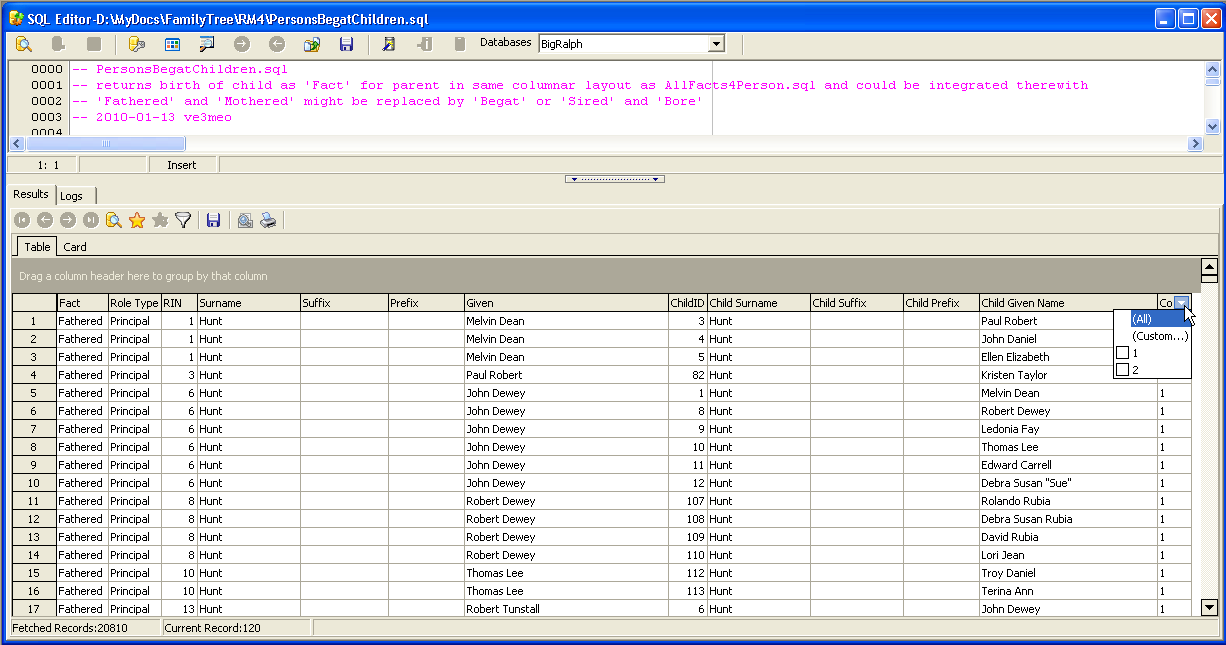
The birth of a child is a major life event for a person so I thought it would be worth adding to the stream of events query for a person. This query is designed to be pasted into the AllFacts4Person5.sql file – it follows the same columnar format – or it can be run on its own. For some unknown reason, it was unnecessary to mess with INDEXED BY and NOT INDEXED clauses to get fast results so this query should run on all flavours of SQLite3.

File updated with labels for Parent name columns and tested on RM7 and #rm8. TH 2021-03-03

Screen shot from SQLite Developer – note the filter drop-down list box on the Count column.

Database System Catalog #datadefinitions

RootsMagic 4 Database System Catalog

A singular system table, sqlite_master, resides in a SQLite database. The table essentially defines the RootsMagic 4 database tables, indices, and fields as follows:

type name tbl_name rootpage sql
table AddressLinkTable AddressLinkTable 52 CREATE TABLE AddressLinkTable (LinkID INTEGER
PRIMARY KEY, OwnerType INTEGER, AddressID INTEGER, OwnerID INTEGER, AddressNum
INTEGER, Details TEXT )
index idxAddressName AddressTable 19 CREATE INDEX idxAddressName ON AddressTable (Name)
table AddressTable AddressTable 18 CREATE TABLE AddressTable (AddressID INTEGER
PRIMARY KEY, AddressType INTEGER, Name TEXT COLLATE RMNOCASE, Street1 TEXT, Street2
TEXT, City TEXT, State TEXT, Zip TEXT, Country TEXT, Phone1 TEXT, Phone2 TEXT,
Fax TEXT, Email TEXT, URL TEXT, Latitude INTEGER, Longitude INTEGER, Note BLOB
)
index idxChildID ChildTable 11 CREATE INDEX idxChildID ON ChildTable (ChildID)
index idxChildFamilyID ChildTable 12 CREATE INDEX idxChildFamilyID ON ChildTable (FamilyID)
index idxChildOrder ChildTable 13 CREATE INDEX idxChildOrder ON ChildTable (ChildOrder)
table ChildTable ChildTable 10 CREATE TABLE ChildTable (RecID INTEGER PRIMARY
KEY, ChildID INTEGER, FamilyID INTEGER, RelFather INTEGER, RelMother INTEGER,
ChildOrder INTEGER, IsPrivate INTEGER, ProofFather INTEGER, ProofMother INTEGER,
Note BLOB )
index idxCitationSourceID CitationTable 50 CREATE INDEX idxCitationSourceID ON CitationTable
(SourceID)
table CitationTable CitationTable 49 CREATE TABLE CitationTable (CitationID INTEGER
PRIMARY KEY, OwnerType INTEGER, SourceID INTEGER, OwnerID INTEGER, Quality TEXT,
IsPrivate INTEGER, Comments BLOB, ActualText BLOB, RefNumber TEXT, Flags INTEGER,
Fields BLOB )
index idxCitationOwnerID CitationTable 51 CREATE INDEX idxCitationOwnerID ON CitationTable
(OwnerID)
index idxRecType ConfigTable 3 CREATE INDEX idxRecType ON ConfigTable (RecType)
table ConfigTable ConfigTable 2 CREATE TABLE ConfigTable (RecID INTEGER PRIMARY
KEY, RecType INTEGER, Title TEXT, DataRec BLOB )
index idxOwnerDate EventTable 17 CREATE INDEX idxOwnerDate ON EventTable (OwnerID,SortDate)
index idxOwnerEvent EventTable 15 CREATE INDEX idxOwnerEvent ON EventTable (OwnerID,EventType)
table EventTable EventTable 14 CREATE TABLE EventTable (EventID INTEGER PRIMARY
KEY, EventType INTEGER, OwnerType INTEGER, OwnerID INTEGER, FamilyID INTEGER,
PlaceID INTEGER, SiteID INTEGER, Date TEXT, SortDate INTEGER, IsPrimary INTEGER,
IsPrivate INTEGER, Proof INTEGER, Status INTEGER, EditDate FLOAT, Sentence BLOB,
Details BLOB, Note BLOB )
index idxExclusionIndex ExclusionTable 65 CREATE UNIQUE INDEX idxExclusionIndex ON ExclusionTable
(ExclusionType, ID1, ID2)
table ExclusionTable ExclusionTable 64 CREATE TABLE ExclusionTable (RecID INTEGER PRIMARY
KEY, ExclusionType INTEGER, ID1 INTEGER, ID2 INTEGER )
table FactTypeTable FactTypeTable 20 CREATE TABLE FactTypeTable (FactTypeID INTEGER
PRIMARY KEY, OwnerType INTEGER, Name TEXT COLLATE RMNOCASE, Abbrev TEXT, GedcomTag
TEXT, UseValue INTEGER, UseDate INTEGER, UsePlace INTEGER, Sentence BLOB, Flags
INTEGER )
index idxFactTypeAbbrev FactTypeTable 22 CREATE INDEX idxFactTypeAbbrev ON FactTypeTable
(Abbrev)
index idxFactTypeName FactTypeTable 21 CREATE INDEX idxFactTypeName ON FactTypeTable
(Name)
index idxFactTypeGedcomTag FactTypeTable 24 CREATE INDEX idxFactTypeGedcomTag ON FactTypeTable
(GedcomTag)
table FamilyTable FamilyTable 5 CREATE TABLE FamilyTable (FamilyID INTEGER PRIMARY
KEY, FatherID INTEGER, MotherID INTEGER, ChildID INTEGER, HusbOrder INTEGER,
WifeOrder INTEGER, IsPrivate INTEGER, Proof INTEGER, SpouseLabel INTEGER, FatherLabel
INTEGER, MotherLabel INTEGER, Note BLOB )
index idxFamilyMotherID FamilyTable 8 CREATE INDEX idxFamilyMotherID ON FamilyTable
(MotherID)
index idxFamilyFatherID FamilyTable 6 CREATE INDEX idxFamilyFatherID ON FamilyTable
(FatherID)
table GroupTable GroupTable 63 CREATE TABLE GroupTable (RecID INTEGER PRIMARY
KEY, GroupID INTEGER, StartID INTEGER, EndID INTEGER )
table LabelTable LabelTable 69 CREATE TABLE LabelTable (LabelID INTEGER PRIMARY
KEY, LabelType INTEGER, LabelValue INTEGER, LabelName TEXT COLLATE RMNOCASE,
Description TEXT )
index idxLabelType LabelTable 70 CREATE INDEX idxLabelType ON LabelTable (LabelType)
index idxLinkRmId LinkTable 58 CREATE INDEX idxLinkRmId ON LinkTable (rmID)
table LinkTable LinkTable 57 CREATE TABLE LinkTable (LinkID INTEGER PRIMARY
KEY, extSystem INTEGER, LinkType INTEGER, rmID INTEGER, extID TEXT, Modified
INTEGER, extVersion TEXT, extDate FLOAT, Status INTEGER, Note BLOB )
index idxLinkExtId LinkTable 59 CREATE INDEX idxLinkExtId ON LinkTable (extID)
index idxMediaOwnerID MediaLinkTable 30 CREATE INDEX idxMediaOwnerID ON MediaLinkTable
(OwnerID)
table MediaLinkTable MediaLinkTable 28 CREATE TABLE MediaLinkTable (LinkID INTEGER PRIMARY
KEY, MediaID INTEGER, OwnerType INTEGER, OwnerID INTEGER, IsPrimary INTEGER,
Include1 INTEGER, Include2 INTEGER, Include3 INTEGER, Include4 INTEGER, SortOrder
INTEGER, RectLeft INTEGER, RectTop INTEGER, RectRight INTEGER, RectBottom INTEGER,
Note TEXT, Caption TEXT COLLATE RMNOCASE, RefNumber TEXT COLLATE RMNOCASE, Date
TEXT, SortDate INTEGER, Description BLOB )
index idxMediaCaption MediaLinkTable 31 CREATE INDEX idxMediaCaption ON MediaLinkTable
(Caption)
index idxMediaURL MultimediaTable 27 CREATE INDEX idxMediaURL ON MultimediaTable (URL)
table MultimediaTable MultimediaTable 25 CREATE TABLE MultimediaTable (MediaID INTEGER
PRIMARY KEY, MediaType INTEGER, MediaPath TEXT, MediaFile TEXT COLLATE RMNOCASE,
URL TEXT, Thumbnail BLOB )
index idxMediaFile MultimediaTable 26 CREATE INDEX idxMediaFile ON MultimediaTable
(MediaFile)
index idxSurname NameTable 35 CREATE INDEX idxSurname ON NameTable (Surname)
index idxGiven NameTable 36 CREATE INDEX idxGiven ON NameTable (Given)
table NameTable NameTable 32 CREATE TABLE NameTable (NameID INTEGER PRIMARY
KEY, OwnerID INTEGER, Surname TEXT COLLATE RMNOCASE, Given TEXT COLLATE RMNOCASE,
Prefix TEXT COLLATE RMNOCASE, Suffix TEXT COLLATE RMNOCASE, Nickname TEXT COLLATE
RMNOCASE, NameType INTEGER, Date TEXT, SortDate INTEGER, IsPrimary INTEGER, IsPrivate
INTEGER, Proof INTEGER, EditDate FLOAT, Sentence BLOB, Note BLOB, BirthYear INTEGER,
DeathYear INTEGER )
index idxNameOwnerID NameTable 34 CREATE INDEX idxNameOwnerID ON NameTable (OwnerID)
index idxNamePrimary NameTable 38 CREATE INDEX idxNamePrimary ON NameTable (IsPrimary)
index idxSurnameGiven NameTable 37 CREATE INDEX idxSurnameGiven ON NameTable (Surname,
Given, BirthYear, DeathYear)
table PersonTable PersonTable 4 CREATE TABLE PersonTable (PersonID INTEGER PRIMARY
KEY, UniqueID TEXT, Sex INTEGER, EditDate FLOAT, ParentID INTEGER, SpouseID INTEGER,
Color INTEGER, Relate1 INTEGER, Relate2 INTEGER, Flags INTEGER, Living INTEGER,
IsPrivate INTEGER, Proof INTEGER, Bookmark INTEGER, Note BLOB )
index idxPlaceName PlaceTable 41 CREATE INDEX idxPlaceName ON PlaceTable (Name)
index idxPlaceAbbrev PlaceTable 42 CREATE INDEX idxPlaceAbbrev ON PlaceTable (Abbrev)
table PlaceTable PlaceTable 39 CREATE TABLE PlaceTable (PlaceID INTEGER PRIMARY
KEY, PlaceType INTEGER, Name TEXT COLLATE RMNOCASE, Abbrev TEXT, Normalized TEXT,
Latitude INTEGER, Longitude INTEGER, LatLongExact INTEGER, MasterID INTEGER,
Note BLOB )
index idxResearchOwnerID ResearchTable 44 CREATE INDEX idxResearchOwnerID ON ResearchTable
(OwnerID)
table ResearchTable ResearchTable 43 CREATE TABLE ResearchTable (TaskID INTEGER PRIMARY
KEY, TaskType INTEGER, OwnerID INTEGER, OwnerType INTEGER, RefNumber TEXT, Name
TEXT COLLATE RMNOCASE, Status INTEGER, Priority INTEGER, Date1 TEXT, Date2 TEXT,
Date3 TEXT, SortDate1 INTEGER, SortDate2 INTEGER, SortDate3 INTEGER, Filename
TEXT, Details BLOB )
index idxResearchName ResearchTable 45 CREATE INDEX idxResearchName ON ResearchTable
(Name)
table RoleTable RoleTable 60 CREATE TABLE RoleTable (RoleID INTEGER PRIMARY
KEY, RoleName TEXT COLLATE RMNOCASE, EventType INTEGER, RoleType INTEGER, Sentence
TEXT )
index idxRoleEventType RoleTable 62 CREATE INDEX idxRoleEventType ON RoleTable (EventType)
table SourceTable SourceTable 46 CREATE TABLE SourceTable (SourceID INTEGER PRIMARY
KEY, Name TEXT COLLATE RMNOCASE, RefNumber TEXT, ActualText TEXT, Comments TEXT,
IsPrivate INTEGER, TemplateID INTEGER, Fields BLOB )
index idxSourceName SourceTable 48 CREATE INDEX idxSourceName ON SourceTable (Name)
table SourceTemplateTable SourceTemplateTable 66 CREATE TABLE SourceTemplateTable (TemplateID
INTEGER PRIMARY KEY, Name TEXT COLLATE RMNOCASE, Description TEXT, Favorite INTEGER,
Category TEXT, Footnote TEXT, ShortFootnote TEXT, Bibliography TEXT, FieldDefs
BLOB )
index idxSourceTemplateName SourceTemplateTable 67 CREATE INDEX idxSourceTemplateName ON SourceTemplateTable
(Name)
table WitnessTable WitnessTable 53 CREATE TABLE WitnessTable (WitnessID INTEGER
PRIMARY KEY, EventID INTEGER, PersonID INTEGER, WitnessOrder INTEGER, Role INTEGER,
Sentence TEXT, Note BLOB, Given TEXT COLLATE RMNOCASE, Surname TEXT COLLATE RMNOCASE,
Prefix TEXT COLLATE RMNOCASE, Suffix TEXT COLLATE RMNOCASE )
index idxWitnessEventID WitnessTable 55 CREATE INDEX idxWitnessEventID ON WitnessTable
(EventID)
index idxWitnessPersonID WitnessTable 56 CREATE INDEX idxWitnessPersonID ON WitnessTable
(PersonID)

Discussions & comments from Wikispaces site


MarkVS

Pulling Together All the Events for An Individual

MarkVS
06 January 2010 16:12:56

One thing that I wanted to do, and I expect might be of interest to others, is to be able to stream all the events for an individual and then, depending on what reporting I wanted to do, sort and/or group and/or filter the records accordingly. I will document elsewhere how to get into the database via Microsoft Access but, whatever tool you are using, getting hold of all the Events for a person is not as straightforward as it might (should?) be.

From what I have learned to date it appears to be neceesary to run three separate queries and combine the results to get the “complete” datastream. These are the queries I think you need:

1) Firstly the straightforward one. The Events held on the Event Table for individuals need to be pulled off. It is important to select only those with an OWNERTYPE of 0. You can link to the various other tables from this data to pick up the FactType description, name of the person etc etc, as required.

2) Secondly, the family events. These are also held in the Event Table but with an OWNERTYPE of 1. This means that the event being recorded acutally applies to 2 people. So to get this data into a stream of events you need to take the value of the OWNERID field and use this to look up the record in the FAMILY table (ie not the PERSON table as you would if the OWNERTYPE was 0). In the Family table you will see the Husband and Wife ID and these can be used to pick up the names of the two people to whom the event applies. Then in theory generate an Event into the data stream for both of them.

3) Thirdly we need to pick up Shared events. These are recorded in the Witness table. This holds the Person ID to link back to the Name of the person and the Event ID to link back to the Event record (and from there to the fact description etc etc).

It seems to me the Database design could have been a wee bit slicker – but this is the way it appears to me at this time.

I am now intendeing to work on a combined set of queries that will pull all this data together into a single Access query – from which, hopefully, it will be easy to pull off regular reports without having to cope with a lot of multi-table SQL statements.

Regards, MVS


romermb

romermb
06 January 2010 23:08:00

For readability, I made some changes to the headers:

SELECT FactTypeTable.Name COLLATE NOCASE AS Fact, ‘Principal’ AS ‘Role Type’, NameTable1.OwnerID AS RIN, NameTable1.Surname COLLATE NOCASE AS Surname, NameTable1.Suffix COLLATE NOCASE AS Suffix, NameTable1.Prefix COLLATE NOCASE AS Prefix, NameTable1.Given COLLATE NOCASE AS ‘Given Name’, NameTable2.OwnerID AS ‘Spouse RIN’, NameTable2.Surname COLLATE NOCASE AS ‘Spouse Surname’, NameTable2.Suffix COLLATE NOCASE AS ‘Spouse Suffix’, NameTable2.Prefix COLLATE NOCASE AS ‘Spouse Prefix’, NameTable2.Given COLLATE NOCASE AS ‘Spouse Given Name’
FROM EventTable
INNER JOIN FactTypeTable ON EventTable.EventType = FactTypeTable.FactTypeID
INNER JOIN FamilyTable ON EventTable.OwnerID = FamilyTable.FamilyID
INNER JOIN NameTable AS NameTable1 ON FamilyTable.FatherID = NameTable1.OwnerID
INNER JOIN NameTable AS NameTable2 ON FamilyTable.MotherID = NameTable2.OwnerID
WHERE EventTable.OwnerType = 1 AND NameTable1.IsPrimary = 1 AND NameTable2.IsPrimary = 1

UNION

SELECT FactTypeTable.Name COLLATE NOCASE, ‘Principal’, NameTable2.OwnerID, NameTable2.Surname COLLATE NOCASE, NameTable2.Suffix COLLATE NOCASE, NameTable2.Prefix COLLATE NOCASE, NameTable2.Given COLLATE NOCASE, NameTable1.OwnerID, NameTable1.Surname COLLATE NOCASE, NameTable1.Suffix COLLATE NOCASE, NameTable1.Prefix COLLATE NOCASE, NameTable1.Given COLLATE NOCASE
FROM EventTable
INNER JOIN FactTypeTable ON EventTable.EventType = FactTypeTable.FactTypeID
INNER JOIN FamilyTable ON EventTable.OwnerID = FamilyTable.FamilyID
INNER JOIN NameTable AS NameTable1 ON FamilyTable.FatherID = NameTable1.OwnerID
INNER JOIN NameTable AS NameTable2 ON FamilyTable.MotherID = NameTable2.OwnerID
WHERE EventTable.OwnerType = 1 AND NameTable1.IsPrimary = 1 AND NameTable2.IsPrimary = 1

UNION

SELECT FactTypeTable.Name COLLATE NOCASE, ‘Principal’, NameTable.OwnerID, NameTable.Surname COLLATE NOCASE, NameTable.Suffix COLLATE NOCASE, NameTable.Prefix COLLATE NOCASE, NameTable.Given COLLATE NOCASE, NULL, NULL, NULL, NULL, NULL
FROM EventTable
INNER JOIN FactTypeTable ON EventTable.EventType = FactTypeTable.FactTypeID
INNER JOIN NameTable ON EventTable.OwnerID = NameTable.OwnerID
WHERE EventTable.OwnerType = 0 AND NameTable.IsPrimary = 1

UNION

SELECT ‘Alternate name’, ‘Principal’, OwnerID, Surname COLLATE NOCASE, Suffix COLLATE NOCASE, Prefix COLLATE NOCASE, Given COLLATE NOCASE, NULL, NULL, NULL, NULL, NULL
FROM NameTable
WHERE IsPrimary = 0

UNION

SELECT FactTypeTable.Name COLLATE NOCASE, ‘Shared’, NameTable.OwnerID, NameTable.Surname COLLATE NOCASE, NameTable.Suffix COLLATE NOCASE, NameTable.Prefix COLLATE NOCASE, NameTable.Given COLLATE NOCASE, NULL, NULL, NULL, NULL, NULL
FROM WitnessTable
INNER JOIN EventTable ON WitnessTable.EventID = EventTable.EventID
INNER JOIN NameTable ON WitnessTable.PersonID = NameTable.OwnerID
INNER JOIN FactTypeTable ON EventTable.EventType = FactTypeTable.FactTypeID
WHERE NameTable.IsPrimary = 1


ve3meo

Use of page-related Discussion

ve3meo
07 January 2010 14:52:53

Let’s try to start discussion topics around the most relevant page. For example, the first discussion topic on this ‘Database System Catalogue’ page is about the problem of designing a query that will pull together all the facts for each individual. I think that should have been started with a new page linked from the page ‘Problem Queries’. That would make it more probable for new members to find by being consistent with the wiki navigational structure (immature as it may be). I’ll try to move the essentials of that discussion over to a new ‘Problem Query’ page for continuation there.

Tom

File Types #filetypes #datadefinitions #database

RootsMagic 4 File Types


Ext Description More
rmgc family tree database SQLite 3-format file readable with SQLiteManagers
rmgb family tree database backup ZIP-format file extractable not only within RM, but also by PKZip, WinRAR, et al.
st Source Template master file used to create sourcetemplatetable on creation of family tree database Source Templates
adl user’s spelling dictionary created by application Addict 4
adm regional spelling dictionary selected during program installation. Addict 4
adt thesaurus Addict 3
adu system and user’s autocorrect spelling dictionaries Addict 4 – system
Addict 4.1 – user
exe Application
dll Application extensions
chm Help files
def 1 XML database file defining dimensions for selected Avery address and shipping labels
elf log of application exception incidents EurekaLog