RMNOCASE – faking it in SQLiteSpy #rmnocase #sqlitespy

Background

RootsMagic 4+ has an internal, proprietary collation sequence called RMNOCASE that controls the order in which names of people, places, sources, etc. are sorted. Fields that are defined to use this collation cannot be sorted by an external SQLite tool without overriding it with another collation sequence, e.g.: NOCASE, nor can they be edited by the external tool without its own RMNOCASE collation. Despite its lack of the latter, SQLiteSpy was at the top of the list of SQLite managers for quite some time since the early days of this wiki. During that time, the only tool we knew of to get around the RMNOCASE obstruction was with the $30 SQLite Developer by renaming one of its UTF-8 collations. Then, with a custom extension described below, SQLiteSpy could do it, even more easily than SQLite Developer, for free. More on the SQLiteSpy story follows but, as of July, 2013, there is a new leader on the RMNOCASE front: see RMNOCASE – faking it in SQLite Expert, command-line shell et al.

Faking RMNOCASE in SQLiteSpy
Thanks to Ralf, the developer of the SQLite3 database engine for Delphi (DISQLite3) on which SQLiteSpy and RootsMagic 4 and up are based, I have compiled an extension for SQLiteSpy that adds a fake RMNOCASE collation sequence, thus enabling Spy to freely query and, indeed, edit the .rmgc databases. No more need to declare COLLATE NOCASE when comparing and ordering certain fields; now it’s possible to modify values in all fields and to insert or delete rows in all tables using the free SQLiteSpy.

But be warned, this collation is not identical to RMNOCASE and there may be some risks – probably none if the English alphabet is used exclusively. All it does is provide the NOCASE collation sequence to SQLiteSpy under another name, RMNOCASE. With other alphabets, anticipate that there will be differences in sorted lists and search results between RootsMagic and SQLiteSpy; editing, with non-English characters, a field that is collated and indexed with RMNOCASE will corrupt the index.

The good news is that RootsMagic 5 has a REINDEX tool that will rebuild the indexes using its internal RMNOCASE. For RootsMagic 4, the only way to rebuild the indexes is to transfer the data to a new database via drag’n’drop or GEDCOM. It is advisable to REINDEX in RootsMagic after adding or modifying any name-type data with an outboard SQLite manager.

Download & Installation

RMNOCASE_fake-SQLiteSpy64.dll.bak 19 Feb 2022 64-bit version of fake RMNOCASE collation for use with 64-bit SQLiteSpy.

RMNOCASE_fake-SQLiteSpy.dll.bak 27 June 2013 32-bit version for use with 32-bit SQLiteSpy.

Neither is identical to RootsMagic RMNOCASE so you must still use its Rebuild Indexes Database Tool after any SQLiteSpy queries that change data or REINDEX. (Remove .bak extension after download)

Download to the same folder where you have installed SQLiteSpy.exe. Open SQLiteSpy without a database and note the list of Collations numbers 7 and does not contain RMNOCASE. Register the extension via the menu path Options > Options > tab Extensions where you will enter the filename and OK. Create a new database (File > New) and note the list of Collations now includes RMNOCASE. It did before when a .rmgc file was open but SQLiteSpy had no access to the RM collation sequence. Now SQLiteSpy accesses the NOCASE collation whenever RMNOCASE is invoked. As long as SQLiteSpy stays open, the fake RMNOCASE collation remains accessible for every database opened during the session. The extension automatically reloads when SQLiteSpy is restarted, provided SQLiteSpy.exe is in a folder over which you have full privileges to allow Spy to write the file SQLiteSpy.db3 which stores the options (Spy does not report any problem if it cannot write the file). Alternatively, the extension can be loaded by command in the SQL editor and this command can be stored in a script. From the SQLiteSpy product description, “Extensions can be loaded for the current database via SELECT load_extension(‘FileName.dll’); or automatically for all databases by entering extension file names to the Options dialog”.
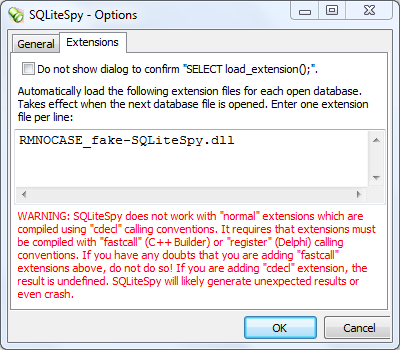
RMNOCASE_fake-SQLiteSpy.PNG

Discussions & comments from Wikispaces site


thejerrybryan

Unable to download fake RMNOCASE dll

thejerrybryan
18 December 2011 01:24:50

Well, I can download it, but within a second or two it has been deleted by my Norton anti-virus. I’ve been looking for a way to whitelist the fake RMNOCASE dll, but it looks like I will have to convince the Norton server to whitelist it for everybody rather than being able to whitelist it here on my local machine just for myself. Big brotherism run amok.

I’ll keep investigationg.

Jerry


thejerrybryan
thejerrybryan
18 December 2011 03:34:58

I got it to work. I had to ignore a pretty severe warning from Norton and move the file out of their Quarantine. Having done so, it all works.

In the beginning of researching the problem, it looked like I was going to have to submit the fake RMNOCASE dll to Norton for their engineers to analyze before they would whitelist it, but I found a way to force Norton to accept the dll without having to submit the dll to Norton for approval.

Jerry


Ksquared333

Rebuilding Indexes

Ksquared333
24 December 2015 23:47:18

So I ran RMNOCASE so I could use .rmgc files on my smallest RM data file (2912 KB). Then I ran an sql. Then I asked RM to Rebuild the Index because I do have some non-English characters in some of my names. That was over an hour ago and the index still isn’t rebuilt. I shudder to think what would happen if I rebuild an index for my biggest files of 72,000 KB or 80,000 KB. Am I doing something wrong? I hope this index gets rebuilt before I need to shut down the computer for the night.:-(
Kim D


ve3meo

ve3meo
25 December 2015 00:53:20

I don’t think you are doing anything wrong. The problem is that the RootsMagic Rebuild Indexes does more than the SQLite REINDEX function which it includes. It also updates the BirthYear and DeathYear columns in NameTable and that is what I suspect is slow. I was delighted that Bruce added the REINDEX function but dismayed that he combined it. Better they were kept separate but that might have caused more user confusion. Check your Windows Resource Monitor for cpu and memory utilisation and hard drive traffic. Perhaps there is some room for optimisation.

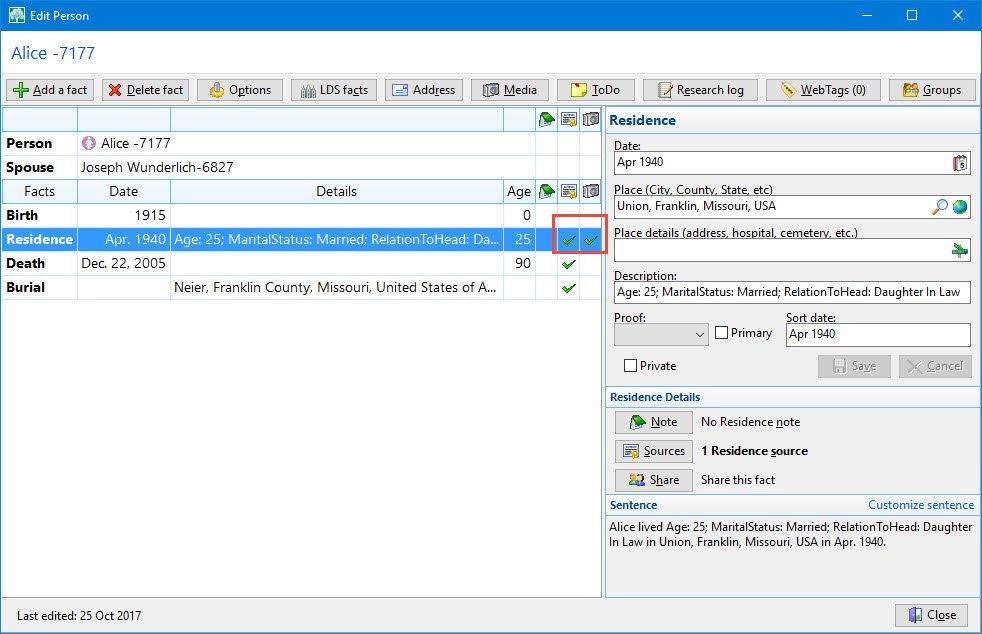
Database is locked

Is it possible to open the databases as read only? Obviously SQLite is opening the database for edit capability. I am getting the database is locked when I have the database open in sqlite and try to open RootsMagic. I am 95% of the time using sqlite for query only. I rarely do an update or delete.

Or is there a way to open the database without locking it?

Discussions & comments from Wikispaces site


thejerrybryan

Which SQLite Manager are you using?

thejerrybryan
14 December 2017 03:44:58

I have never seen this behavior with SQLiteSpy, even if I’m doing an update. I happily use SQLiteSpy and RM at the same time on the same database.

The problem I do encounter is that I can’t exit RM with a backup if SQLiteSpy has the database open. Something about RM’s backup procedure apparently tries to lock the database in a way that conflicts with SQLiteSpy. Exiting RM without a backup is always fine. It’s just the backup that’s the problem.

Finally, I try to avoid updates, but sometimes they do seem necessary. Usually, my updates “just work” and the newly updated data is immediately available to RM without incident. But in some situations, I have to run the Rebuild Index procedure inside of RM after one of my SQLiteSpy updates. Otherwise, there are indexing errors in the RM user interface. I think Tom understands the reason for this, but I confess I do not. My understanding of relational databases and indexes is that updates to data are also supposed to update the indexes automatically. I seldom encounter this problem, even when making updates, even when doing inserts. So I don’t understand why sometimes I do encounter this problem.


momakid

momakid
14 December 2017 05:29:03

I am using SQLite Expert Personal 5.2. It also happens with SQLite Expertt Personal 3.5.96.2516. I I have gotten the database lock message when SQLite is open and I try to open RM7.5 or update something on the edit screen like the residence date. But I get it when RM7.5 is open and I try to query the database also. I don’t do it everytime I do those things but it happens occasionally. I am trying to remember exactly what was going on in both programs. I think I may have updated a date in rootsmagic. I usually do not press save. I just press close. And the changes are saved. I do remember being on that screen and then running a query.
I sometimes have problems when I do a compact in RM. It never ends. So I do the 3 finger salute and end RM. I have the best luck re-indexing the file in SQLite. I am not sure what VACUUM does but I use it and then reindex it.
So far the only deletes I do is blank death dates.
I seldom do backups. I prefer making copies of the file before I do the deletes.

Exporting Data

My RootsMagic file has over 8,500 people in it, 23,000 events, 3,000 families, 3,000 citations, and 3,600 multimedia links I have a query that takes a bit to run. I am using sqlite expert Personal 5.2. I am trying to export the results of the query to a spreadsheet. So far I have not found the way to export it to a spreadsheet other than doing a Ctrl + A > Ctrl + C and Ctrl V in the spreadsheet.

Is there a way to do it? Or is there another program that can do it?


I believe SQLite Expert Pro supports a more powerful capability for export to spreadsheet. IIRC, Expert Personal supports only the copying of the results screen as you describe which is paged, 500 rows at a time is the default.

SQLiteSpy also supports copying its results screen which is not paged. That would be more convenient for results that are many more than 500 but not so large that it chokes the application.

SQLite Studio 3 can export results to a CSV file among other formats. I don’t have much experience with it; don’t know if it’s easy to add a fake RMNOCASE collation.

Excel itself can be connected via ODBC to a SQLite database and run queries; the RMNOCASE issue could be an impediment.

Tom

Query is taking a very, very long time

I have been using this query for a quite a while now:
— Alternate Name Typos
Select f.FamilyID,
— 1 — Column B Gets the surname, given name and fathered for the fatherid from the famillytable for the fathers primary record. This is the husband.
(select n1.surname || “, ” || n1.given || ” ” || f.FatherID
from nametable n1
where f.fatherid = n1.ownerid — Get the father info from the primary record
and n1.isprimary = 1) as Husband,
— 2 — Column C Gets the surname, given name and mothered from the familytable for the motherid from the mothers primary record. This is the Wife.
(select n2.surname || “, ” || n2.given || ” ” || f.MotherID
from nametable n2
where f.motherid = n2.ownerid — Get the mother info from the primary record
and n2.isprimary = 1) as Wife,
— 3 — Column D — Gets the wife’s given name, maiden name, married name, husband’s given name and MothersID from the wife’s alternate name record. This is the Alternate Name.
(select n3.given || ” ” || n5.surname || ” ” || n5.suffix || ” ” || f.MotherID
from nametable as n3
inner join — get the father’s record from nametable file for the primary record
nametable as n4
on f.fatherid = n4.ownerid
and n4.isprimary = 1
inner join — get the surname and suffix from the nametable for the father’s primary record
nametable as n5
on “(” || n4.given || “)” = n5.suffix
where f.motherid = n3.ownerid — get the mother’s information from the alternate record
and n3.isprimary = 0) as Alternate,
— 4 — Column E — Gets the wife’ given name from the wife’s alternate record. This is the Alternate Maiden Name.
(select n6.given
from nametable n6
inner join — get the father’s record from nametable file for the primary record
nametable as n7
on f.fatherid = n7.ownerid
and n7.isprimary = 1
where f.motherid = n6.ownerid — get the mother’s information for the alternate record and the husbands Surname
and n6.isprimary = 0
and n7.surname = n6.surname) as Alt_Maiden_Name,
— 8 — Column I — Gets the wife’s surname from the alternate record. This is the Alternate Surname.
(select n18.surname
from nametable as n16
inner join — gets the father’s record from nametable file
nametable as n17
on (f.fatherid = n17.ownerid)
inner join — gets the father’s record from the nametable with the the suffix
nametable as n18
on “(” || n17.given || “)” = n18.suffix
and f.MotherID = n18.ownerid
and n17.surname = n18.surname
where f.motherid = n16.ownerid
and n16.isprimary = 0) as Alt_Surname,
— 6 — Column G — Gets the suffix for the wife from the alternate name record. This is the Alternate Suffix.
(select n12.suffix
from nametable as n10
inner join — get the father’s record from nametable file for the primary record
nametable as n11
on f.fatherid = n11.ownerid
and n11.isprimary = 1
inner join — get the suffix from the nametable for the father’s primary record
nametable as n12
on n10.given || ” ” || n11.surname = n12.given || ” ” || n12.surname
and “(” || n11.given || “)” = n12.suffix
where f.motherid = n10.ownerid
and n10.isprimary = 0) as Alt_Suffix,
— 5 — Column F — Gets the wife’s given name and surname from the wife’s primary record. This is the Primary Maiden Name.
(Select n9.given || ” ” || n9.surname
from nametable as n9
where f.motherid = n9.ownerid
and n9.isprimary = 1) as Pri_Maiden_Name,
— 9 — Column J — Gets the husband’s surname form the husband’s primary record. This is the husband’s surname.
(select n19.surname
from nametable as n19
where f.fatherid = n19.ownerid
and n19.isprimary = 1) as Primary_Surname,
— 7 — Column H — Puts parenthesis around the husbands given name from the primary records. This is the Primary Siffix.
(select “(” || n13.given || “)”
from nametable as n13
where f.fatherid = n13.ownerid
and n13.isprimary = 1) as Pri_Suffix
from familytable f
where f.FatherID is not 0 — fatherid is not 0
and f.MotherID is not 0 — motherid is not 0
–and substr(wife, 1, 1) <> “,” — the first position of the wife was not a comma
–and $Enterfamilyid = f.familyid — Inputs the familyid
–and familyid in(66, 1617)
order by wife, husband;

Up until a couple days ago, it took about 3 seconds to run. All of a sudden it is taking minutes like at least 5 minutes. I am using sqlite Expert 3.4.76.2306. I have tried Sqlite 5 also and i am getting the same thing. I created a GED and imported it back into rootsmagic. I have rebooted my machine. I have run ccleaner and malwarebytes. Nothing seems to work. Any ideas on what is happening or what I need to do?

I am adding a new SQL Tab and it is taking minutes.

Discussions & comments from Wikispaces site


ve3meo

Comments

ve3meo
23 November 2017 14:08:31

Something changed. Think back. Your last sentence suggests that it’s not the database or the query; rather the OS or the program. Maybe RAM has been overflowed into the swapdisk file. That would explain sluggish database but not the slow new tab. Run the Windows Task Manager and see what part of the system is saturating.


ve3meo

ve3meo
24 November 2017 04:54:07

I had a quick look at your script and ran it on both SQLite Expert Personal 4-32b and on SQLiteSpy and got similar results on a smallish database (729 records in NameTable of which only 170 are Alternate) ~200 milliseconds.

Explain Query Plan suggests that it could bog down because there are so many correlated sub-queries (9) involving a total of 16 SEARCHes. Fortunately, the optimiser applies an INDEX to all the SEARCHes else these would have become SCANs. A redesign to eliminate or reduce the CORRELATED SUBQUERIES could make a huge improvement on a large database.

A minor point perhaps is this. IsPrimary is already a logic value. There is no need to test that it =1 or =0. WHERE NOT IsPrimary produces the same result as WHERE IsPrimary=0; WHERE IsPrimary is one less operation than WHERE IsPrimary = 1.

And this may no longer be true. In early RM4+, I found that WHERE +IsPrimary was actually faster than WHERE IsPrimary. But that was due to an Indexing error on the part of the developer which, I believe, was corrected.

SQLite Expert Personal Edition Version 5.2.2.240 (x64) problem

I installed SQLite Expert Personal Edition Version 5.2.2.240 (x64).

external image user_none_lg.jpgve3meo Nov 12, 2017

What is your OS? Is it 32 or 64 bit. You can install 32 or 64 bit programs on a 64 bit OS but you cannot install a 64 bit program on a 32 bit system. 32 bit programs on a 64 bit system must be installed in “Program Files (x86)”; 64 bit programs go into “Program Files”.

I started SQLite Expert Personal Edition
I opened my database
I got a popup saying SQLite Library not loaded.
I click OK
When I checked the SQLite Library in the options it contained sqlite3.dll 3.21.0 [FTS3 FTS4 FTS5 RTREE]

ve3meo Nov 12, 2017

That looks right. But maybe the 32b/64b issue caused this error.

I entered the following in the SQL window:

select surname
from nametable;

ve3meo Nov 12, 2017

Don’t select a field that requires RMNOCASE until you resolve the basic issues. This just complicates the matter.

I got Database not connected

ve3meo Nov 12, 2017

because the SQLite Library didn’t load. Has nothing to do with unifuzz.

I did a right click on my database
I selected Load Extension
I selected the the File Name (C:Program DataMicrosoftWindowsStart MenuProgramsSQLite ExpertPersonal 5 – 64bitunifuzz.dll

ve3meo Nov 12, 2017

This is a path to a hyperlink, not to the file unifuzz.dll unless that’s where you put it. I think the best place for extensions is with the program. On my 64b Win 10 system, I have the 32b version 4 program and unifuzz in “C:Program Files (x86)SQLite ExpertPersonal 4”

I entered sqlite_extension_init for the Entry Point
I checked Auto
I clicked OK
I got the following: Could not load library: C:Program DataMicrosoftWindowsStart MenuProgramsSQLite ExpertPersonal 5 – 64bitunifuzz.dll%1 is not a valid Win32 application.
I tried doing the above but left Auto unchecked
I got an Access violation error

I have put the unifuzz.dll file in C:program FileSQLite Expert Personal 5 folder and did the above steps and got the same results.

I put the unifuzz.dll file in the folder where the rmgc file is and still got the same thing.

What am I doing wrong?

Should the library be unifuzz.dll instead of sqlite.dll? If so how do I change it?

ve3meo Nov 12, 2017

No.

Discussions & comments from Wikispaces site


ve3meo

unifuzz.dll is compatible only with the 32 bit version

ve3meo
12 November 2017 16:19:01

Using unifuzz.dll with SQLite Expert

So uninstall the 64b SQLite Expert. Install the 32b version and place unifuzz.dll in the same folder as the program.


momakid

momakid
12 November 2017 18:17:11

Is it possible to use the 64b SQLite Expert version with Rootsmagic 7.5? If so what do I need to do to make it work? I have a 64b machine so I would like to use the 64b version. But if it is not possible, I have no problem using the 32b version. Thank you so very much. You are a miracle worker.

Inline comments


ve3meo

Comment: What is your OS? Is it 32 or 64 bit. …

ve3meo
12 November 2017 16:15:20

What is your OS? Is it 32 or 64 bit. You can install 32 or 64 bit programs on a 64 bit OS but you cannot install a 64 bit program on a 32 bit system. 32 bit programs on a 64 bit system must be installed in “Program Files (x86)”; 64 bit programs go into “Program Files”.


ve3meo

Comment: That looks right. But maybe the 32b/6…

ve3meo
12 November 2017 16:15:21

That looks right. But maybe the 32b/64b issue caused this error.


ve3meo

Comment: Don’t select a field that requires RM…

ve3meo
12 November 2017 16:15:22

Don’t select a field that requires RMNOCASE until you resolve the basic issues. This just complicates the matter.


ve3meo

Comment: because the SQLite Library didn’t loa…

ve3meo
12 November 2017 16:15:23

because the SQLite Library didn’t load. Has nothing to do with unifuzz.


ve3meo

Comment: This is a path to a hyperlink, not to…

ve3meo
12 November 2017 16:15:23

This is a path to a hyperlink, not to the file unifuzz.dll unless that’s where you put it. I think the best place for extensions is with the program. On my 64b Win 10 system, I have the 32b version 4 program and unifuzz in “C:Program Files (x86)SQLite ExpertPersonal 4”


ve3meo

Comment: No.

ve3meo
12 November 2017 16:15:24

No.

Where is this data?

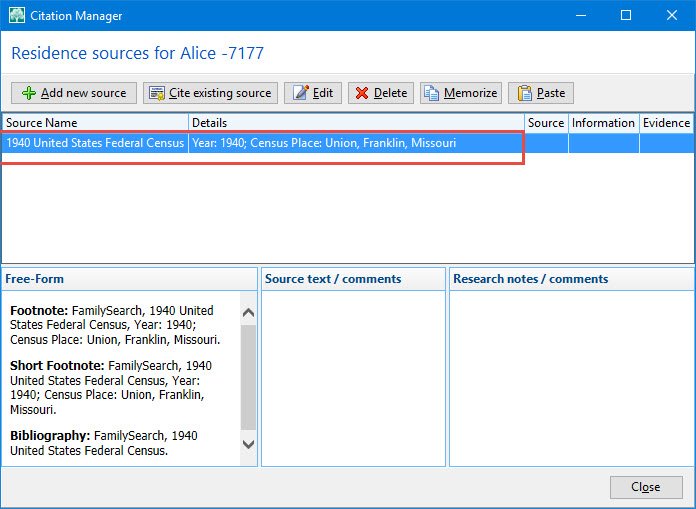
I am trying to put query together that will get the information for the Date, Place, Place Details, Description, Citation, and media fields on the following screen:

Pic 1.jpg
Pic 1

The put the following query together to get the above information:
select et.ownerid,
nt.surname,
nt.given,
et.eventid,
et.eventtype,
nt.birthyear,
ft.Name,
et.placeid,
et.siteid,
substr(et.date,4,4) as Ev_Date,
–(select pt.name
— from placetable pt
— where et.siteid = pt.placeid) as Place,
pt.name as Place,
site.name as Place_Details,
trim(et.details) as Description,
ml.mediaid,
ml.linkid,
–mm.mediatype,
(select m1.mediapath
from multimediatable m1
where ml.MediaID = m1.mediaid) as Path,
(select m2.mediafile
from multimediatable m2
where ml.MediaID = m2.mediaid) as File,
(select m3.caption
from multimediatable m3
where ml.MediaID = m3.mediaid) as Caption,
(Select s1.name
from sourcetable s1
where ct.sourceid = s1.sourceid) as Source,
(Select s2.actualtext
from sourcetable s2
where ct.sourceid = s2.sourceid) as Actual_Text,
(Select s3.comments
from sourcetable s3
where ct.sourceid = s3.sourceid) as Comments

from eventtable et,
placetable pt,
facttypetable ft,
nametable nt,
sourcetable st

left join medialinktable as ml
on et.ownerid = ml.ownerid

left join citationtable as ct
on et.ownerid = ct.ownerid

left join placetable as site
on et.siteid = site.placeid

where et.ownerid = nt.ownerid
and et.eventtype = ft.facttypeid
and et.placeid = pt.placeid
and ct.sourceid = st.sourceid
and et.EventType = 29
and et.ownerid = 1490

order by nt.surname, nt.given, ev_date
;

I am getting the Event Date, Place, Place Details and Description.

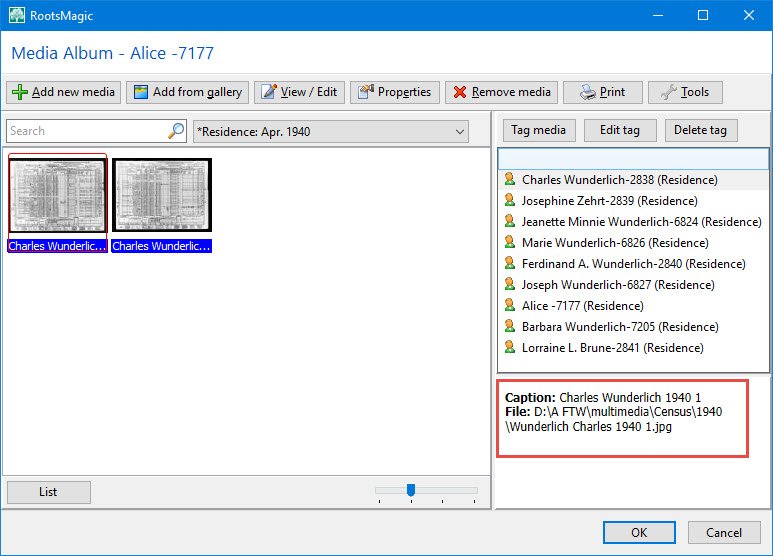
I am not getting the following information:

Pic 2.jpg
Pic 2

Nor this information:

Pic 3.jpg
Pic 3

I am getting the source but it is not correct. I am not getting anything for Actual_Text or Comments.
I am getting the filepath which appears to be correct. I am getting a filename and caption but they are not correct.

I am getting too many rows

I want a row for every eventtype of 29 from the eventtable. If there is a place, place detail, description, mediapath, mediafile, caption, source, actual_text or comments, that it appear in the query results. If there isn’t data, the field be blank but the row to be displayed.

I want to be able to sort it my surname, given and eventdate.

I am missing something somewhere. Can you point me in the right direction or tell me what I am doing wrong?

Discussions & comments from Wikispaces site


ve3meo

Will produce big results set

ve3meo
25 October 2017 22:10:39

Because for each event for a person, there can be multiple citations AND multiple media. If an event has 2 of each, there will be 4 rows; 3 of each, 9 rows… And if you are also after the Master Source media and/or the Source Details media for which there can be more than one in each case, then it can exponentiate even faster. Are you sure that is what you really want? It’s one reason why RM has all these sub-windows.


momakid

momakid
26 October 2017 02:26:13

I have residence events for attaching the census image. They do have the month and year of the census. There should be only one citation and on a few occasions 2 images. If there is more than one citation, then I need research it and delete the extras. But on a whole there should be only one. There should be multiple years on a lot of them. I am trying to determine which records are missing census images, which ones are missing citations and sources. Which ones are missing a census year.
A family member had a shoe box full of funeral cards. I scanned them and started attaching them to the death event. But I soon discovered most of those women names were married names. I didn’t know their maiden names. So I created alternate names consisting of given name and maiden name for the given name of the alternate record. The surname was the married name and the suffix was the husbands given name. I was now able to find a big majority of the women.
BUT i think that could affect my results. I am not going to restrict it to the primary record first but I have a feeling I am going to have to. I did do a query to see how many residence records there were and there were 3,414. I am trying to think of why I should not get at least that many records in my results. I want to get every residence event. I may need to restrict it to A thru G, H thru K, etc. I will dump the results into an excel spreadsheet and work from it.
I did discover that I needed to look at the eventid and ownertype of 2 for the citation and medialinktable .I am getting the path, file, caption and source but not the source details.
This is what I have now:
select et.ownerid,
nt.IsPrimary,
nt.surname,
nt.given,
et.eventid,
et.eventtype,
nt.birthyear,
ft.Name,
et.placeid,
et.siteid,
substr(et.date,4,4) as Ev_Date,
pt.name as Place,
site.name as Place_Details,
trim(et.details) as Description,
ml.mediaid,
ml.linkid,
–mm.mediatype,
(select m1.mediapath
from multimediatable m1
where ml.MediaID = m1.mediaid) as Path,
(select m2.mediafile
from multimediatable m2
where ml.MediaID = m2.mediaid) as File,
(select m3.caption
from multimediatable m3
where ml.MediaID = m3.mediaid) as Caption,
(Select s1.name
from sourcetable s1
where ct.sourceid = s1.sourceid) as Source,
(Select s2.actualtext
from sourcetable s2
where ct.sourceid = s2.sourceid) as Actual_Text,
(Select s3.comments
from sourcetable s3
where ct.sourceid = s3.sourceid) as Comments

from eventtable et,
placetable pt,
facttypetable ft,
nametable nt,
sourcetable st

left join medialinktable as ml
on et.eventid = ml.ownerid and ml.ownertype = 2

left join citationtable as ct
on et.eventid = ct.ownerid and ct.ownertype = 2

left join placetable as site
on et.siteid = site.placeid

where et.ownerid = nt.ownerid
and et.eventtype = ft.facttypeid
and et.placeid = pt.placeid
and ct.sourceid = st.sourceid
–and nt.isprimary = 0
and et.EventType = 29
–and et.ownerid = 1490

order by nt.surname, nt.given, ev_date;

Removing media from one person

I attached the 1920 Census to the people displayed in the window below:
Pic 1.jpg
I want to remove the media from Sophia only.and leave the media attached to the remaining people.

Actual Results:
I have Sophia’s record open, selected the media column for the fact, highlighted Sophia and pressed the Remove media button. It removes the media from everyone in the list. I have to re-add the media to everyone again. That is not good. That is a lot of wasted time.

Expected Results:
I expected to highlight the person I wanted to remove the media from. Select Remove media and the media only would be removed from only the person selected. I would expect the event to still be there. If I wanted to have the media removed from everyone, I would highlight/select everyone and then press remove media.

If the actual results is the way it is supposed to work, may I suggest an enhancement for the expected results?

Discussions & comments from Wikispaces site


ve3meo

Removing a media item from a specific person/event…

ve3meo
19 October 2017 04:12:54

Use Delete tag for what you wanted to have happen. The controls across the top are for the Media file or Album – Remove Media removes the media item from the Media Gallery and eliminates all its tags, as you discovered.

For RM user issues or questions having nothing to do with SQLite, please post to the RM Forum or FB Page.

Tom

Where is the data stashed

Pic 1.jpg
Pic 1
The explanation for the Details field in the EventTable of the Data Definitions states Content of Description field in Edit Person fact/event pane.
Pic 2.jpg
Pic 2
I take that to mean it should contain Marital Status: MarriedRelation to Head of House: Head in the above print screen.

I created the following query to get those details:

select et.eventid, et.eventtype, ft.Name, et.placeid, pt.name, substr(et.date,4,4), pt.name, et.Details, et.note

from eventtable et,
facttypetable ft,
placetable pt

where et.eventtype = ft.facttypeid
and et.placeid = pt.placeid
and ownerid = 70
;
I got the following results:
Pic 3.jpg
Pic 3

What file(s) do I find the Place details (address, Hospital, cemetery, etc.) field and the Descriptions: field on the Edit Person window above? I am trying to find where testing and Marital Status: MarriedRelation to Head of House: Head is stashed.

Discussions & comments from Wikispaces site


thejerrybryan

Place Details Location

thejerrybryan
18 October 2017 00:43:43

The Place Details are in the PlaceTable. The format is the same as for the Place info itself except that the PlaceType is 2 for PlaceDetails. The corresponding PlaceID is in the MasterID field. The basic idea is that you have to do a JOIN of the PlaceTable to itself so that you are joining the PlaceDetails values to the Place values on MasterID for the PlaceDetails and PlaceID for the Place.


ve3meo

ve3meo
18 October 2017 02:31:01

The text you are looking for is in the Blob type field Details. You need to convert the binary data to Text. See the different results between:
SELECT Details FROM EventTable;
and
SELECT TRIM(Details) FROM EventTable;

Tom


thejerrybryan

Descriptions field location

thejerrybryan
18 October 2017 00:46:59

This field has many names in RM, like all the multiple names for one person in a Russian novel. It is Description in the Edit Person screen, Details in the EventTable if you are using SQLite, and Value if you are in the Find/Search dialog in the RM user interface.


thejerrybryan

Individual Facts and Family Facts

thejerrybryan
18 October 2017 00:55:18

Your query for info about person 70 looks like it’s fine for individual events such as birth and death, but it will not work correctly for “family” event such as marriage. RM’s “family” events are really just for the couple, not for the children.

When you are first starting out with SQLite and RM, it’s probably easier to make two separate queries, one for individual events and one for couple events. The trick in the EventTable is to test the OwnerType field with a WHERE clause such that OwnerType = 0 for individual events and OwnerType = 1 for couple events. Individual events are easy. For couple events, OwnerID points to the FamilyTable rather than to the PersonTable. So depending on what you are trying to accomplish with couple events, you will probably have to JOIN the EventTable to the FamilyTable and the FamilyTable to the PersonTable or the NameTable (or to both).

Alternate Names List

I created alternate names for wives so I can find the wife with her married name.
I put the given and maiden name in the given for the alternate name. I put her husband’s surname in surname. I use Married as Name Type, Mrs. As Prefix and the husbands given name with parenthesis around it as the suffix.

I am using the following query to get the alternate names: (See Pic 1)
Pic 1.jpg
It works great if there is only one alternate name. It is a problem if there is more than one alternate name for each husband as displayed in Pic 1.

Pic 2.jpg
This is the print screen of Rootsmagic. (See Pic 2)

Pic 3.jpg
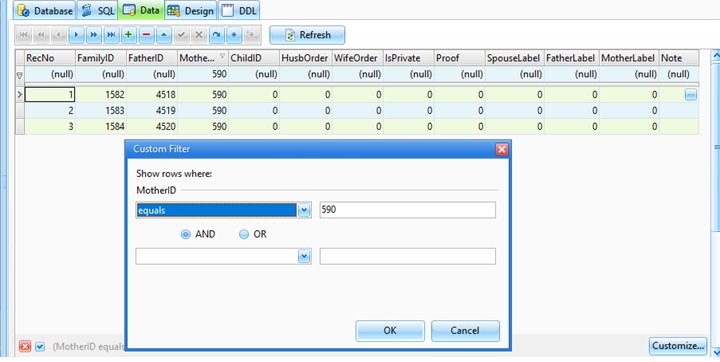
If I do a data view of the nametable and do a custom on ownerid of 590, I get the following: (See Pic 3)

Pic 4.jpg
If I do a data view of the familytable and do a custom on ownerid of 590, I get the following: (See Pic 4)

Pic 5.jpg
How do I get the original query to display the correct husband with the wife like displayed below? (See Pic 5)

Pic 6.jpg
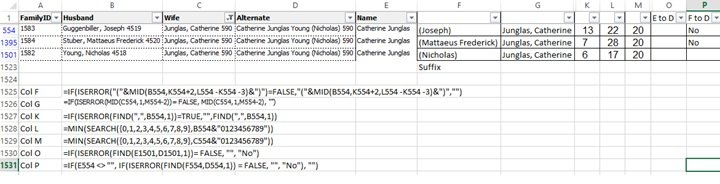
I copy all of the results of the query into a spreadsheet to verify there aren’t any typos in the alternate name. (See Pic 6)

Is it possible to create the query to get the results contained in the spreadsheet? (Column O and Column P)

How could I put a where statement in thee query to select only certain ownerid’s? I need to be able to hard code it and to be able to input the ownerid.

Discussions & comments from Wikispaces site


ve3meo

Add Married Name as Alternate

ve3meo
15 September 2017 16:15:15

Are you acquainted with this script? Names+-+Add+Married


ve3meo

ve3meo
15 September 2017 16:22:41

Okay, I understand that you have already manually created these Alternate Names and are looking for a way to detect errors. Is that your objective?

If we are to tinker wit your script, it would be helpful if you would post the script file or copy the script onto the page.

Submit Your Problem #requestforhelp

Problem Queries
Create a New Page for your problem by editing this page, inserting a link from the Editor menu which will permit you to insert the text for the hyperlink and name your new page. After saving this revised page, click on your new link to create and edit your new problem page. On your new page, describe the problem and insert a link (Use the ‘Insert Images or Files’ button of the Editor bar) to the .rmgc or .ged file holding the sample data you are querying; this will allow you to upload the file. Discussion can then proceed around your page which can be revised as progress is made. Once solved, then your working query may be added to the RM4 Queries page.

Discussions & comments from Wikispaces site


thejerrybryan

Page Number Field in Citations using Freeform Source Template

thejerrybryan
05 June 2011 17:56:23

Using the Freeform source template, citations include a field called Page Number. To see it, edit an individual, go to the Citation Manager sub-window, choose a citation, and edit the citation. The page number field is towards the bottom of the sub-window in the green area, and is just under where it says “source details”.

I have been trying to figure out where this field is stored so that I may run an SQLite query against it, but I can’t it. It almost has to be in the CitationTable, but the only possibility in the Citation Table is a column entitled “Fields”. It display in hex in SQLiteSpy. I have a test database with only 5 citations. The page number is different in the 5 citations, and the hex data for Fields as displayed by SQLiteSpy is the same for all 5 citations. So the data must be somewhere else, or else SQLiteSpy is not displaying the entire contents of the Fields column in the CitationTable.

Jerry Bryan


ve3meo

ve3meo
05 June 2011 19:51:22

Use CAST to convert the BLOB to TEXT:
SELECT CAST(Fields AS Text) FROM CitationTable;

You will see a result like this for a Free Form template:
<?xml version=”1.0″ encoding=”UTF-8″?>
<Root><Fields><Field><Name>Page</Name><Value>Email 2 June 2008</Value></Field></Fields></Root>

Tom


craigg43

Add fact for color coding

craigg43
24 January 2013 03:12:45

I have a system of color coding all persons in my data base. I also have defined a fact call _color which I would like to add to each person to reflect their current color coding. Once that is done, I can use color coding for other purposes and still would be able to revert to my color coding system.
So I would like to be able to take all people and add a _color fact reflecting their current color coding.


ve3meo

ve3meo
24 January 2013 03:32:48

Adding a _color fact to store a current color code is one approach and lends itself to RM’s Search Persons tool. Is there any reason to use this fact to restore the color-coding? That would require a complementary query.

A second approach that is actually easier to implement is to snapshot the color settings to a new table in the database. Not searchable within RM. Easy to restore the setting from the table with a complementary query.

Tom


JoyceAE

Listing of Ref No’s for Spouses & Parents

JoyceAE
21 January 2014 22:51:51

What I want is a list (report) of everyone in my database with the following information:

Person’s RefNo, Person’s Name, Spouse’s RefNo, Spouse’s Name, Father’s RefNo, Father’s Name, Mother’s RefNo & Mother’s Name

For example:

Person’s Spouse’s Father’s Mother’s
RefNo Name RefNo Name RefNo Name RefNo Name
H456 George Harris H717 Ed Harris L954 Edith Lister No spouse
J001 Joyce Smith M124 Fred Brown J002 Bill Smith G056 Mary Good Spouse, father & mother
M546 Harry Mead M856 Roy Mead Only a father
R563 Edith Royce W067 Angela Woodman Only a mother

If the person does not have a spouse then that information should be blank. The same thing goes for either of the person’s father or mother.

Can someone point me to an SQL query that might provide this kind of information? Right now, I am trying to maintain this information in an Excel spreadsheet but it is very labour-intensive and prone to errors and discrepancies. Any help on this would be greatly appreciated.


wegm

wegm
07 May 2015 20:25:34

This should do what you want:

— Listing of Ref No’s for Individuals and Spouses & Parents

SELECT
PersonTable.PersonID AS [PersonsRefNo],
CASE
WHEN ifnull(NameTable.Prefix, ”) = ”
THEN ”
ELSE NameTable.Prefix || ‘ ‘
END || CASE
WHEN ifnull(NameTable.Given, ”) = ”
THEN ”
ELSE NameTable.Given || ‘ ‘
END || CASE
WHEN ifnull(NameTable.Nickname, ”) = ”
THEN ”
ELSE ‘(‘ || NameTable.Nickname || ‘) ‘
END || ifnull(NameTable.Surname, ”) || CASE
WHEN ifnull(NameTable.Suffix, ”) = ”
THEN ”
ELSE ‘, ‘ || NameTable.Suffix
END AS [PersonsName],
CASE
WHEN PersonTable.Sex = 0
THEN famSpouse.MotherID
ELSE famSpouse.FatherID
END SpouseRefsNo,
CASE
WHEN ifnull(spouseName.Prefix, ”) = ”
THEN ”
ELSE spouseName.Prefix || ‘ ‘
END || CASE
WHEN ifnull(spouseName.Given, ”) = ”
THEN ”
ELSE spouseName.Given || ‘ ‘
END || CASE
WHEN ifnull(spouseName.Nickname, ”) = ”
THEN ”
ELSE ‘(‘ || spouseName.Nickname || ‘) ‘
END || ifnull(spouseName.Surname, ”) || CASE
WHEN ifnull(spouseName.Suffix, ”) = ”
THEN ”
ELSE ‘, ‘ || spouseName.Suffix
END AS [SpousesName],
famParents.FatherID AS [FathersRefNo],
CASE
WHEN ifnull(FatherName.Prefix, ”) = ”
THEN ”
ELSE FatherName.Prefix || ‘ ‘
END || CASE
WHEN ifnull(FatherName.Given, ”) = ”
THEN ”
ELSE FatherName.Given || ‘ ‘
END || CASE
WHEN ifnull(FatherName.Nickname, ”) = ”
THEN ”
ELSE ‘(‘ || FatherName.Nickname || ‘) ‘
END || ifnull(FatherName.Surname, ”) || CASE
WHEN ifnull(FatherName.Suffix, ”) = ”
THEN ”
ELSE ‘, ‘ || FatherName.Suffix
END AS [FathersName],
famParents.MotherID AS [MothersRefNo],
CASE
WHEN ifnull(MotherName.Prefix, ”) = ”
THEN ”
ELSE MotherName.Prefix || ‘ ‘
END || CASE
WHEN ifnull(MotherName.Given, ”) = ”
THEN ”
ELSE MotherName.Given || ‘ ‘
END || CASE
WHEN ifnull(MotherName.Nickname, ”) = ”
THEN ”
ELSE ‘(‘ || MotherName.Nickname || ‘) ‘
END || ifnull(MotherName.Surname, ”) || CASE
WHEN ifnull(MotherName.Suffix, ”) = ”
THEN ”
ELSE ‘, ‘ || MotherName.Suffix
END AS [MothersName]
FROM
PersonTable
INNER JOIN NameTable ON PersonTable.PersonID = NameTable.OwnerID AND NameTable.IsPrimary = 1
LEFT JOIN FamilyTable famSpouse ON (
(
PersonTable.Sex = 0
AND famSpouse.FatherID = PersonTable.PersonID
)
OR (
PersonTable.Sex = 1
AND famSpouse.MotherID = PersonTable.PersonID
)
)
LEFT JOIN NameTable spouseName ON spouseName.IsPrimary = 1
AND (
(
PersonTable.Sex = 0
AND famSpouse.MotherID = spouseName.OwnerID
)
OR (
PersonTable.Sex = 1
AND famSpouse.FatherID = spouseName.OwnerID
)
)
LEFT JOIN ChildTable ON ChildTable.ChildID = PersonTable.PersonID
LEFT JOIN FamilyTable famParents ON famParents.FamilyID = ChildTable.FamilyID
LEFT JOIN NameTable FatherName ON famParents.FatherID = FatherName.OwnerID AND FatherName.IsPrimary = 1
LEFT JOIN NameTable MotherName ON famParents.MotherID = MotherName.OwnerID AND MotherName.IsPrimary = 1
ORDER BY
PersonTable.PersonID,
CASE
WHEN PersonTable.Sex = 0
THEN famSpouse.WifeOrder
ELSE famSpouse.HusbOrder
END
–LIMIT 100
;


niall15

Home Person

niall15
26 May 2015 17:01:15

How do I find the Home Person who is not necessarily PersonId 1?
Cheers
Niall


ve3meo

ve3meo
26 May 2015 17:53:21

It is stored in record 1 of the ConfigTable in the XML “file” stored as a Blob in the DataRec field, e.g.,
<Root><Version>6000</Version><RootPerson>1</RootPerson><Las…

This query will let you inspect the XML data
SELECT *, CAST(DataRec AS TEXT) FROM `ConfigTable` WHERE 1 LIMIT 100;

Tom


boltongenes

SQLite query required that lists Citation Details in separate columns

boltongenes
29 November 2015 02:42:23

I have looked at the Source queries but find all the ones with Citation Fields in them list all the fields together in one cell. I would like a query that lists the citation fields in separate columns. As the list of citation fields can be different between any two sources the query would have to be limited to the user specifying one of the following:

1. which Source Template to run the query for eg Basic Ancestry Database Template ( where I have multiple Master Sources based on a single Source Template it would include all of those sources), or
2. which specific Master Source for eg My English Birth Certificates (from the Master Source List).
Fields required:

RecNo, Source Name, Surname, Given Name, OwnerID, Event Type, Cit Field 1, Cit Field 2, Cit Field 3,….etc, Citation Quality

Any help would be appreciated.

thanks
Anne-Marie


ve3meo

ve3meo
29 November 2015 05:17:41

That is likely beyond the capabilities of the SQLite language and would require a higher level language and processing. At least, it is beyond me. The problem is that the column names and values you want are in XML in one column and defined by a cell in another table. SQLite does not have any native XML support.


spR6sMtno

Database Schema

spR6sMtno
06 March 2016 11:14:06

Hi folks!

I work with DBs for a few years now, but the desing of the RM6 DB is not clear for me. And I’m not in genealogy – I do this for my wife.

Currently I work on a program that imports a RM DB and generates a graphical view of the relationships for direct ancestors. But I have trouble always detecting the correct parents, and this is where I need your assistance.

I have a name, and using nametable.ownerid, I go to the person. Then the problem begins. There are at least three different tables where I could look up the parents:
childtable ( … where childtable.childid = persontable.personid) (I dont belive this table really helps me)
familytable ( select fatherid, motherid from persontable where familytable.childid = persontable.personid)
parenttable (select parentid from persontable where persontable.personid = nametable.ownerid).

Ok, enough confusion.

What’s the correct way to look up a person’s parents?

Thank you four your help!


ve3meo

ve3meo
09 March 2016 20:36:30

Just received notification of your message. Also am not able to access SQLite at moment so this is from memory and may not be accurate. Yes, PersonTable.PersonID = ChildTable.ChildID to find FamilyID WHERE RelFather =0 AND RelMother =0 to get birth parental couple. Then ChildTable.FamilyID = FamilyTable.FamilyID to get RINs of birth parents. Then FamilyTable.FatherID = NameTable.OwnerID WHERE NameTable.IsPrimary to get name of Father and likewise for mother.


Ksquared333

Merge unknown spouses

Ksquared333
05 February 2017 23:24:06

I have a good number of people where one of the spouses is unknown (usually the wife). When I imported to RM (from The Master Genealogist) a separate unknown spouse was assigned to each of the children. For instance, in TMG I had John Smith with 1 unknown wife and 5 children. In RM I have John Smith with 5 unknown wives, each with 1 child. I need a SQLite that will merge the children under the known spouse and combine all the unknown spouses.

Thanks!


Ksquared333

Ksquared333
19 February 2017 23:52:54

So I did that. I backed up my original and then restored the one you sent. I put the guy I was having trouble with in the Family View and it worked fine. Then I started checking other RINs from my list. It was all going fine until I tried 10019 and the same thing happened. When in the Family View I got a blank Family View. I closed the database and reopened it. Navigated to him through his grandparents and parents this time instead of using the Explorer, but I still got a blank Family View when I made him (10019) the primary. This isn’t happening on databases that I haven’t run the script on, so I don’t think it’s my system or my copy of RM. Would you mind having a further look around the database to see if it happens to you after you’ve looked at several. I think it happened on the 5th one I looked at. I looked at
14284, 13770, 13784, 10012, then 10019 and the blank Family View happened.


momakid

Alternate name problem

momakid
24 July 2017 13:00:10

In entering names in the suffix field for Alternate Name with name type Married, I entered some names like ( Doe Sally). With a space between the parenthesis and the D. I did the following query and got the people I wanted:
Select suffix
from nametable
where suffix like ‘( %’;

A space between the parenthesis and the percent.

So I created the following update query:
update nametable
set suffix = ‘(%’
where suffix like ‘( %’;

the problem is it wiped the names out and put (% in the suffix field.

What should the update query have been?
What query can I run to make it (Doe Sally) again?

When I run the following query:
Select suffix
from nametable
where suffix like ‘(%’;

I get the following results:
(Doe Sally)
(%
(White Snow)

I want the entries with (% fixed. Of course it would be OK to update all suffix entries because I am sure there may be some typos.

If I wanted to change the suffix name to (Sally Doe) what would the update query be? I do have husbands who have no wives and wives that have no husbands. I do not want a suffix entry in those.


ve3meo

ve3meo
24 July 2017 19:52:54

Always make a copy or backup before you modify the database. That’s the easiest way to get back to where you were so you can try again.

Use a SELECT to evaluate the expression you draft as an UPDATE before applying the UPDATE. For example, you would have seen that your UPDATE would produce the results you got from:
SELECT ‘(%’ AS Suffix where suffix like ‘( %’;

The % wild card is only a wild card, not a memory variable. You need to use the REPLACE() function:
SELECT REPLACE(Suffix, ‘( ‘, ‘(‘) AS Suffix where suffix like ‘( %’;
If satisfied, then:
UPDATE NameTable SET Suffix = REPLACE(Suffix, ‘( ‘, ‘(‘) AS Suffix where suffix like ‘( %’;

I’m unclear whether you are asking for a way to swap the first and last names already entered in Suffix or a way to populate the Suffix with the Given and Married Surname from the database records. The former would count on there being an existing Suffix entry having only two names with a space separating them. The latter would require that there be an Alternate Name fact with its type set to Married; alternatively, it would have to invent the Married Surname from the husband’s Surname. Then there is the question of handling multiple spouses – multiple Surnames.

Tom


faliondg

Fix for marriages imported thru Ancestry TreeShare _ invalid IDs cause _[Couple] were married_ sentences

faliondg
18 January 2018 21:12:03

I have 34 marriage records in my RM file with a sentence that begins with “[couple] married on…” instead of the spouse’s names. All affected marriages were from records added in Ancestry and pulled into RM. I’ve narrowed down the problem in the data: there are marriage events for each of the spouses, but the OwnerType is 0, not 1, and the FamilyID is 0 instead of the FamilyID for the couple.

Below are the changes I developed. I’ve verified the data afterwards, by data dumps and printing the narrative reports. I had to do this as a multi-step process; there may be a more way to code the SQL but I’m sure this worked.

— test table development below
— create temporary table to hold problem records

DROP TABLE IF EXISTS TesttableEventTable ;

CREATE TEMP TABLE TesttableEventTable AS
Select *
FROM EventTable
where EventType = 300
and OwnerType <> 1
Order by Date;

— this SQL Identifies the two rows where individuals also have a valid marriage record (these records to be deleted)
— and stores the data into a temporary testing table:
DROP TABLE IF EXISTS TestEventsToDELETE
;
CREATE TEMP TABLE TestEventsToDELETE AS

select * from TestTableEventTable T
Where T.OwnerID in
(Select F.FatherID from FamilyTable F
INNER JOIN EventTable E on F.FamilyID = E.OwnerID
AND E.OwnerType = 1
And E.EventType = 300
)
UNION
select * from TestTableEventTable T
Where T.OwnerID in
(Select F.MotherID from FamilyTable F
INNER JOIN EventTable E on F.FamilyID = E.OwnerID
AND E.OwnerType = 1
And E.EventType = 300
)

;
— END this SQL stores the above data into a temporary testing table

— this SQL stores the IDs to be updated into a temporary testing table:
DROP TABLE IF EXISTS TestEventsToUPDATE
;
CREATE TEMP TABLE TestEventsToUPDATE AS

Select EventID
FROM TesttableEventTable
where (EventType = 300
and OwnerType <> 1)
AND EventID not in (Select EventID from TestEventsToDELETE)
GROUP BY Date
HAVING ( COUNT (Date) > 1)
ORDER BY Date;
— END this SQL stores the IDs to be updated into a temporary testing table

— this SQL creates a second test table to run tests against and compare to first:
DROP TABLE IF EXISTS TesttableEventTable2
;
CREATE TEMP TABLE TesttableEventTable2 AS
Select *
FROM EventTable
where EventType = 300
and OwnerType <> 1
Order by Date;
— END this SQL creates a second test table to run tests against and compare to first

DROP table if exists TestEventsChangeData;

CREATE TEMP TABLE TestEventsChangeData
AS
select TETU.EventID,
TTET.OwnerID,
F.FamilyID
from TestEventsToUPDATE TETU, TestTableEventTable TTET, FamilyTable F
where TETU.EventID = TTET.EventID
And ((F.FatherID = TTET.OwnerID) OR (F.MotherID = TTET.OwnerID))
;

— These three steps, run in order, solve the problem:

BEGIN TRANSACTION;

— set OwnerID in EventTable to Family ID from FamilyTable
UPDATE EventTable

SET
OwnerID = (SELECT TestEventsChangeData.FamilyID
FROM TestEventsChangeData
WHERE TestEventsChangeData.EventID = EventTable.EventID)
WHERE
EXISTS (
SELECT *
FROM TestEventsChangeData
WHERE TestEventsChangeData.EventID = EventTable.EventID
)
;

— set OwnerType in EventTable to 1 instead of 0
UPDATE EventTable
SET
OwnerType = (SELECT 1
FROM TestEventsChangeData
WHERE TestEventsChangeData.EventID = EventTable.EventID)
WHERE
EXISTS (
SELECT *
FROM TestEventsChangeData
WHERE TestEventsChangeData.EventID = EventTable.EventID
)
;

— Delete remaining invalid records
Delete from EventTable
where EventType = 300
and OwnerType <> 1
;

COMMIT;


Trob2

Sources merged in error

Trob2
04 July 2018 19:55:27

I have accidentally merged two similar sources and now regret it!

This relates to a parish baptism, marriage and burial data for my local area. I set up separate free-form Sources for each of the three elements. Unfortunately I now have only two sources as I somehow managed to merge the baptism and burial templates.

For obvious reasons I only used the baptism Source for Birth or Baptism events and the burial Source for Death or Burial events.

It is a very simple job to recreate the two original source templates and as stated above it’s quite simple to identify which source should be used for each event.

Would it be possible to create a query which would find instances of the merged source and rewrite them (using the relevant event as key) using the correct Source template – without losing any of the individual detail data?

Thanks in advance for any help you can offer.I’m using RM version 7.5.7.0 BTW.


ve3meo

ve3meo
05 July 2018 02:58:12

The regret stems from not having a backup just prior to the merge or you’ve done a lot of changes since then before realising the error of your ways… Familiar story!

You’ll start by looking up the merged source Name in the SourceTable and noting the value of its SourceID. We’ll call this variable “SourceIDold” in the SQL statements that follow; you will substitute the value where the name is written.

Likewise for the Name of the new Birth-Baptism source to sub for “SourceIDnew”. (You don’t need a new source for the Death-Burial source – just edit the merged source.

From the FactTypeTable, the Birth and Baptism types have FactTypeID of 1 and 7 respectively.

The CitationTable points each citation to a Master Source via SourceID and to a record in the EventTable via OwnerID when OwnerType=2.

The EventTable points to a record in the FactTypeTable via its EventType value.

So a list of all Citation records of the merged source for Birth-Baptism events can be found by this query:

DROP VIEW IF EXISTS BirthCitations
;
CREATE TEMP VIEW BirthCitations AS
SELECT CitationID FROM CitationTable C
JOIN EventTable E ON C.OwnerID = E.EventID AND C.OwnerType = 2
WHERE C.SourceID=SourceIDold –plug in your value for the merged source
AND E.EventType IN (1,7)
;

–Look under Views to see the resulting list.
–Then transfer the SourceID for this list to that of your new Birth-Bapt source with this statement.

UPDATE CitationTable
SET SourceID = SourceIDnew –plug in your value
WHERE CitationID IN (SELECT CitationID FROM BirthCitations)
;

That should have repointed the Birth-Bapt citations to the new Birth-Bapt source. Now you can edit the merged source in RM to be the Death-Burial source. You’ll be editing only the Master Source (yellow) fields.

CAUTION – you will make a backup or a copy of your database first. I have tested these statements for syntax errors but not for actual results.

Good luck!

Tom